A robot vacuum water tank leak can leave puddles beneath your cleaner, soak the mop pad, or cause water to collect around the docking station. The problem often comes from a loose seal, cracked tank, clogged water outlet, or blocked dock drainage system. You can identify many of these faults without opening the robot or replacing expensive parts.
Quick Answer
To fix a leaking robot vacuum water tank, turn off the robot, remove the tank, and inspect it for cracks, loose seals, and a damaged cap. Clean the water outlets, reinstall the tank securely, and check the mop dock for drainage problems. Replace damaged parts if cleaning and reseating do not stop the leak.
At a Glance
| Difficulty | Easy for basic inspection and cleaning; professional repair may be needed for internal faults. |
| Tools Needed | Soft cloth, flashlight, small cleaning brush, and a toothpick or needle only where the manufacturer permits. |
Check the Robot Vacuum Water Tank
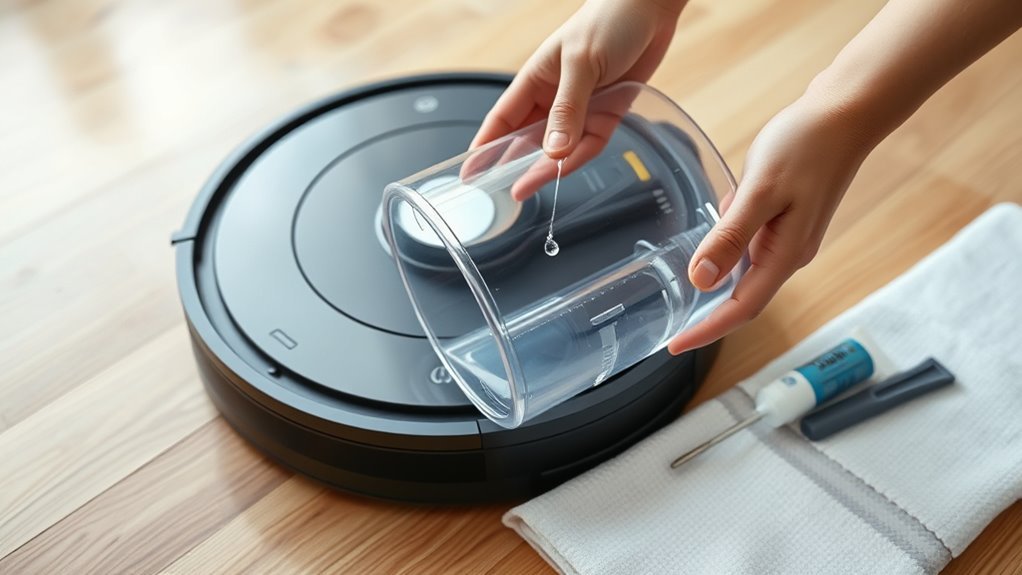
Start by checking whether water is escaping from the removable tank itself or from another part of the robot. A cracked tank, loose filling cap, or poorly seated rubber seal can cause water to escape even when the mop is not running.
Use these steps to inspect the tank safely:
- Turn off the robot. Stop the cleaning cycle and follow the manufacturer’s shutdown instructions before removing the water tank.
- Remove the tank. Keep it upright to avoid spilling water into the robot’s electrical components.
- Inspect the tank body. Look closely at the corners, seams, bottom, and filling port for cracks, chips, or warping.
- Check the rubber seals. Examine the sealing rings and cap gasket for dirt, deformation, looseness, or damage.
- Clean and reseat the seals. Wipe away debris with a soft cloth. Return removable seals to their proper grooves without stretching them.
- Reinstall the tank. Fill it according to your model’s instructions, close the cap, and press the tank into position until its latch engages.
To check for a tank leak, place the removed tank upright over a sink or on a dry, water-safe surface. Watch for water collecting around the seams, cap, or outlet. Follow the manufacturer’s instructions for filling and handling the tank during this test.
If water escapes while the tank is removed, the problem is likely in the tank, cap, or outlet seal rather than the robot’s internal plumbing.
BISSELL’s tank troubleshooting instructions recommend checking the tank and cap for damage, then replacing the tank when either part is defective.
A properly installed tank should sit securely without gaps or movement. However, not every model makes an audible click, so check the locking mechanism described in your manual.
Warning: If water has reached the robot’s charging contacts, electrical compartments, or the powered docking station, stop using the equipment. Unplug the dock when safe to do so. Do not restart wet electrical components or open sealed electronic housings to investigate a leak.
Is Water Under the Robot Always a Tank Leak?
Not necessarily. Some robot mops release small amounts of residual water after filling or washing their mop pads. This is different from a damaged tank that drips continuously.
For example, eufy’s S1 Pro troubleshooting guidance explains that one or two drops of clean water near the station can be normal after refilling.
Repeated puddles, a rapidly emptying tank, dirty water dripping from the robot, or water entering electrical areas are stronger signs of a problem.
Also inspect the mop pad. A saturated or incorrectly attached pad can leave wet patches that resemble a tank leak. On models that use passive water feeding, leaving a filled mop tank attached during storage can also allow water to soak into the pad.
Clear Clogs in the Water Nozzles
Clogged water nozzles can interrupt water delivery and leave the mop unusually dry. Debris, dried cleaning solution, and mineral deposits may block the small water outlets. Clearing these passages can restore normal flow, although a clog does not always explain an external leak.
First, remove the water tank and locate the outlets or dispensing holes. Their number and position depend on the robot vacuum model.
Inspect each opening under good lighting. Look for dirt, scale, or dried residue that could interfere with water flow.
| Checkpoint | Action | Result |
|---|---|---|
| Nozzle opening | Inspect for dirt or blockage | Identifies restricted outlets |
| Light debris | Gently remove with an approved tool | Clears the water passage |
| Mineral scale | Use only model-approved cleaning methods | Removes buildup without unnecessary chemical exposure |
| After clearing | Rinse removable parts if permitted | Removes loosened residue |
| Routine care | Inspect outlets during maintenance | Reduces recurring blockages |
Some manufacturers permit careful cleaning with a thin tool. For example, Roborock’s water-outlet guidance recommends gently using a needle to clear the opening on supported models.
Do not force a needle or toothpick deep into a nozzle. Excessive pressure can damage a valve, enlarge an opening, or push debris farther inside.
Check the air vent in the tank’s rubber filling plug if your model has one. A blocked vent can interfere with normal water delivery.
For removable components, rinse with water at a temperature allowed by the manufacturer. Avoid putting water into the robot’s electronic housing.
Heavy mineral buildup may require a manufacturer-approved descaling procedure. Although vinegar can dissolve mineral deposits, it should not be used as a general cleaning solution for robot vacuum water systems.
After cleaning, reinstall the components and run a short mopping test. Water should reach the mop at a controlled rate without pooling beneath the robot.
Pro Tip: If the mop pad stays nearly dry despite a filled tank, check the water outlets, pad condition, and water filters before assuming the pump has failed. A blockage can produce similar symptoms.
Inspect the Mop Base Station for Leaks
A robot mop base station can leak when dirty water cannot drain from its cleaning tray. A blocked outlet, damaged tray, loose dirty water tank seal, or missing plug may cause water to collect around the dock.
First, determine whether water is overflowing from the tray or escaping from underneath the station. These symptoms point to different problems.
Check the Cleaning Tray and Drainage Outlet
Remove the robot from the station and switch off the equipment before cleaning removable dock parts.
Then follow these checks:
- Inspect the cleaning tray for standing water, hair, dirt, and residue.
- Remove the tray if your model allows it.
- Check the dirty water outlet for visible obstructions.
- Clean the tray and removable drainage components according to the manufacturer’s instructions.
- Wipe accessible overflow sensors or floats, where fitted.
- Dry and reinstall the tray so it sits flat in its proper position.
On some docks, a dirty or stuck overflow sensor can prevent the station from recognizing water levels correctly.
Dreame’s dock-overflow troubleshooting procedure identifies blocked wastewater outlets, dirty overflow sensors, and poorly fitted sealing rings as possible causes of water accumulation.
Inspect the Dirty Water Tank and Seals
The dirty water tank must close tightly for the station’s wastewater collection system to work correctly. A loose cover or damaged sealing ring may prevent proper suction and contribute to an overflowing cleaning tray.
Remove the dirty water tank and inspect its lid, rubber gasket, and locking clip.
- Empty accumulated dirty water.
- Clean debris from the lid and sealing surfaces.
- Reset any loose sealing ring into its correct position.
- Check for cracks, warping, and damaged locking clips.
- Close the lid firmly and reinstall the tank securely.
If a seal is permanently distorted or a latch is broken, replace the affected part or tank as recommended by the manufacturer.
Look for a Missing Rubber Plug or Damaged Tray
Some cleaning trays contain a rubber plug around the water-filling or drainage port. A missing plug can create a direct path for water to escape beneath the station.
Inspect the tray for missing plugs, cracks, and deformation.
According to eufy’s Auto-Clean Station leakage guidance, a missing water-port rubber plug on the X9 Pro cleaning tray requires replacement of the tray.
Do not assume a rubber plug from another device will provide the correct fit. Use compatible replacement components.
After reassembly, run a short pad-washing cycle if the dock is dry, safe to power, and no electrical parts have been exposed to water.
The station should move wastewater into its collection tank without overflowing the tray or releasing water onto the floor.
Check Cleaning Solution and Flow Settings
Incorrect cleaning fluid or water-flow settings can contribute to excessive floor wetness and poor mopping performance. Unapproved solutions may also cause foam, residue, corrosion, or blockages inside the water system.
Use the fluid type and mixing instructions specified for your exact robot vacuum model.
Some robots require plain water. Others support a specific cleaning solution or dispense cleaner through a separate compartment.
For example, iRobot’s approved cleaning solution guidance warns that water mixed with vinegar can cause corrosion in specified Roomba Combo models. It also identifies cleaning products that can create excessive foam in some docks.
Avoid adding ordinary dish soap, bleach, essential oils, or other household chemicals unless the manufacturer explicitly permits them.
Adjust Water Flow to Match the Problem
Many robot mops allow you to adjust water output through their companion app. The appropriate setting depends on whether the machine releases too much or too little water.
- Too much water: Reduce the flow setting if your model supports adjustment and the floor is becoming excessively wet.
- Mop pad stays dry: Increase the setting from low to medium or high if permitted, after checking the tank and outlets.
- Water leaks while idle: Inspect seals, tank damage, and outlet valves instead of relying on a flow adjustment.
Changing the flow setting does not repair a cracked tank or failed gasket. It only changes the amount of water the machine is instructed to dispense.
| Check | Action |
|---|---|
| Fluid type | Use only manufacturer-approved water or cleaning solution |
| Tank fit | Secure the cap and confirm proper installation |
| Flow rate | Reduce for excess wetness; increase for low output when appropriate |
| Nozzles | Remove permitted blockages and check water delivery |
| Temperature | Operate within the model’s specified temperature range |
Can Low Temperature Cause Water System Problems?
Low temperatures can affect water-system operation, especially if water becomes cold enough to freeze. Some troubleshooting guidance identifies temperatures below 10 °C as a possible operating concern, but this is not a verified leak threshold for every robot vacuum.
If the machine has been stored in a cold location, allow it to reach the operating temperature specified in its manual before testing it.
Never pour hot water into a tank unless the manufacturer explicitly allows it. Excessive heat may damage plastic parts or seals.
Check for Cracks and Pump Failure
If your robot vacuum still leaks after cleaning and reseating the tank, inspect it for structural damage and possible pump problems. A cracked reservoir needs a different solution from a blocked hose or a defective wastewater pump.
Check for Hidden Tank Damage
Remove the tank and inspect its surface under strong light. Pay attention to the welded seams, corners, filling port, and water outlet connection.
Small fractures may be difficult to see when the tank is dry.
If the tank leaks during a permitted standalone water test, replace the damaged tank rather than continuing to operate the machine.
A warped tank may also fail to seal correctly against the robot, even without a visible crack.
Manufacturers generally recommend replacing defective water tanks. For example, iRobot’s leaking-tank instructions for supported Roomba Combo models direct users to replace a tank that has physical defects.
Check Whether the Pump Is Working
A pump failure can prevent clean water from reaching the mop or dirty water from leaving the dock. However, a clogged pipe, loose connection, or poor tank seal can cause similar symptoms.
For a safe basic test:
- Confirm that the clean water tank contains the required amount of approved fluid.
- Empty and reinstall the dirty water tank if the dock uses one.
- Check all accessible tank connections and hoses for loose fittings or visible blockages.
- Run the manufacturer’s normal mopping or pad-washing cycle.
- Observe whether water reaches the mop or moves from the cleaning tray into the dirty water tank.
- Stop the test if water escapes unexpectedly or an error appears.
An unusual grinding sound, repeated pumping attempt, or complete failure to transfer water may suggest a pump or water-path problem.
However, pump noise alone cannot confirm a failure. Some systems operate quietly, while others run their pumps only during specific parts of a cleaning cycle.
Xiaomi’s wastewater pump troubleshooting guidance identifies damaged pumps, disconnected tubes, loose tank covers, and distorted sealing rings as possible causes of failed wastewater collection.
Do not dismantle internal pumps, electrical connections, or inaccessible hoses unless the manufacturer provides an approved repair procedure and you have the necessary skills.
When Should You Replace Parts or Contact Support?
Basic cleaning cannot fix every robot vacuum water tank leak. Replacement or professional service may be necessary when the problem involves damaged plastic, a defective pump, or internal water-system components.
Consider replacement or professional service when:
- The water tank has a visible crack, chip, or permanent warping.
- The rubber seal is torn, hardened, or no longer fits correctly.
- The water tank cap or locking mechanism is broken.
- The cleaning tray has a crack or missing non-serviceable plug.
- The pump fails to move water after accessible blockages and seals have been checked.
- Water continues leaking after the recommended troubleshooting steps.
- Water has reached electrical components or the interior of the robot.
Use parts designed for your exact robot model. Similar-looking tanks, gaskets, and valves may not provide the same fit or seal.
If the robot is under warranty, contact the manufacturer before attempting internal repairs. Keep photos of the leak and a record of the checks you completed.
Note: If the leak persists after basic maintenance, contact the manufacturer’s support team or a qualified appliance repair technician. A water leak near electrical parts should be treated as a safety concern rather than a routine cleaning issue.
Frequently Asked Questions
How to Fix a Leaking Water Tank?
To fix a leaking robot vacuum water tank, remove it and check for cracks, damaged seals, and a loose filling cap. Clean the sealing surfaces and reinstall the tank securely. If the tank leaks while removed from the robot, replace the damaged tank or compatible seal.
What Is the Best Sealant for a Leaking Water Tank?
The safest solution for a cracked robot vacuum water tank is usually replacement, not sealant. Silicone and epoxy products may not withstand repeated water exposure, movement, or contact with cleaning solutions. Unless the manufacturer approves a repair method, replace the damaged tank to restore a reliable seal.
What Chemical Can I Use to Fix a Water Tank Leakage?
No cleaning chemical can reliably fix a cracked robot vacuum water tank. Silicone-based waterproof adhesives, epoxy resin, and super glue should not be used unless the manufacturer explicitly approves them. For mineral buildup or residue, use only the cleaning method recommended for your specific model.
How Do I Stop My Water Tank From Leaking?
Stop a robot vacuum water tank from leaking by keeping its cap and seals clean, avoiding overfilling, and installing it correctly. Use approved cleaning fluids and inspect the tank for damage. If water continues to escape while the robot is idle, check the outlet valve and replace defective components.
Conclusion
A robot vacuum water tank leak usually comes from a damaged tank, loose seal, blocked water passage, or problem with the mop base station. Start with the removable parts, clean accessible blockages, and check whether the leak continues after correct installation.
If water still escapes or the pump cannot move water normally, stop using the affected equipment and arrange a compatible replacement or manufacturer-approved repair. Fixing the actual leak source is safer than masking it with sealant or changing water-flow settings.
Sources
- eufy Support: S1 Pro Water Leakage: Normal residual droplets and causes of dirty water leakage.
- BISSELL Support: SpinWave R5 Leaking or Puddling: Tank inspection, cap condition, approved cleaning fluid, and replacement guidance.
- Roborock Support: Water Tank and Mop Output: Cleaning water outlets, checking filters, and identifying warped tanks.
- Dreame Support: Abnormal Washboard Water Level: Dock drainage, overflow sensors, dirty water tank seals, and reinstallation.
- eufy Support: Auto-Clean Station Leaks: Cleaning tray overflow, damaged tank seals, and missing rubber plugs.
- iRobot Support: Approved Cleaning Solutions: Compatible cleaning fluids, vinegar restrictions, and risks from unsuitable additives.
- Xiaomi Support: Dirty Water Pump Troubleshooting: Pump faults, disconnected tubes, loose covers, and damaged seals.
- iRobot Support: Roomba Combo Error 1013: Tank leak detection, inspection, and replacement of defective tanks.