Disclosure: As an Amazon Associate I earn from qualifying purchases. If you click a link on this page and make a purchase, we may receive a small commission at no extra cost to you.
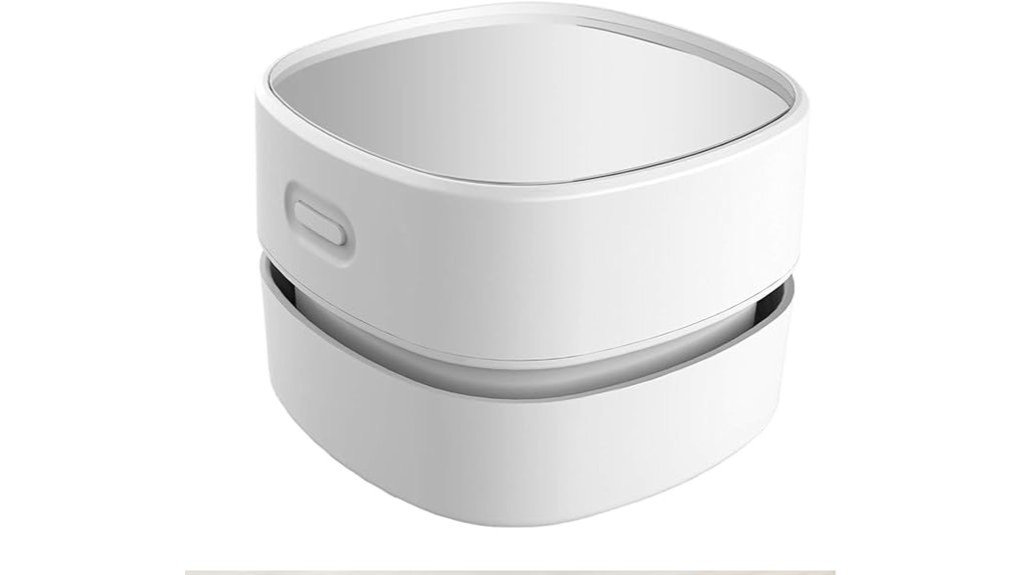
Crumbs, pencil shavings, loose hair, and dust can make a desk messy long before you need a full-size vacuum. The ODISTAR Desktop Vacuum Cleaner HL-306 is designed for those quick cleanup jobs, using two AA batteries and a palm-sized rotating body that you can move around keyboards, desktops, and other small surfaces. Its strongest advantages are portability and simple operation, but it is still a light-duty cleaner rather than a replacement for a conventional handheld vacuum. This review explains where it works well, its important operating limit, and who is most likely to find it useful.
Quick Verdict
Rating: 8/10, Recommended with caveats
Best For: Desks, keyboards, study areas, craft tables, and quick cleanup of small dry debris.
Bottom Line: The ODISTAR is compact, cordless, and convenient for crumbs and everyday desk debris. Its main tradeoff is that the manufacturer advises keeping each continuous operating session under 10 minutes, so it is intended for short touch-ups rather than extended vacuuming.
ODISTAR Desktop Vacuum Cleaner Specifications
| Specification | Detail |
|---|---|
| Brand | ODISTAR |
| Model | HL-306 |
| Product Type | Mini desktop vacuum cleaner |
| Power Source | 2 AA batteries, not included |
| Rated Voltage | 3V |
| Listed Dimensions | 3.1 × 3.1 × 2.85 inches |
| Listed Weight | 5.12 ounces |
| Body Material | Clear plastic acrylic |
| Brush Material | Nylon |
| Filter Type | Disk |
| Design | Cordless, handheld, 360° rotatable |
| Recommended Surfaces | Desktop, computer, and keyboard areas |
| Included Items | Mini vacuum cleaner, user manual, and cleaning brush |
| Continuous-Use Guidance | Keep each continuous operating session under 10 minutes |
| Manufacturer Warranty | 1 year |
What Is the ODISTAR Desktop Vacuum Cleaner?
The ODISTAR HL-306 is a small battery-powered vacuum intended for quick cleanup on desks, keyboards, computers, and similar compact areas. Instead of using a hose or traditional crevice attachment, you hold the entire unit in your hand and guide its rotating base across the surface.
The bottom uses a nylon brush and suction opening to collect loose debris. ODISTAR also includes a capture nozzle intended to help with larger crumbs and particles that a simple desk brush might leave behind. Its cordless design is especially useful when you want to clean a work area without finding an outlet or managing another cable.
Before You Buy: Do not treat the advertised battery endurance as permission to run the vacuum continuously for hours. ODISTAR’s operating instructions specifically advise keeping each continuous cleaning session under 10 minutes to avoid damage.
Who Should Buy It?
Best For
- Students cleaning pencil shavings, eraser crumbs, and dust from a study desk.
- Office users who want a small cleaner for keyboards and desktop debris.
- Anyone who prefers a compact AA-powered tool for fast, light-duty cleanup.
Skip If
- You need a vacuum for carpets, floors, upholstery, or large amounts of debris.
- You specifically want USB charging or an integrated rechargeable battery.
- You need long, uninterrupted vacuuming sessions.
Design and Build
At a listed 5.12 ounces, the ODISTAR is light enough to keep on a desk or store in a drawer without taking up much room. Its compact dimensions also make it easier to maneuver around monitors, notebooks, office accessories, and other objects that would get in the way of a larger handheld vacuum.
ODISTAR describes the body as clear plastic acrylic with a glass-like appearance. The design is simple, but the small footprint is part of the appeal because this cleaner is meant to stay close to the mess rather than replace your main vacuum.
Suction and Cleaning Performance
The vacuum is designed to pick up desk dust, crumbs, loose hair, paper scraps, eraser debris, and other small particles. The capture nozzle helps guide larger loose pieces into the vacuum, while the brush underneath loosens debris as you move the unit across the surface.
Its size also defines its limitation. This is best viewed as a tabletop sweeper with powered suction, not a high-output handheld vacuum for deep cleaning. Loose pet hair on a desk or hard surface is a reasonable task, but embedded hair in carpet or upholstery calls for a more powerful vacuum with the right attachment.
360° Rotatable Design and Maneuverability
The 360° rotating design allows you to change direction without repeatedly lifting and repositioning the vacuum. That is useful when cleaning around desk accessories or working into small open spaces between larger objects.
The unit is still wider than a narrow crevice nozzle, so very tight keyboard gaps must be approached from the surface rather than vacuumed individually. For those spaces, the goal is to pull loose particles upward as you move across the keys and surrounding area.
AA Battery Operation and Runtime
The HL-306 runs on two AA batteries, which are not included. Standard replaceable batteries make the cleaner easy to put back into service without waiting for an internal battery to recharge, although frequent users may prefer rechargeable AA batteries to reduce disposable-battery use.
Runtime information on current product material is not completely consistent, so an exact continuous runtime should not be the deciding factor. The more important operating instruction is that ODISTAR says each continuous working period should remain under 10 minutes. That fits the product’s intended role as a quick-cleaning tool.
Pro Tip: Use the ODISTAR for short cleanup bursts and empty the debris compartment before it becomes packed. Keeping the airflow path clear helps the small vacuum work more effectively.
Noise Level
ODISTAR promotes the mini vacuum as a low-noise cleaner suitable for work or study environments. That makes sense for the product’s intended desk use, where a loud full-size vacuum would be distracting.
However, an exact decibel figure should not be the reason you buy it because current product information does not consistently substantiate the previously published 5 dB claim. It is safer to expect a small motor sound rather than silent operation.
What to Expect in Everyday Use
For an Office Desk
The ODISTAR is most useful when crumbs, dust, or small paper particles collect around a keyboard and monitor. Because it is cordless, you can make a quick pass over the work area without setting up a larger vacuum.
For Keyboard Cleanup
The rotating base can move across the keyboard surface and surrounding desk, collecting loose particles near and between keys. Turn the computer or keyboard off before cleaning, and do not force the vacuum against delicate keys or openings.
For Study and Craft Areas
Pencil shavings, eraser crumbs, paper scraps, and similar dry debris fit the ODISTAR’s light-duty role well. Its small size also means students can store it near their workspace instead of carrying out a household vacuum for every small mess.
For Small Car Messes
The cordless format can be convenient for loose crumbs and dust on accessible hard areas inside a vehicle. It is less useful for deep seat seams, carpeting, or large floor areas because it lacks the reach and power of a dedicated automotive handheld vacuum.
How to Use It Correctly
- Install two AA batteries correctly: Match the positive and negative markings inside the battery compartment.
- Use short sessions: Keep continuous operation under 10 minutes as directed by the manufacturer.
- Move it gently: Guide the vacuum over loose debris instead of pressing hard against keyboards or delicate surfaces.
- Empty collected debris regularly: Open the bottom waste compartment and clear out dust and crumbs before buildup restricts airflow.
- Use the supplied cleaning brush: The included brush can help remove debris from the collection area during maintenance.
Compatibility and Safety
The ODISTAR is intended for small surface-cleaning jobs around desktops, computers, and keyboards. It is not presented as a wet vacuum, so keep it away from liquids and use it for dry debris only.
ODISTAR’s instructions say to keep fingers away from the opening on the bottom while the unit is running. Children should use the vacuum only with adult supervision. For electronics, switch the device off or disconnect it from power when practical before cleaning around keys, vents, or ports.
Cleaning and Maintenance
Maintenance is straightforward because the debris is collected inside the base. Press the release, remove the bottom cover, empty the waste compartment, and clean away remaining dust with the supplied brush before fastening the cover again.
Do not allow debris to remain tightly packed inside the collection area. A small vacuum has less airflow capacity than a full-size model, so regular emptying is especially important when picking up fine dust or hair.
Pros and Cons
Pros
- Compact 5.12-ounce design is easy to keep near a desk.
- Cordless operation needs only two replaceable AA batteries.
- 360° rotating design improves maneuverability around small objects.
- Capture nozzle and nylon brush help collect crumbs and loose desk debris.
- Simple waste compartment and included cleaning brush make routine maintenance easy.
Cons
- Manufacturer guidance limits each continuous operating session to under 10 minutes.
- Two AA batteries are required and are not included.
- Not designed to replace a stronger vacuum for carpet, upholstery, floors, or deep crevices.
Is It Worth the Price?
The ODISTAR makes the most sense as a budget-oriented convenience tool. You are paying for a compact cleaner that can remain on or near your desk and handle small messes without the setup required by a larger vacuum.
The value is strongest for people who regularly deal with crumbs, pencil debris, or dust in a small workspace. It is less compelling if you expect one device to clean your desk, furniture, carpets, and car interior because the HL-306 is purposely designed around light, localized cleanup.
How It Compares to Alternatives
A rechargeable handheld vacuum is a better alternative when you need stronger suction, attachments, or larger-area cleaning. The tradeoff is additional size and the need to recharge an internal battery.
An electric air duster is another option for keyboards, especially when the goal is to blow particles from narrow gaps. The ODISTAR works differently because it collects loose debris instead of blowing it elsewhere, which is useful when you want to contain crumbs and dust directly on the desk.
Frequently Asked Questions
Does the ODISTAR Desktop Vacuum include batteries?
No. The HL-306 requires two AA batteries, and they are not included with the vacuum. Install them according to the polarity markings in the battery compartment before use.
How long can you run it continuously?
ODISTAR’s operating instructions advise keeping continuous working time under 10 minutes to avoid damaging the unit. Treat it as a short-session desk cleaner rather than a vacuum for extended cleaning jobs.
Can the ODISTAR clean a computer keyboard?
Yes. Keyboard and computer areas are among its listed recommended uses. It works best on loose crumbs, dust, and debris around the key surfaces rather than material wedged deeply beneath the keyboard mechanism.
Can it pick up pet hair?
It can collect loose hair from a desk or similar hard surface. It is not the right tool for deeply embedded pet hair in carpet, upholstery, or fabric, where a stronger vacuum and suitable attachment are more appropriate.
How do you clean the ODISTAR vacuum?
Open the bottom waste compartment, empty the collected dust and crumbs, and use the supplied cleaning brush to clear remaining debris. Reattach the cover securely before operating the vacuum again.
Is the ODISTAR safe for children to use?
The manufacturer’s instructions say children should use it only with adult supervision. Fingers should also be kept away from the opening on the bottom while the vacuum is operating.
Who should skip the ODISTAR Desktop Vacuum?
Skip it if you need deep carpet cleaning, upholstery cleaning, a narrow crevice tool, or long uninterrupted runtime. A larger rechargeable handheld vacuum will usually suit those jobs better.
The Bottom Line
The ODISTAR HL-306 is a practical choice when you want a tiny cordless vacuum dedicated to crumbs, dust, pencil debris, and other light messes around a desk or keyboard. Its compact size, AA battery operation, and rotating design make quick cleanup convenient, but buyers who need stronger suction or long continuous sessions should choose a larger handheld vacuum instead.