Looking for the best Apple Home robot vacuum? A Matter-compatible robot vacuum can work with the Apple Home app, Siri, and supported smart home automations. But not every robot vacuum with Siri support offers direct Apple Home integration. You also need to consider cleaning performance, navigation, mopping features, and how much maintenance the docking station requires.
This guide compares six robot vacuums from Roborock, ECOVACS, and SwitchBot. Each model has different strengths, from advanced obstacle avoidance to automatic mop washing and water management. We also explain what to check before buying so you can choose a vacuum that suits both your floors and your Apple Home setup.
Quick Answer: The Roborock Saros 10R is our best overall choice for its advanced navigation, slim design, and Matter integration. The ECOVACS DEEBOT X9 PRO OMNI is a strong option for frequent mopping, while the DEEBOT T50 PRO OMNI offers useful automation features with a value-focused design. The SwitchBot S10 and S20 are especially interesting if Apple Home and water-management automation are important to you.
Important: Matter compatibility may depend on the exact model, installed firmware, region, and Apple Home software. Confirm these details before buying.
Key Takeaways:
- Best Overall: Roborock Saros 10R for navigation, low-clearance cleaning, and an advanced dock.
- Best Premium Alternative: Roborock Qrevo CurvX for powerful suction, flexible carpet handling, and automated mopping.
- Best for Frequent Mopping: ECOVACS DEEBOT X9 PRO OMNI for its self-washing roller mop.
- Best Value Features: ECOVACS DEEBOT T50 PRO OMNI for its slim body and automated cleaning station.
- Best for Automatic Water Handling: SwitchBot S10 when its water station can be installed correctly.
- Best for Smart Home Integration: SwitchBot S20 for Matter support and routine floor cleaning.
Affiliate disclosure: This roundup is reader-supported. We may earn a commission from qualifying purchases made through our Amazon links, at no additional cost to you.
Top Picks
|
Category |
Product |
Main Advantage |
|---|---|---|
|
🏆 Best Overall |
Advanced navigation, low-profile access, and automated dock care. |
|
|
🎯 Best Premium Alternative |
Strong suction, flexible chassis, and powerful mopping features. |
|
|
🚀 Best Self-Washing Mopping |
OZMO ROLLER mopping and automatic station maintenance. |
|
|
💰 Best Value Omni Features |
Slim design, anti-tangle technology, and automatic mop care. |
|
|
🔰 Best Hands-Free Water Handling |
Automatic draining and refilling with suitable installation. |
|
|
⭐ Best Smart Home Integration |
Matter connectivity, routine cleaning, and roller-mop maintenance. |
Apple Home Compatibility Note: Traditional HomeKit support, Siri Shortcuts, and Matter are not identical. For direct control through Apple’s Home app, look for a supported Matter integration and an available pairing option. Apple Home supports compatible Matter robot vacuums starting with iOS 18.4. Some manufacturers require newer software or additional firmware updates. Advanced mapping and cleaning settings may still require the manufacturer’s app.
How We Picked These Robot Vacuums
Our selection focuses on features that matter to Apple Home users: Matter compatibility, cleaning performance, navigation, mopping systems, docking convenience, and everyday maintenance.
Compatibility comes first. We considered manufacturer documentation and available information about Matter integration. Because support changes through firmware updates, buyers should still confirm that their particular model can be added to Apple Home.
Cleaning performance includes suction, brush design, carpet handling, and mopping technology. Navigation features such as LiDAR, 3D sensing, and obstacle recognition can help robots move around furniture and household objects.
We also considered self-emptying stations, mop washing, drying, water refilling, and the amount of routine attention each system requires.
How to interpret our recommendations: The categories below are editorial buying recommendations based on product features and intended uses. They are not laboratory test scores or claims that we personally tested every model. Manufacturer suction figures are maximum ratings measured under different conditions and should not be treated as direct proof of cleaning performance.
Roborock Saros 10R: Best Overall

The Roborock Saros 10R is a strong choice if you want advanced navigation, low-furniture access, and convenient automatic maintenance. Its 3.14-inch profile helps it reach beneath many beds and sofas, while the StarSight Autonomous System 2.0 uses 3D sensing to map rooms and recognize obstacles.
Roborock originally specified up to 20,000Pa suction for this model, although regional specifications can vary. Its dual anti-tangle brush design helps reduce hair wrapping, while the multifunctional dock can wash and dry mops, collect dust, and perform additional maintenance tasks.
Apple Home compatibility: The Saros 10R supports Matter through compatible firmware. After setup, supported cleaning controls can appear in Apple Home. More detailed maps, no-go zones, and cleaning preferences remain available in the Roborock app.
What People Say
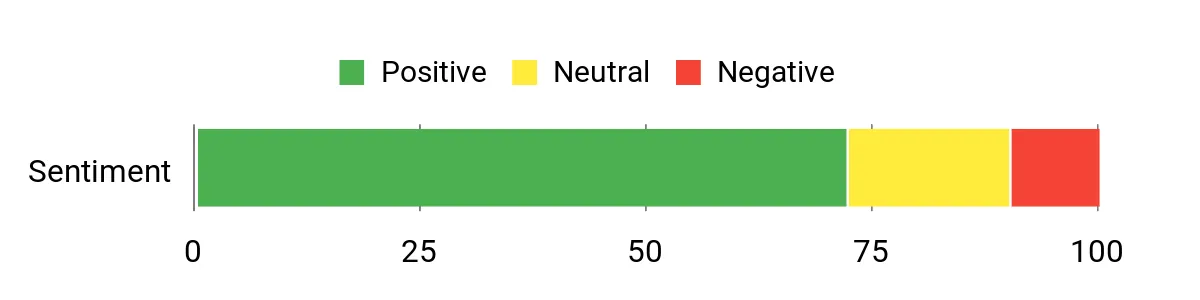
The original roundup highlights edge cleaning, low-profile access, and hair management as important buyer considerations. These are useful features to compare, but actual experiences can vary with carpet type, furniture clearance, and room layout.
Review data note: The original sentiment graphic is retained below. Its underlying review sample and analysis method were not supplied, so it should not be treated as independently verified customer research.
Situational Benefits
|
Situation |
How It Helps |
|---|---|
|
Homes with Pets |
The dual anti-tangle brushes help reduce hair wrapping and make regular maintenance easier. |
|
Tight, Low-Clearance Rooms |
Its approximately 3.14-inch height allows access beneath furniture with sufficient clearance. |
|
Busy Weekdays |
App scheduling and automated dock functions reduce the need to manage every cleaning session. |
|
Before Guests Arrive |
Room-specific cleaning and automatic re-mopping features can help target frequently used areas. |
Time Savings
The Saros 10R can reduce routine chores through scheduled cleaning, automatic dust collection, mop washing, and drying. You still need to maintain filters, brushes, tanks, and the dock.
Ease of Use
|
Feature |
What to Expect |
|---|---|
|
Setup & Apple Home |
Requires initial Roborock setup, compatible firmware, and Matter pairing. |
|
App Controls & Siri |
Apple Home handles supported actions, while the Roborock app offers more detailed controls. |
|
Maintenance |
Anti-tangle brushes and automated dock features reduce some manual cleaning tasks. |
|
Docking & Charging |
Automatic docking is supported; the station still needs space and periodic maintenance. |
Versatility
The Saros 10R is suited to mixed-floor homes with hardwood, tile, and carpet. Its liftable components and detachable mop system help it adapt to different cleaning tasks.
Energy
The robot uses a 6,400mAh battery and supports automatic charging. Runtime varies with suction settings, cleaning modes, floor surfaces, and the number of obstacles.
Navigation and Practical Safeguards
|
Feature |
Practical Benefit |
|---|---|
|
3D Obstacle Detection |
Helps identify furniture, cables, and common floor obstacles. |
|
Cliff Sensors |
Help detect drops, although physical precautions remain important near dangerous edges. |
|
Anti-Tangle Brushes |
Reduce hair wrapping around the cleaning mechanism. |
|
Matter and App Controls |
Provide different options for smart home and manufacturer-app control. |
Key Benefits
- Ultra-thin 3.14-inch profile for reaching beneath suitable furniture.
- Up to 20,000Pa advertised suction, subject to regional specifications.
- Dual anti-tangle brushes help reduce hair maintenance.
- Advanced 3D navigation and automated mop care.
Who Should Buy This?
Choose the Saros 10R if you want a premium robot for mixed flooring, low furniture, pet hair, and Apple Home integration.
Who should avoid it? It may be more equipment than you need for a small apartment with simple floor cleaning needs. Also check the dock dimensions and maintenance costs before buying.
Roborock Qrevo CurvX: Best Premium Alternative
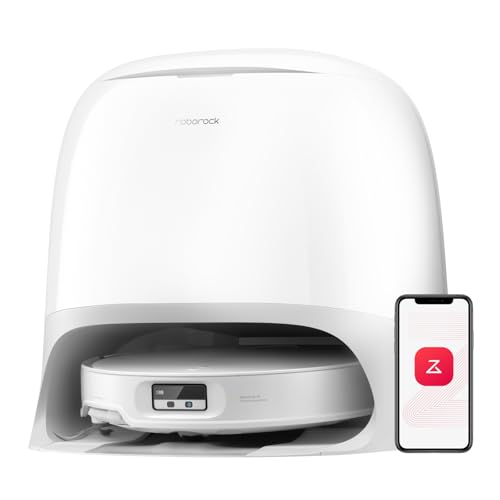
The Roborock Qrevo CurvX combines powerful vacuuming with advanced mopping and a self-cleaning dock. Its advertised 22,000Pa HyperForce suction, dual spinning mops, and anti-tangle brush system make it attractive for households with pets and mixed flooring.
The CurvX also features a retractable LiDAR navigation system and an AdaptiLift chassis. These features help it work beneath suitable low furniture and cross certain floor transitions. Its dock uses hot water for mop washing and provides automatic dust collection and drying functions.
Apple Home compatibility: Roborock advertises Matter support for the CurvX, and later compatibility reports identify it among supported models. However, some manufacturer documentation describes Matter as a firmware-delivered feature. Confirm the exact firmware and Matter pairing option in the Roborock app before purchasing specifically for Apple Home.
What People Say
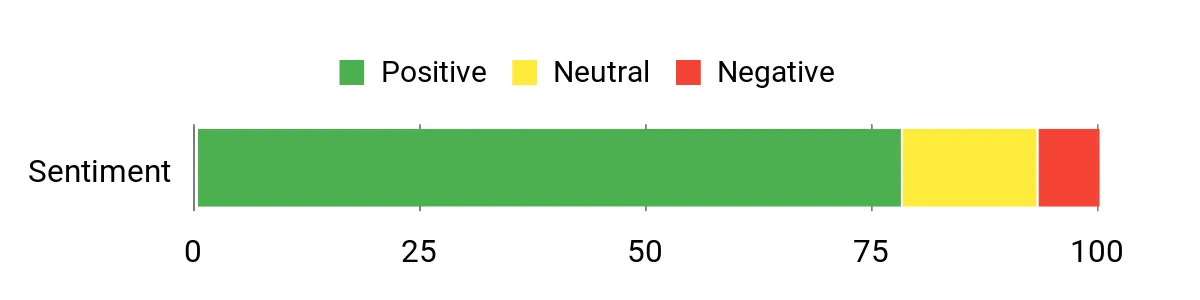
Important considerations for CurvX buyers include mop washing, hair management, navigation, dock size, and how easily the advanced settings can be configured.
Review data note: The original sentiment graphic is preserved below. Its review sample and methodology were not available for independent verification.
Situational Benefits
|
Situation |
How It Helps |
|---|---|
|
Pet Households |
High suction and dual anti-tangle brushes help manage everyday fur and hair. |
|
Large Open Floors |
LiDAR mapping and scheduled cleaning help maintain broad areas efficiently. |
|
Mixed Flooring |
Its liftable chassis and mops help it adapt between different floor surfaces. |
|
Quick Pre-Guest Cleaning |
Targeted cleaning and automatic re-mopping can focus on busy areas. |
Time Savings
Automatic mop washing, drying, dust emptying, and cleaning schedules reduce routine chores. You still need to refill or empty station tanks as required and clean the dock periodically.
Ease of Use
|
Feature |
What to Expect |
|---|---|
|
Setup & Apple Home |
Check the installed firmware and confirm that Matter pairing is enabled for the exact model. |
|
Mapping & No-Go Zones |
Detailed floor maps and cleaning restrictions are managed through the Roborock app. |
|
Dock Maintenance |
The dock automates several tasks but still needs tank and cleaning-system upkeep. |
|
Voice Control |
Siri Shortcuts and Matter-based Apple Home controls are distinct integration methods. |
Versatility
The CurvX is designed for carpet, wood, tile, and other suitable sealed hard floors. Its liftable components help manage floor changes without requiring constant manual adjustments.
Energy
The CurvX uses a 6,400mAh battery and supports automatic docking and charging. Actual runtime depends on suction levels, cleaning mode, and floor conditions.
Navigation and Practical Safeguards
|
Feature |
Practical Benefit |
|---|---|
|
Reactive AI 3.0 |
Helps identify and avoid common obstacles. |
|
RetractSense Navigation |
Allows the LiDAR system to retract when cleaning beneath suitable low furniture. |
|
AdaptiLift Chassis |
Helps manage certain thresholds and floor transitions. |
|
Automatic Docking |
Supports charging and station maintenance routines. |
Key Benefits
- 22,000Pa advertised maximum suction.
- Dual spinning mops with hot-water dock washing.
- Automated dust collection and mop drying.
- Retractable LiDAR and a liftable chassis.
Who Should Buy This?
The CurvX is a good fit if you prioritize premium cleaning features, carpet transitions, and low-maintenance mopping.
Who should avoid it? Buyers who require guaranteed Apple Home operation immediately after unboxing should verify their exact unit’s firmware before committing. The station also needs a suitable installation area.
ECOVACS DEEBOT X9 PRO OMNI: Best for Frequent Mopping
The ECOVACS DEEBOT X9 PRO OMNI is designed for households that need frequent vacuuming and mopping with less manual effort. Its OZMO ROLLER system washes the mop during operation, while the OMNI station handles additional cleaning and maintenance tasks.
The X9 combines an advertised 16,600Pa maximum suction rating with ECOVACS BLAST airflow technology. Its Triple Lift system helps separate cleaning tasks across carpets and hard floors. ZeroTangle 3.0 technology is designed to reduce hair wrapping around the brushes.
Apple Home compatibility: The X9 PRO OMNI supports Matter integration and can work with Apple’s Home app on compatible software. Supported controls include cleaning operations and room selection, while more detailed configurations remain in the ECOVACS HOME app.
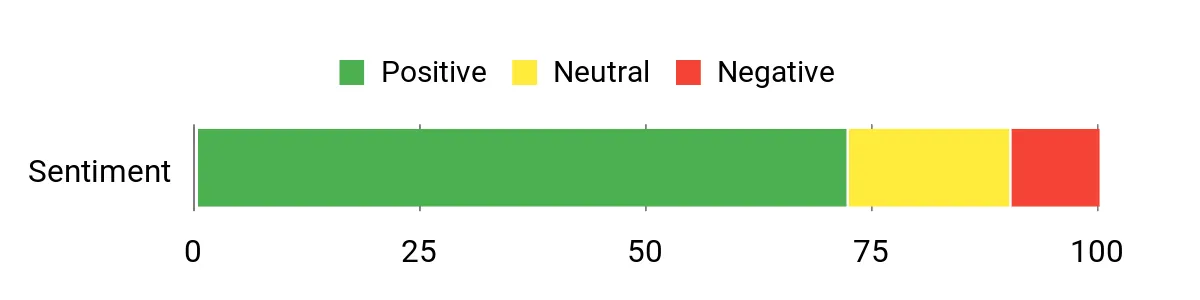
What People Say
For X9 buyers, important considerations include the roller mop, automated station, carpet handling, station noise, and maintenance supplies. The roller system is particularly relevant for households with large areas of hard flooring.
Review data note: The original sentiment graphic appears below, but the underlying review dataset and methodology were not provided.
Situational Benefits
|
Situation |
How It Helps |
|---|---|
|
Pet Hair Cleanup |
BLAST airflow and ZeroTangle technology help manage fur and reduce brush maintenance. |
|
Large Homes |
Automated mapping and docking help support scheduled cleaning across larger areas. |
|
Frequent Mopping |
The self-washing roller mop continually refreshes its cleaning surface during operation. |
|
Mixed Flooring |
The Triple Lift system adjusts cleaning components for different floor conditions. |
Time Savings
The OMNI station reduces the need for frequent manual mop washing and dustbin emptying. The roller system also helps manage mop cleanliness while the robot is operating.
Ease of Use
|
Feature |
What to Expect |
|---|---|
|
Setup & App |
Initial mapping and detailed cleaning preferences use the ECOVACS HOME app. |
|
Station Maintenance |
Automatic washing and drying reduce work, but tanks and cleaning components still need care. |
|
Daily Operation |
Scheduled cleaning and targeted modes help reduce manual operation. |
|
Apple Home Control |
Matter integration provides supported cleaning actions through the Home app. |
Versatility
The X9 works across suitable hard floors and carpets. Its roller mop is especially useful when hard-floor cleaning is a frequent household task.
Energy
ECOVACS specifies a 6,400mAh battery. Published operating times vary significantly between quiet vacuuming, standard vacuuming, and combined vacuum-and-mop modes.
Navigation and Practical Safeguards
|
Feature |
Practical Benefit |
|---|---|
|
AIVI 3D Obstacle Avoidance |
Helps recognize and navigate around common household obstacles. |
|
Triple Lift System |
Helps separate wet and dry cleaning tasks. |
|
Automatic Docking |
Allows the robot to return for charging and maintenance. |
|
Dust Collection |
Reduces how often you need to empty the robot manually. |
Key Benefits
- 16,600Pa advertised maximum suction with BLAST airflow technology.
- OZMO ROLLER mop system with cleaning during operation.
- Automated mop washing, drying, and dust collection.
- Triple Lift technology for mixed-floor cleaning.
Who Should Buy This?
Choose the X9 PRO OMNI if you have significant hard-floor space and want strong mopping automation with Apple Home compatibility.
Who should avoid it? It may be unnecessary if your home is mostly carpeted or you rarely mop. Consider station size, water handling, and replacement supplies.
ECOVACS DEEBOT T50 PRO OMNI: Best Value Features

The ECOVACS DEEBOT T50 PRO OMNI is a practical choice if you want advanced cleaning features without automatically choosing a flagship model. It combines a slim body, strong suction, edge cleaning, and a multifunctional OMNI station.
At approximately 3.19 inches tall, the robot can reach beneath suitable furniture. Its advertised 15,000Pa suction, ZeroTangle 2.0 brush technology, and TruEdge 2.0 edge-cleaning system address common household problems such as pet hair and dust along walls.
The OMNI station offers automatic mop washing, drying, and dust collection, reducing some of the maintenance associated with traditional robot vacuums.
Apple Home compatibility: ECOVACS has introduced Matter support across the T50 family through phased updates. Reports also describe T50 PRO OMNI integration with Apple Home. Because firmware availability can differ, confirm Matter functionality for the exact unit before purchase.
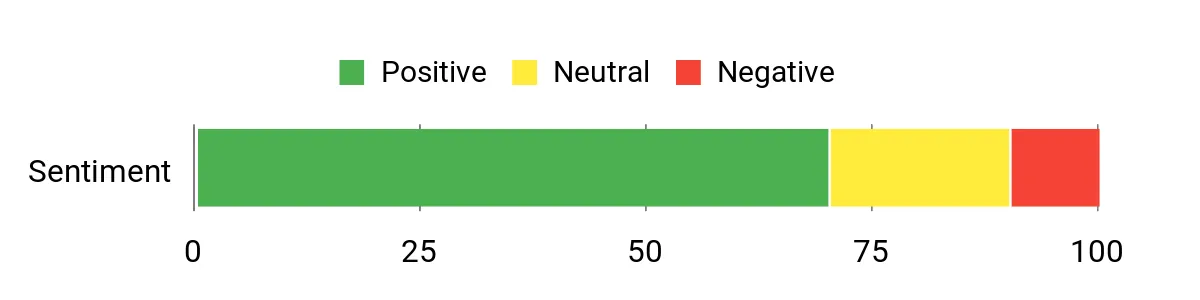
What People Say
Relevant buyer considerations include the slim design, edge-cleaning system, automated station, and navigation performance. Compare these benefits against station size, ongoing supplies, and the features available in the ECOVACS app.
Review data note: The original sentiment chart is preserved, but its source data and scoring methodology were not independently verified.
Situational Benefits
|
Situation |
How It Helps |
|---|---|
|
Pet Owners |
Anti-tangle brushes and strong suction help manage fur and reduce frequent detangling. |
|
Low-Clearance Rooms |
The approximately 3.19-inch body can reach beneath furniture with enough clearance. |
|
Busy Households |
Automatic mop washing, drying, and dust collection reduce daily maintenance. |
|
Mixed Flooring |
Vacuuming, mopping, and carpet-handling features support different cleaning needs. |
Time Savings
The T50 PRO OMNI can reduce routine work through scheduled cleaning and automatic station functions. Its anti-tangle system also helps limit brush maintenance, although it does not eliminate it.
Ease of Use
|
Feature |
What to Expect |
|---|---|
|
Setup & App |
Initial mapping and cleaning preferences require ECOVACS HOME setup. |
|
Daily Operation |
Schedules and automatic docking reduce frequent manual starts. |
|
Station Maintenance |
Water tanks, dust bags, and washing components still require regular attention. |
|
Voice Control |
Confirm whether your firmware exposes the intended Matter functions in Apple Home. |
Versatility
The T50 PRO OMNI is suitable for everyday dust, hair, and floor maintenance. Its slim design makes it especially interesting for rooms with low sofas and cabinets.
Energy
ECOVACS specifies a 6,400mAh battery. Runtime depends on whether the robot is vacuuming, mopping, or using combined cleaning modes.
Navigation and Practical Safeguards
|
Feature |
Practical Benefit |
|---|---|
|
AIVI 3D Obstacle Avoidance |
Helps identify and avoid common household objects. |
|
TruEdge 2.0 |
Supports closer cleaning along walls and furniture edges. |
|
Automatic Docking |
Allows the robot to return for charging and station maintenance. |
|
Washable Filter |
Supports routine filter maintenance when cleaned according to manufacturer instructions. |
Key Benefits
- Ultra-slim 3.19-inch body.
- 15,000Pa advertised maximum suction.
- Automatic mop washing and drying.
- Anti-tangle brushes and edge-cleaning features.
Who Should Buy This?
The T50 PRO OMNI is worth considering if you want a slim robot vacuum with comprehensive station features and prefer a value-focused option.
Who should avoid it? If direct Matter integration is your deciding factor, confirm the exact firmware and Apple Home setup first. Do not assume that all products in the T50 family have identical software features.
SwitchBot S10: Best for Automatic Water Handling

The SwitchBot S10 is designed for households that want to reduce manual water handling during frequent mopping. Its dual-station system can automatically manage clean and dirty water when the water station is installed with a suitable supply and drain connection.
The S10 uses real-time mop washing to keep the cleaning surface refreshed during operation. It also provides automatic dust collection, LiDAR navigation, and an advertised maximum suction rating of 6,500Pa.
Apple Home compatibility: SwitchBot confirms Matter support for the S10. Depending on its firmware and configuration, it can connect through native Matter functionality or a compatible SwitchBot Matter hub. Supported functions in Apple Home may differ between integration methods and software versions.
What People Say
The main reason to consider the S10 is its water-management design. Before buying, pay close attention to installation requirements, plumbing access, station placement, and the maintenance needed to keep the water system working properly.
Review data note: The original sentiment graphic is retained below, but its underlying customer-review methodology could not be independently verified.

Situational Benefits
|
Situation |
How It Helps |
|---|---|
|
High-Frequency Mopping |
Real-time washing and automatic water management reduce frequent manual rinsing and refilling. |
|
Large Open Areas |
Scheduled cleaning and automatic station operation help manage recurring floor care. |
|
Smart Home Routines |
Matter support enables compatible cleaning actions within Apple Home. |
|
Busy Households |
Automatic water handling can reduce repeated maintenance when correctly installed. |
Time Savings
The S10’s main advantage is reducing manual water refilling and draining. This benefit depends on correct water-station installation and does not remove the need to inspect filters, brushes, and water connections.
Ease of Use
|
Feature |
What to Expect |
|---|---|
|
Setup & App |
Requires initial SwitchBot setup and careful planning for the water station. |
|
Daily Operation |
Scheduled cleaning and automatic water handling reduce routine intervention. |
|
Station Upkeep |
Water supply, drainage, cleaning components, and filters still need inspection. |
|
Voice Control |
Matter-compatible firmware enables supported Apple Home and Siri actions. |
Versatility
The S10 is especially attractive for homes with extensive hard flooring and frequent mopping needs. It also provides vacuuming, although buyers focused primarily on carpet cleaning may prefer another model.
Energy
The S10 supports rechargeable operation and automatic docking. Battery runtime depends on cleaning settings and household conditions, so compare the manufacturer’s mode-specific figures rather than relying on a single maximum estimate.
Navigation and Practical Safeguards
|
Feature |
Practical Benefit |
|---|---|
|
LiDAR Navigation |
Supports room mapping and planned cleaning routes. |
|
Real-Time Mop Washing |
Refreshes the mop during cleaning. |
|
Automatic Water Management |
Reduces manual refilling and draining when properly connected. |
|
Automatic Docking |
Supports charging and station routines. |
Key Benefits
- Dual-station design with automatic water handling.
- Real-time mop washing for frequent hard-floor cleaning.
- 6,500Pa advertised maximum suction.
- Matter integration for compatible Apple Home controls.
Who Should Buy This?
Choose the S10 if your main goal is reducing water-related maintenance and you have a suitable location for its water station.
Who should avoid it? It may not be practical if you cannot safely connect the required plumbing or have limited station space. Installation requirements should be checked before ordering.
Installation Note: Follow SwitchBot’s water connection instructions and inspect all connections for leaks. Automatic draining and refilling should not be assumed to work without the appropriate station and installation.
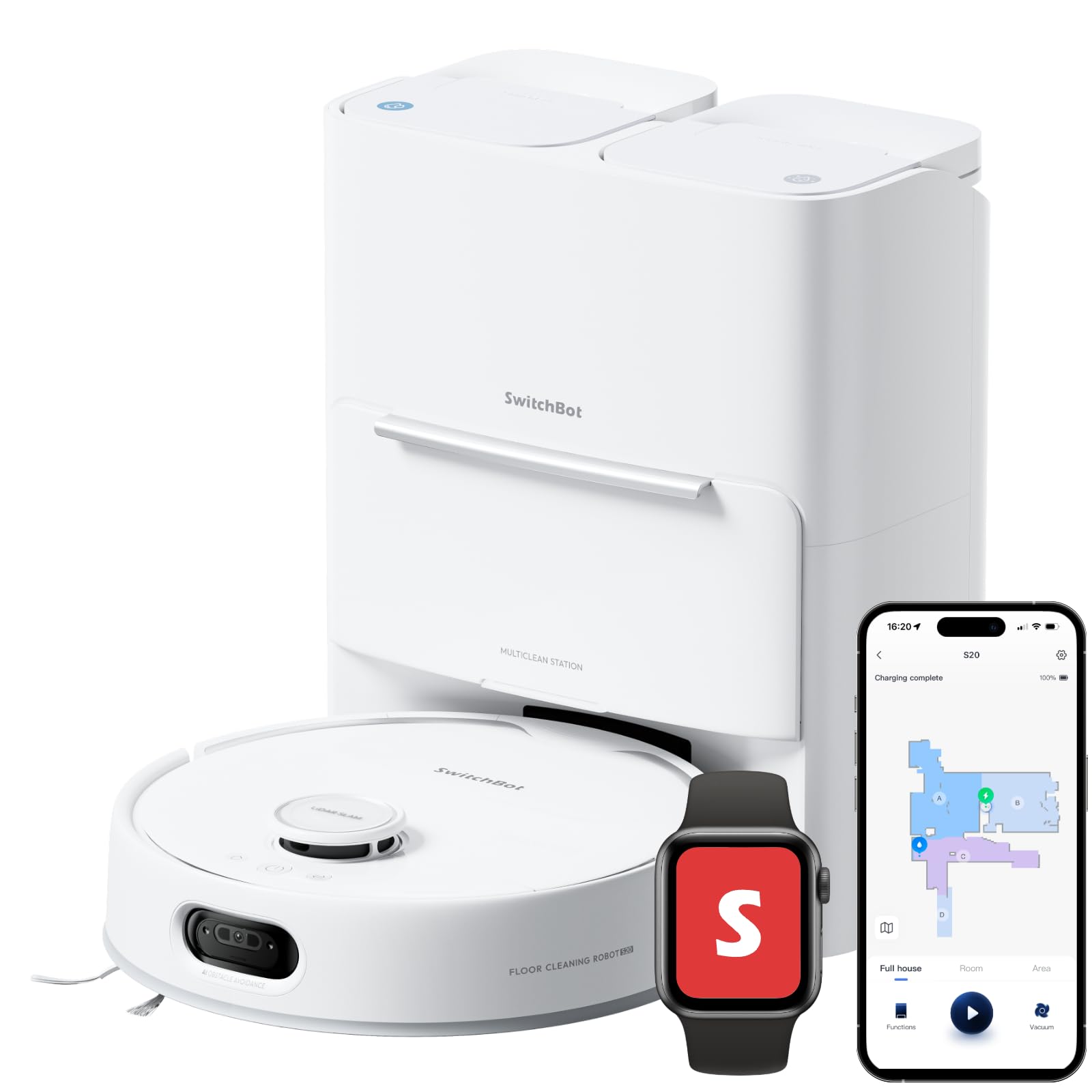
SwitchBot S20: Best for Smart Home Integration

The SwitchBot S20 combines Matter connectivity with automated floor cleaning and a self-washing roller mop. It is designed for regular cleaning rather than requiring you to start and maintain every session manually.
The S20 provides advertised suction of up to 10,000Pa, dToF LiDAR navigation, and obstacle detection using multiple sensors. Its station supports automatic mop cleaning, drying, and dust collection.
Apple Home compatibility: SwitchBot lists the S20 among its Matter-compatible robot vacuums. With compatible firmware and Apple Home software, you can add it through Matter and use supported cleaning controls, Siri commands, and automations.
What People Say
For the S20, useful buying considerations include Matter setup, cleaning coverage, roller-mop performance, station maintenance, and the controls available through Apple Home compared with the SwitchBot app.
Review data note: The original sentiment graphic is preserved below. Its review dataset and analytical method were not supplied for independent verification.

Situational Benefits
|
Situation |
How It Helps |
|---|---|
|
Daily Maintenance |
Automated cleaning and mop washing help keep hard floors maintained between deeper cleans. |
|
Smart Home Automation |
Matter support allows compatible cleaning actions through Apple Home. |
|
Large Single-Level Rooms |
Mapping and scheduled cleaning help organize cleaning across open spaces. |
|
Regular Hard-Floor Cleaning |
The roller mop and washing system reduce frequent manual mop rinsing. |
Time Savings
The S20 reduces routine cleaning effort through scheduled operation, mop washing, drying, and automatic dust collection. These features make it convenient for recurring floor maintenance.
Ease of Use
|
Feature |
What to Expect |
|---|---|
|
Setup & App |
Requires SwitchBot app setup, updated firmware, and Matter pairing for Apple Home. |
|
Mapping & Navigation |
Detailed mapping controls remain available in the manufacturer app. |
|
Station Upkeep |
Automatic mop maintenance reduces work but does not eliminate cleaning supplies and tank care. |
|
Daily Operation |
Supports recurring cleaning and smart home routines. |
Versatility
The S20 can perform vacuuming and mopping on suitable floor surfaces. It is particularly useful when hard-floor maintenance and smart home integration are priorities.
Energy
The S20 uses a 4,000mAh lithium-ion battery. Actual cleaning time depends on suction power, mop operation, and floor conditions.
Navigation and Practical Safeguards
|
Feature |
Practical Benefit |
|---|---|
|
dToF LiDAR Navigation |
Supports accurate mapping and planned cleaning routes. |
|
Obstacle Detection |
Uses sensors to help navigate around common objects. |
|
Automatic Docking |
Supports charging and station functions. |
|
Matter Connectivity |
Enables supported controls through compatible smart home platforms. |
Key Benefits
- 10,000Pa advertised maximum suction.
- Roller mop with automatic washing and drying.
- LiDAR navigation with obstacle-detection features.
- Matter support for Apple Home integration.
Who Should Buy This?
The S20 is a good match if you want regular floor cleaning, Matter-based smart home control, and convenient mop maintenance.
Who should avoid it? Buyers who need a very low-profile vacuum should measure furniture clearance carefully. The S20 is approximately 115mm tall, so it is taller than the slim Roborock and ECOVACS models in this roundup.
How to Choose the Best Apple Home Robot Vacuum
1. Confirm Matter Support for the Exact Model
Start by checking the manufacturer’s compatibility documentation. A robot vacuum may support Siri through Shortcuts without providing direct access through Apple Home.
For native Apple Home integration, confirm that the exact model supports Matter and has an appropriate pairing option. Some products receive Matter through firmware updates, while others can connect through compatible bridges.
2. Check Your Apple Home Setup
Apple Home introduced support for compatible Matter robot vacuums with iOS 18.4. Make sure your iPhone and other Apple devices use supported software. A compatible HomePod or Apple TV is important for home automation and remote control features.
Manufacturers may require newer versions of iOS, their companion app, or the robot’s firmware. Follow the specific setup instructions for your vacuum.
3. Decide Which Controls You Need
Apple Home can provide convenient access to supported cleaning functions, but its controls may not match everything available in the manufacturer’s app.
Basic commands can include starting, stopping, changing cleaning modes, and returning the robot to its station. Depending on the model and software, room selection and additional controls may also be available.
More advanced tasks such as creating maps, drawing no-go zones, adjusting obstacle avoidance, and maintaining the dock are often handled in the manufacturer’s app.
4. Match the Cleaning System to Your Floors
If you have mostly carpets, pay attention to brush design, suction, carpet detection, and mop lifting. If you have hardwood or tile, compare the mop system, edge cleaning, and automatic washing features.
Do not choose a robot based only on its maximum suction number. Brush performance, airflow, floor type, and navigation also affect real cleaning results.
5. Measure the Robot and Its Dock
Measure the clearance beneath sofas, beds, and cabinets before buying. A slim robot cannot clean beneath furniture that is lower than its actual operating height.
Also measure the docking station area. Leave the clearance recommended by the manufacturer so the robot can approach, charge, and perform maintenance correctly.
6. Consider Long-Term Maintenance
Self-emptying and self-washing features reduce chores, but they do not eliminate maintenance. Most owners still need to replace filters, brushes, dust bags, and mop components and clean the station.
Compare the availability and cost of replacement supplies before buying, particularly if you plan to use the robot daily.
Before You Buy Checklist
- Confirm the exact model supports Matter and Apple Home.
- Check the required firmware and companion-app version.
- Check your iPhone, HomePod, or Apple TV compatibility.
- Measure furniture clearance and dock space.
- Match vacuuming and mopping features to your flooring.
- Confirm Wi-Fi requirements, especially 2.4GHz support.
- Review water-station installation requirements where applicable.
- Check replacement supplies, warranty, and return terms.
FAQ
How Can I Verify Apple Home Compatibility?
Check the manufacturer’s documentation for support of Matter robot-vacuum functionality. Confirm the exact model, required firmware, and pairing instructions. After setup, the vacuum should appear as a supported accessory in the Apple Home app. Siri Shortcuts alone do not confirm native Matter integration.
What Features Should I Prioritize as an Apple Home User?
Prioritize reliable Matter support and the cleaning controls you actually need. Then compare navigation, mopping quality, self-emptying, dock maintenance, and carpet handling. A robot that cleans your floors effectively and supports your preferred automations is usually more useful than one with a long list of features you rarely use.
Do I Need a HomePod or Apple TV?
A compatible Apple home hub is important for supported Apple Home automation and remote access features. Requirements can vary by Matter device and manufacturer. Check the current Apple Home and robot-vacuum setup instructions before purchase.
Can I Use Siri to Clean a Specific Room?
Some Matter-compatible robot vacuums support room-specific cleaning through Apple Home and Siri. However, the available controls depend on the robot, firmware, and Apple Home software. Initial room mapping may need to be completed in the manufacturer’s app.
Is Matter Better Than Siri Shortcuts?
Matter and Siri Shortcuts serve different purposes. Matter can expose supported robot-vacuum functions directly within compatible smart home platforms. Siri Shortcuts can trigger app-based actions without necessarily making the vacuum a native Apple Home accessory. Choose based on how you want to control and automate cleaning.
How Much Maintenance and Troubleshooting Should I Expect?
Plan to inspect brushes, sensors, wheels, filters, and the docking station regularly. Follow the manufacturer’s schedule for washing or replacing parts. Self-cleaning stations reduce some work but still need maintenance.
If the vacuum stops responding in Apple Home, check its power, Wi-Fi connection, firmware, and Matter pairing status. Restarting the affected devices or re-pairing Matter may help. A factory reset should generally be a last resort because it can remove maps and saved settings.
Can I Use a Matter Robot Vacuum Without an Internet Connection?
Matter supports local communication for compatible functions, but actual offline behavior depends on the device and setup. Manufacturer-app features, remote services, initial pairing, and firmware updates may still require internet access. Do not assume every robot feature will work offline.
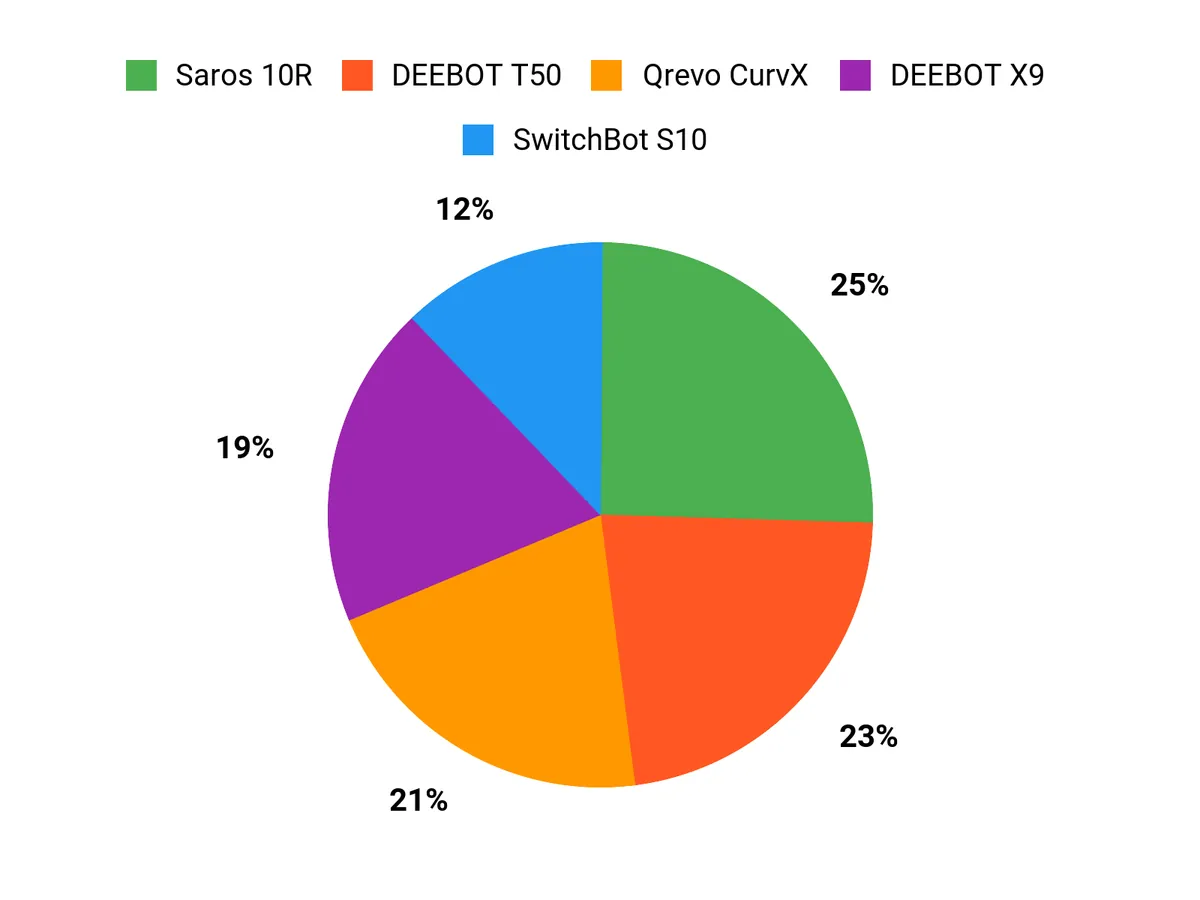
Customer Preferences
The best vacuum depends on what you want to automate. For mixed-floor cleaning and navigation, the Saros 10R is a compelling option. For advanced premium cleaning features, consider the Qrevo CurvX. The DEEBOT X9 PRO OMNI is especially attractive for frequent mopping, while the T50 PRO OMNI provides many convenient station features in a value-oriented package.
If reducing manual water handling is a priority, consider the SwitchBot S10 after checking installation requirements. If Matter integration and routine cleaning are central to your setup, the SwitchBot S20 deserves consideration.
Chart note: The customer-preference graphic from the original roundup is retained below. Its source dataset and methodology were not available for independent verification.
Wrapping Up
If you want a premium robot vacuum with advanced navigation, low-profile cleaning, and automated maintenance, the Roborock Saros 10R is our best overall recommendation. The Qrevo CurvX is another strong premium option, especially if suction, mop washing, and carpet transitions matter most.
For frequent hard-floor mopping, choose the ECOVACS DEEBOT X9 PRO OMNI. If you prefer a value-focused model with a slim body and automated dock, consider the DEEBOT T50 PRO OMNI.
The SwitchBot S10 stands out for automatic water management when properly installed. The SwitchBot S20 combines roller-mop cleaning with Matter integration and straightforward smart home features.
Final recommendation: Choose based on your floors, available dock space, maintenance expectations, and required Apple Home controls. Before ordering any model specifically for Matter integration, confirm the exact product version and firmware support.
Robot Vacuum Comparison Table
| Product Name | Image | Apple Home / Matter | Advertised Max Suction | Special Highlights |
|---|---|---|---|---|
| Roborock Saros 10R Robot Vacuum and Mop |
 |
Matter supported with compatible firmware | 20,000Pa* |
|
| Roborock Qrevo CurvX Robot Vacuum and Mop |
 |
Matter advertised; verify current firmware | 22,000Pa |
|
| ECOVACS DEEBOT X9 PRO OMNI Robot Vacuum |
 |
Matter supported | 16,600Pa |
|
| ECOVACS DEEBOT T50 PRO OMNI Robot Vacuum and Mop |
 |
Matter rollout; confirm exact firmware | 15,000Pa |
|
| SwitchBot S10 Robot Vacuum and Mop |
 |
Matter supported; setup method depends on firmware | 6,500Pa |
|
| SwitchBot S20 Robot Vacuum and Mop |
 |
Matter supported with compatible firmware | 10,000Pa |
|
*The Saros 10R’s 20,000Pa figure comes from Roborock’s original product announcement; specifications may vary by country or product version. All suction figures are manufacturer-advertised maximums and do not represent standardized cross-brand cleaning-test results. Product features and software support may change through firmware updates.
Compatibility and Product Information Sources
For the latest product specifications, firmware instructions, and compatibility requirements, refer to these manufacturer resources:
- Roborock Saros 10R product information
- Roborock Qrevo CurvX specifications
- ECOVACS DEEBOT X9 PRO OMNI specifications
- ECOVACS DEEBOT T50 PRO OMNI specifications
- SwitchBot S10 and S20 Matter compatibility guidance
- SwitchBot Apple Home Matter setup instructions
- Apple Home software and compatibility guidance
This roundup is reader-supported. When you click through Amazon affiliate links, we may earn a referral commission on qualifying purchases. Product recommendations are based on documented features and stated buyer needs. Check current specifications, warranty, availability, and software compatibility before purchasing.