
Disclosure: As an Amazon Associate, we earn from qualifying purchases. If you click a link on this page and make a purchase, we may receive a small commission at no extra cost to you.
Quick Answer
To unlock a YKYI electric spin scrubber, charge it first, then long-press the power switch for about 3 seconds. If the display shows LOCK or the voice prompt says “Please unlock”, long-press the power switch again for about 3 seconds. When the scrubber says “Power ready”, press the M button to start if your model uses that control. If it still will not run, check the brush head, handle connection, charging cover, and battery level before trying again.
This guide helps you unlock, start, and troubleshoot a YKYI cordless scrubber for bathrooms, tubs, tile, grout, floors, windows, and car cleaning. It focuses on lock mode, charging problems, brush-head fit, handle setup, speed selection, and safe use around wet surfaces.
Source note: A YKYI manual copy says the product can show LOCK, give a “Please unlock” voice prompt, and require a roughly 3-second long press on the power switch to unlock. Use your printed manual first if your model differs, because button labels and display prompts can vary by batch. View the manual copy.
How to Unlock a YKYI Electric Spin Scrubber Step by Step
- Charge the battery first. A low battery can make the scrubber appear locked, silent, or unresponsive.
- Check the charging cover. Make sure the charging port cover is closed before using the scrubber near water.
- Attach the brush head securely. Push or twist the head into place according to your model so it does not wobble.
- Check the handle connection. Make sure the handle and extension rod are seated, twisted, or locked into place.
- Long-press the power switch. Hold the power switch for about 3 seconds to unlock the unit if it shows LOCK or says “Please unlock.”
- Start the scrubber. After the unit says “Power ready,” press the M button or power control your model uses to begin cleaning.
- Restart after overload. If the motor stops while you scrub, reduce pressure, clear debris from the brush, and restart the unit.
Quick Picks: YKYI and Related Electric Spin Scrubber Options
- Best for versatile home cleaning: Electric Spin Scrubber with 8 Replaceable Heads
- Best for longer reach: Electric Cordless Spin Scrubber with 8 Brush Heads
- Best for higher-speed scrubbing: YKYI Cordless Electric Spin Scrubber with 8 Heads
Brand check: Some Amazon listings with similar scrubber names may show a different store, brand, or seller than YKYI. Confirm the current brand, seller, warranty, and included accessories on the listing before buying.
YKYI Electric Spin Scrubber Comparison
| Product | Best For | Key Listed Features | CTA |
|---|---|---|---|
| Electric Spin Scrubber with 8 Replaceable Heads | Multi-surface cleaning around the home | 8 heads, telescopic handle, Type-C charging, up to 120 minutes listed runtime | View Latest Price |
| Electric Cordless Spin Scrubber with 8 Brush Heads | Cleaning high spots, tight corners, and wet areas | 5000mAh battery, adjustable 12/43/54-inch handle, 250/350 RPM listed speeds | View Latest Price |
| YKYI Cordless Electric Spin Scrubber with 8 Heads | Tubs, grout, floors, tiles, and car wheels | 8 heads, 12–43.3-inch handle, 380–480 RPM listed speeds, Type-C charging | View Latest Price |
Electric Spin Scrubber with 8 Replaceable Heads
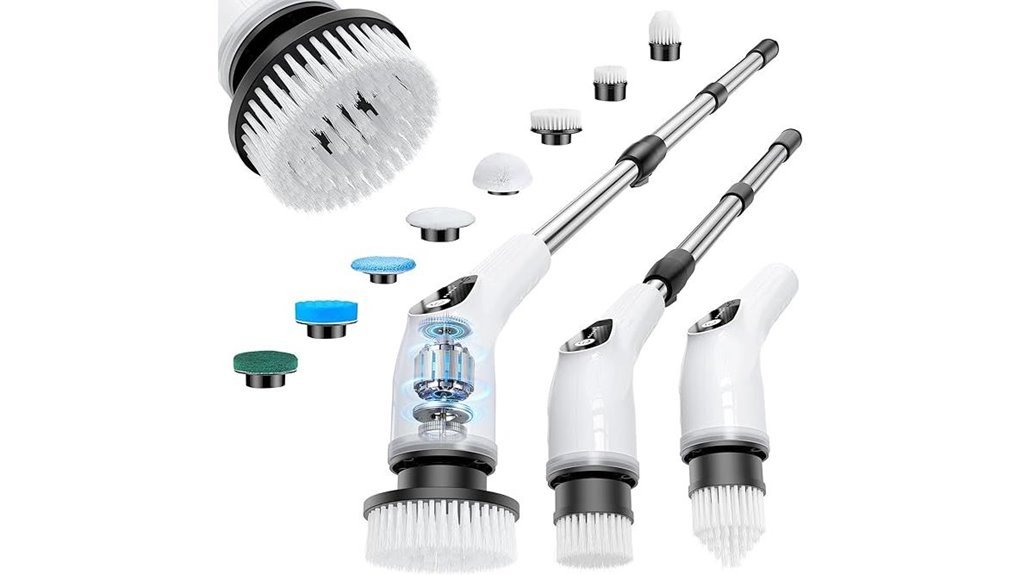
If you want one cleaning tool that adapts to several household surfaces, this Electric Spin Scrubber with 8 replaceable heads is a practical option to consider. You can swap in the flat brush for tile floors, walls, and pools, then switch to the corner brush for grout, faucets, and edges. Use the cloth brush on wood floors and furniture, or the sponge head for windows.
This model makes the most sense if you want a cordless scrubber that reduces bending, kneeling, and hand-scrubbing. It is especially useful for bathrooms, tubs, counters, cars, and other areas where a regular sponge or brush takes too much effort.
Best For: Busy parents, older adults, and anyone who wants an easy-to-use cordless scrubber for cleaning bathrooms, tubs, floors, windows, and hard-to-reach surfaces.
Who Should Skip It: Skip it if you need a heavy-duty commercial cleaning tool, want a manual scrubber with no charging, or plan to submerge the device underwater.
Pros:
- Comes with 8 replaceable heads for different surfaces and tasks.
- Adjustable telescopic handle helps reduce bending and kneeling.
- Fast Type-C charging, up to 120 minutes of listed runtime, and five speed settings.
Cons:
- Not meant for underwater use despite the IPX7 waterproof rating.
- Best results may require switching brush heads often for different jobs.
- Battery-powered operation means it eventually needs recharging.
Buyer Note: Before buying, confirm the brush-head set, battery details, handle length, brand name, and seller on the Amazon listing, because bundles and specifications can change over time.
Electric Cordless Spin Scrubber with 8 Brush Heads
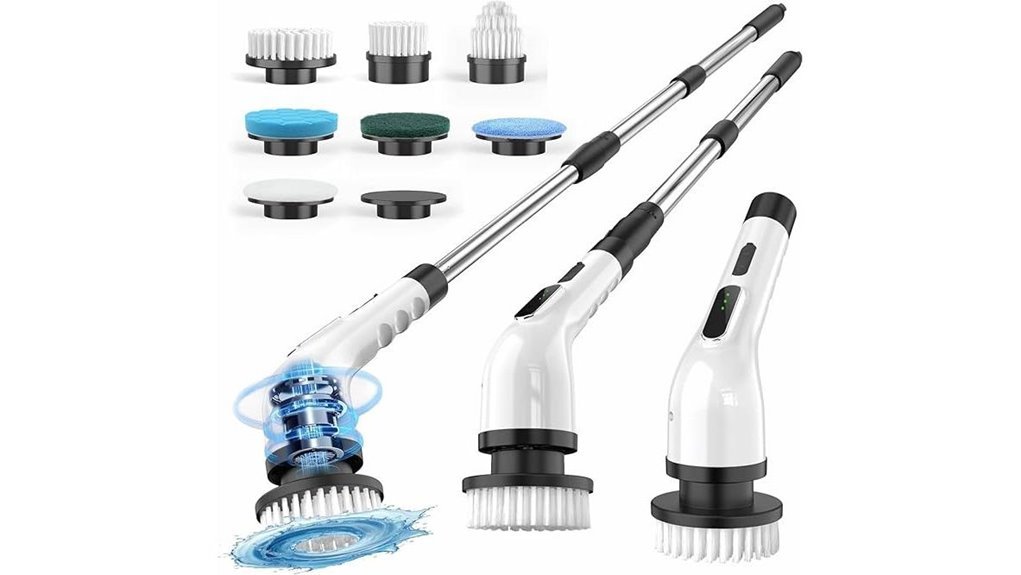
The Electric Cordless Spin Scrubber suits anyone who wants faster, easier cleaning without dragging out a bucket of hand tools. The listing describes a cordless, ergonomic tool with a 5000mAh battery, a 2–3 hour charge time, and up to 90 minutes of runtime.
You can adjust the handle to 12, 43, or 54 inches, which helps when you need to clean high spots or tight corners without bending or kneeling. Choose low speed at 250 RPM, or press for high speed at 350 RPM if your exact model supports that control. With 8 brush heads, you can scrub bathrooms, kitchens, tubs, floors, glass, and vehicles.
Best For: People who want a cordless, adjustable spin scrubber for faster household cleaning, especially those avoiding bending or kneeling and anyone cleaning bathrooms, kitchens, tubs, floors, glass, or vehicles.
Who Should Skip It: Skip it if you only clean small areas occasionally, prefer a lightweight manual brush, or do not want another battery-powered tool to charge.
Pros:
- 5000mAh battery offers up to 90 minutes of listed cordless use after a 2–3 hour charge.
- Adjustable to 12, 43, or 54 inches, making it easier to reach high or tight areas.
- Includes 8 brush heads and a waterproof design for cleaning in wet environments.
Cons:
- Battery life may be limiting for very large or multiple deep-cleaning jobs.
- The linked listing may not show YKYI as the current brand, so brand verification matters.
- Not ideal for users who prefer a lightweight manual scrubber with no charging needed.
Buyer Note: Check the current listing before purchase to confirm the included brush heads, handle length, charging cable, brand name, and current seller support.
YKYI Cordless Electric Spin Scrubber with 8 Heads
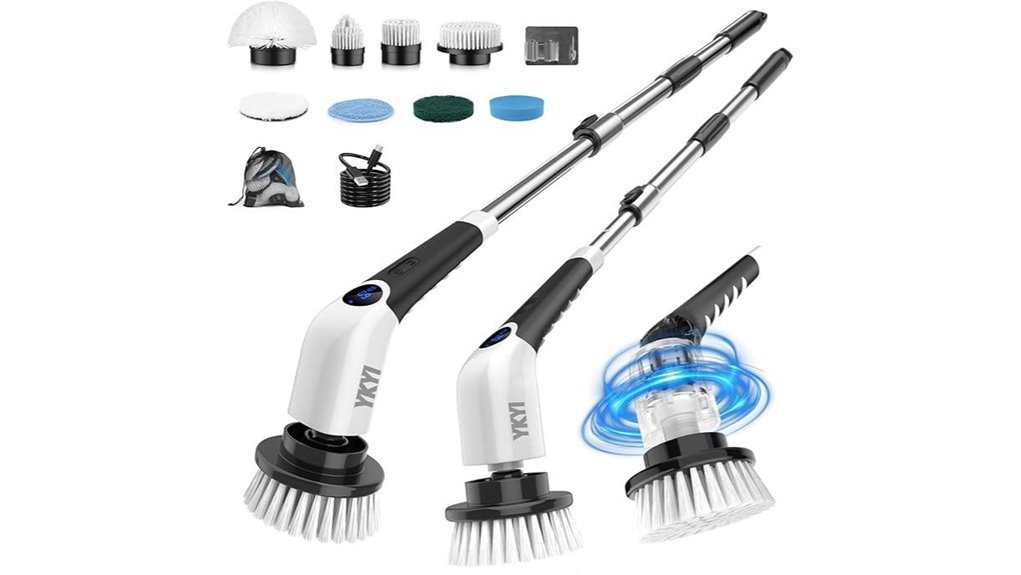
With eight interchangeable heads, this YKYI Cordless Electric Spin Scrubber is designed for grout, tubs, floors, and car wheels. You can switch between the included brushes to reach corners, tiles, metal, and other hard-to-clean spots.
Its dual-speed motor is listed at 380 to 480 RPM, which gives you more scrubbing force for soap scum and stubborn grime. The extendable handle adjusts from 12 to 43.3 inches, helping you clean without bending or kneeling. The article lists up to 100 minutes of runtime, IPX7 waterproof protection, fast Type-C charging, and quiet 62dB operation.
Best For: Homeowners, renters, seniors, and car owners who want a cordless, easy-to-use scrubber for tackling bathrooms, tiles, grout, floors, and other hard-to-reach cleaning jobs.
Who Should Skip It: Skip it if you need the longest possible handle length, need a professional-grade scrubber, or want a device for fully underwater cleaning.
Pros:
- 8 interchangeable brush heads for cleaning a wide range of surfaces and spaces.
- Adjustable 12–43.3 inch handle reduces bending and kneeling.
- Up to 100 minutes of listed runtime with fast Type-C charging and IPX7 waterproofing.
Cons:
- Full charge still takes 3–4 hours.
- Runtime may not be enough for very large deep-cleaning tasks in one session.
- Best performance is focused on scrubbing, so it may not replace heavier-duty cleaning tools.
Buyer Note: Confirm the current ASIN details, included accessories, seller information, and warranty before purchasing, especially if you need a specific handle length or brush-head type. [VERIFY: confirm the current US Amazon listing details for ASIN B0GVHN21CM before publishing.]
What to Check When a YKYI Electric Spin Scrubber Will Not Unlock
When your YKYI electric spin scrubber will not unlock, start with the battery and power controls. Then check the handle, brush head, speed mode, and charging-port cover. Most startup problems come from low charge, LOCK mode, a loose attachment, overload protection, or moisture near the charging area.
Battery and LOCK Mode Check
Before you try to use your YKYI electric spin scrubber, make sure the battery is fully charged. Low power can keep the unit in standby or stop it from responding. If the display shows LOCK or the scrubber says “Please unlock”, long-press the power switch for about 3 seconds.
Once it unlocks, some versions give a “Power ready” prompt and require you to press the M button to start. If that does not work, recharge the unit, let the contacts dry, and try again before assuming the battery has failed.
Handle Adjustment Steps
Once the battery is powered up and the scrubber is ready to run, adjust the handle to match the task and your reach. Some YKYI models list an adjustable handle range from 12 to 43.3 inches, while others list longer configurations. Check your exact model before forcing the handle.
Rotate the handle and extension rod until you reach the length you want, then lock it firmly in place. This keeps the scrubber steady while you clean and helps reduce bending or kneeling during bathroom, tub, tile, and floor cleaning.
Speed Mode Selection
To choose the right cleaning power, start with the lower setting when cleaning delicate surfaces. This gives you scrubbing power without unnecessary wear. Use a higher speed only when the surface can handle extra force and your model supports that speed mode.
The higher speed works better on stubborn grime, hard water stains, and soap scum. Matching the speed to the job also helps protect the scrubber, because you won’t push it harder than needed.
Brush Head Compatibility
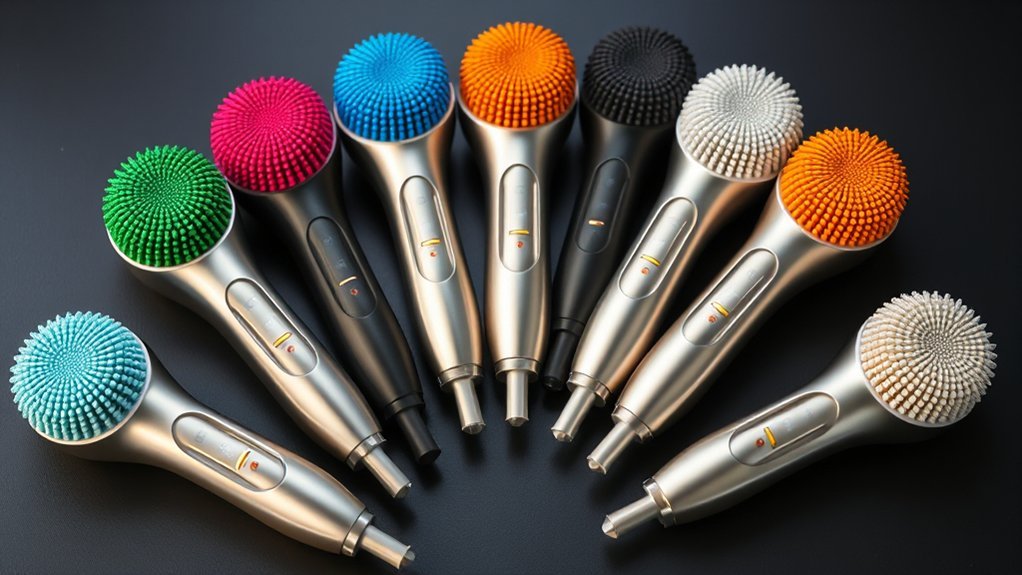
After picking the right speed, choose the brush head that fits the surface. The YKYI Electric Spin Scrubber models in this article include 8 replaceable heads for different surfaces and tasks. Use a flat head for broad floors, a corner head for tight edges, and a grout brush for narrow lines.
Pick the soft-bristle option when you’re working on delicate surfaces, because it is less likely to scratch. Before you start, make sure the head locks on firmly; a secure fit keeps performance steady and helps prevent wear.
Waterproof Safety Checks
When you check waterproof safety before using the YKYI Electric Spin Scrubber, look for the water-resistance rating listed for your exact model. Some models mention IPX7, but that does not mean the entire device should be submerged.
Inspect seals and joints for cracks, looseness, or wear, since damaged parts can let moisture in and shorten the scrubber’s life. Keep the charging cover closed during wet cleaning, then wipe and air-dry the unit after every session.
Charging Port Access
Once you’ve confirmed the scrubber is safe around water, focus on charging port access so powering it up stays simple. A Type-C port is useful because it works with many modern cables, but always use a compatible charger and cable.
Check that the port sits in a protected spot to help block water ingress, especially if you’ll use the scrubber in wet areas. LED indicators near the port can show battery level and charging progress at a glance.
Power Button Operation
To activate your YKYI Electric Spin Scrubber, start with the power button or power switch on the handle. Press and hold it for about 3 seconds if the unit is locked. Before you do, make sure the scrubber is assembled correctly and the brush head you want is attached.
A charged battery also matters, because a weak charge can keep the unit from turning on. If nothing happens, don’t force it; check the battery level, recharge as needed, then try again.
LOCK Display or Voice Prompt Status
The LOCK display or “Please unlock” voice prompt gives you a quick status check on your YKYI Electric Spin Scrubber. If the unit is locked, a normal press may not start the motor. Long-press the power switch for about 3 seconds, then press the M button if your model asks for it.
Always check this status first, especially if you’ve just handled the scrubber, charged it, or switched attachments. This simple habit helps prevent accidental startup and avoids unnecessary pressure on the brush head.
Common YKYI Electric Spin Scrubber Problems
- Scrubber will not turn on: Recharge the battery, unlock LOCK mode with a 3-second power-switch press, and confirm the brush head is attached.
- Unit says “Please unlock”: Long-press the power switch for about 3 seconds, then press the M button if the scrubber says it is ready.
- Motor starts then stops: Reduce pressure on the brush head, clear debris, and check whether overload protection or low battery stopped the motor.
- Handle feels loose: Reconnect the extension rod and twist or lock it into place before cleaning.
- Brush head wobbles: Remove the head, check for debris around the connector, and reattach it firmly.
- Charging is slow: Use the correct charging cable and check the charging port for moisture or buildup.
What to Check Before Buying a YKYI Spin Scrubber
- Brand and seller: Confirm whether the listing currently says YKYI, another brand, or a third-party store.
- Battery runtime: Choose a model with enough listed runtime for your cleaning routine.
- Handle length: Check the minimum and maximum handle settings if you want to avoid bending.
- Brush-head set: Make sure the included heads match the surfaces you clean most often.
- Charging type: Type-C charging is convenient, but confirm what cable is included.
- Water-resistance limits: Waterproof does not always mean safe for full submersion.
- Seller details: Review the current Amazon listing for updated bundle details, availability, warranty, and return information.
Frequently Asked Questions
How do you unlock a YKYI electric spin scrubber?
Charge the scrubber first, then long-press the power switch for about 3 seconds. If the unit says “Please unlock” or shows LOCK, long-press the power switch again for about 3 seconds. When it says “Power ready,” press the M button to start if your model uses that control.
Why does my YKYI spin scrubber say “Please unlock”?
The “Please unlock” prompt usually means the scrubber is in LOCK mode. Long-press the power switch for about 3 seconds to unlock it. If it still will not start, recharge the battery, check the brush head connection, and make sure the handle is assembled securely.
Why does my YKYI electric spin scrubber stop while cleaning?
The scrubber may stop if the battery is low, the brush head is jammed, or you press too hard. Reduce pressure, remove debris from the brush connector, recharge the battery, and restart the unit.
Can you use a YKYI electric spin scrubber in the shower?
You can use a water-resistant YKYI scrubber around wet shower surfaces, but do not submerge the motorized handle or charging area. Keep the charging cover sealed during use, then wipe and air-dry the unit after cleaning.
Which brush head should you use for grout, tile, and glass?
Use a pointed or corner brush for grout lines and edges, a flat brush for broad tile or tub surfaces, and the softest pad or sponge-style head for glass. Test a small area first before using higher speed or firmer pressure.
Conclusion
To unlock and activate a YKYI electric spin scrubber, start with the basics: charge the battery, attach the brush head, check for LOCK mode or the “Please unlock” prompt, and long-press the power switch for about 3 seconds. If the unit still will not start, inspect the handle, brush-head connection, charging cover, and battery level before trying again.
If you are comparing models, focus on the handle length, brush-head set, listed runtime, charging type, water-resistance limits, and current seller details. For most home cleaning tasks, a cordless scrubber with multiple brush heads is most useful when you match the right head and speed setting to the surface you are cleaning.

[…] button sequence before they respond. If yours is new and nothing happens when you press power, read how to unlock and activate a YKYI electric spin scrubber first, because a locked tool and a dead tool look the […]