Affiliate disclosure: This article contains affiliate links. If you buy through one of these links, we may earn a commission at no extra cost to you.
If you are planning a workspace upgrade for 2026, four standing desk converters worth comparing are the VIVO 32-inch Height Adjustable Desk Converter, VariDesk Pro Plus 36, UPLIFT DESK E7 Electric Standing Desk Converter, and Humanscale QuickStand Eco. They cover different needs, from a straightforward manual sit-stand desk riser to a powered converter for heavier equipment. The right choice depends on your desk size, monitor setup, preferred lift style, required weight capacity, and whether you want manual or electric adjustment.
Quick Verdict
- VIVO 32-inch: A practical choice for users who want a compact manual converter with room for a monitor or laptop setup.
- VariDesk Pro Plus 36: A strong option for dual-monitor users who want a wide manual converter that arrives fully assembled.
- UPLIFT E7 Electric: Best suited to users who prefer powered height adjustment, saved positions, and substantially higher lifting capacity.
- Humanscale QuickStand Eco: A good fit for a streamlined single-monitor workstation with integrated cable management and a compact appearance.
Quick Comparison of Standing Desk Converters
| Model | Lift Type | Capacity | Height Adjustment | Best Fit | Amazon |
|---|---|---|---|---|---|
| VIVO 32-inch | Manual pneumatic spring | 33 lb desktop; 4 lb keyboard tray | 4.5″–20″ | Compact monitor/laptop setups | Check on Amazon |
| VariDesk Pro Plus 36 | Manual spring-assisted rowing lift | 35 lb | 4.5″–17.5″ | Wide dual-monitor setups | Check on Amazon |
| UPLIFT E7 Electric | Electric | Up to 110 lb | 21″ vertical range | Powered adjustment and heavier setups | Check on Amazon |
| QuickStand Eco | Manual self-locking/counterbalanced adjustment | Up to 35 lb main assembly | 18.6″ | Streamlined single-monitor workstation | Check on Amazon |
Note: Specifications, included accessories, warranty terms, and Amazon availability can change. Check the exact configuration on the product page before ordering, especially when choosing monitor-mount options.
VIVO 32 inch Height Adjustable Desk Converter
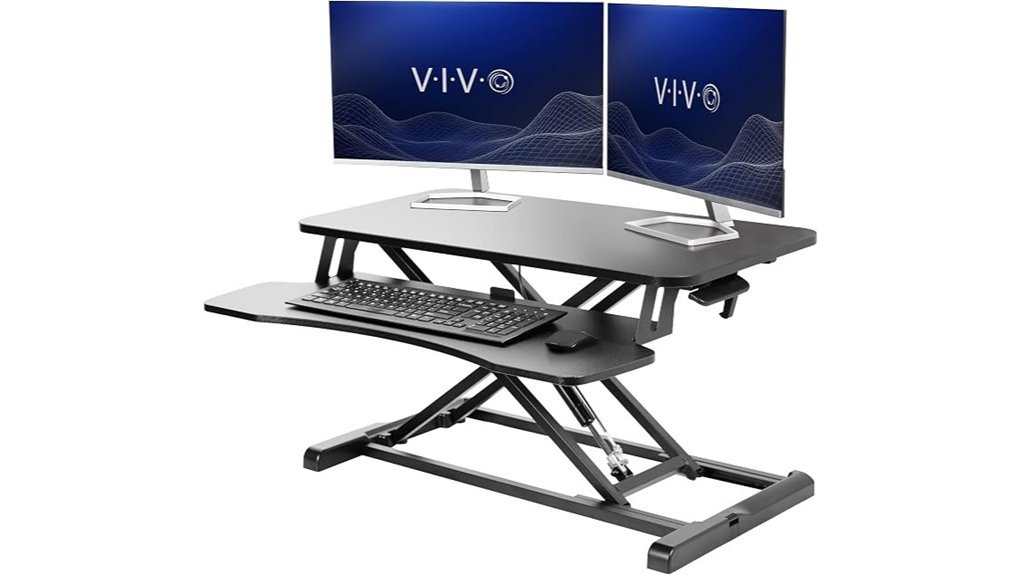
The VIVO 32-inch Height Adjustable Desk Converter is a practical option for turning an existing desk into a sit-stand workstation without replacing the entire desk. Its 31.5” x 15.7” top surface provides room for a monitor, laptop, or compatible multi-screen arrangement, while the separate keyboard tray keeps input devices on a lower tier. The desktop supports up to 33 lbs, and the keyboard tray has its own lower load limit, so users with heavier equipment should total their setup weight before buying.
A manual pneumatic spring mechanism lets the work surface move from about 4.5 to 20 inches above the existing desk. That relatively broad range makes it useful for many sitting and standing positions, although very tall users should still measure their required keyboard and screen heights rather than relying on the maximum figure alone. Minimal assembly is required, and the manufacturer currently lists a 3-year warranty.
Best For: Users who want a relatively compact manual standing desk riser for a monitor, laptop, keyboard, and everyday office accessories.
Why You’ll Like It: It combines a wide keyboard tray, straight-up adjustment, and a useful height range without requiring a powered motor.
Pros:
- 31.5” x 15.7” top surface provides useful room for common office setups.
- 4.5” to 20” height range gives users substantial adjustment flexibility.
- 33 lb desktop capacity works for many monitor and laptop combinations.
- Minimal assembly keeps setup relatively simple.
Cons:
- Users with unusually tall standing-height requirements should measure carefully before ordering.
- The 33 lb desktop limit can be restrictive for heavier monitor arrangements.
- The keyboard tray has a separate lower weight limit and may feel restrictive with oversized peripherals.
Vari Pro Plus 36 Standing Desk Converter – Spring-Loader Lift – White
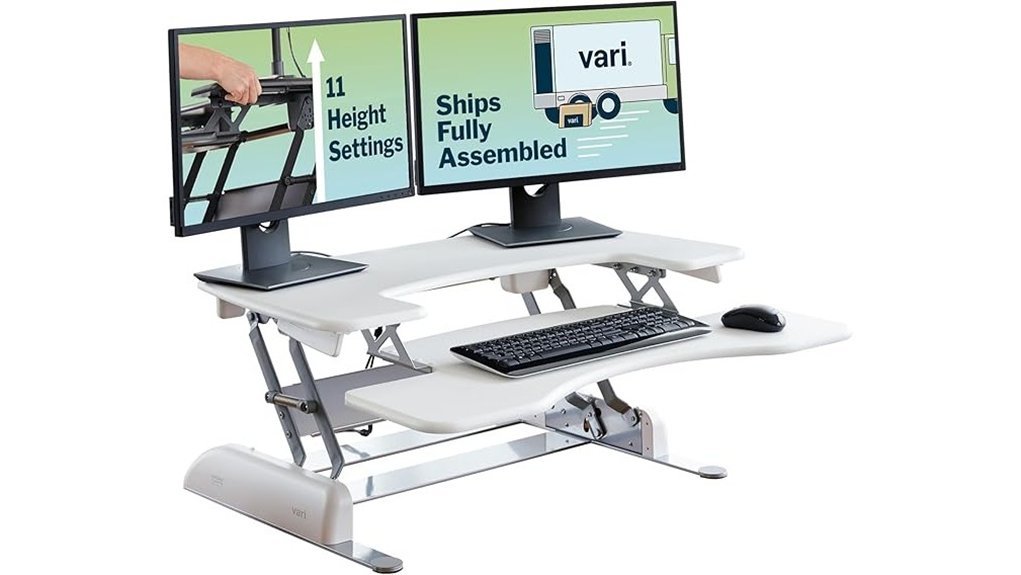
The VariDesk Pro Plus 36 is designed for users who want a wide standing desk converter with a dedicated keyboard tier and enough surface width for a dual-monitor workspace. The 36-inch model supports up to 35 lbs and offers 11 height settings from about 4.5 to 17.5 inches above the desk.
Its spring-assisted rowing lift helps move the converter between positions, while the weighted base and dual-handle design are intended to provide controlled adjustment. Unlike many desktop risers, the Pro Plus 36 arrives fully assembled, so setup mainly involves positioning it securely on a desk large enough to support its footprint and equipment load.
Best For: Dual-monitor users who want a wide manual converter that arrives ready to place on an existing desk.
Why You’ll Like It: The 36-inch work area and separate keyboard deck provide a straightforward two-tier workstation without requiring electrical power.
Pros:
- 36-inch width gives dual-monitor users useful workspace.
- 11 height settings make it easy to return to familiar positions.
- Spring-assisted manual lift requires no outlet or motor.
- Arrives fully assembled for fast setup.
Cons:
- The 17.5-inch maximum rise may not suit every tall user or desk-height combination.
- Its large footprint requires more desk depth and surface area than compact converters.
- The 35 lb load capacity requires careful equipment-weight planning with heavier monitors.
UPLIFT DESK E7 Electric Standing Desk Converter
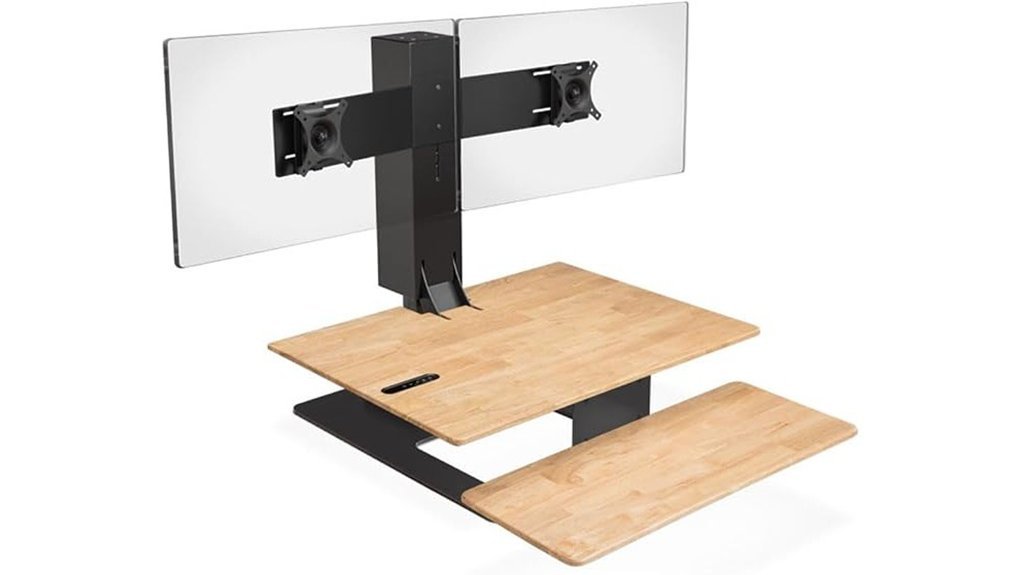
The UPLIFT DESK E7 Electric Standing Desk Converter is the most powerful and feature-rich option in this group. Instead of a manual spring mechanism, it uses an electric motor and an advanced memory keypad that can save preferred sitting and standing positions. Its vertical adjustment range is about 21 inches, and the converter is rated to lift up to 110 lbs.
The E7 also uses a tiered keyboard tray that can position the keyboard below the main work surface. A monitor-mount system is part of the design, and UPLIFT offers single-, dual-, and triple-monitor configurations. The Amazon ASIN linked here is listed as a two-monitor configuration, but buyers should still verify the included mount and finish on the current Amazon page before ordering. UPLIFT currently states that the E7 meets ANSI/BIFMA X5.5-2021 and lists a 15-year warranty.
Best For: Users who want powered adjustment, saved heights, and substantially more lifting capacity than typical manual desk converters.
Why You’ll Like It: One-touch powered movement reduces the effort involved in changing workstation height, especially when the work surface carries heavier equipment.
Pros:
- Electric lift provides push-button height adjustment.
- Memory keypad can save preferred sitting and standing heights.
- Up to 110 lb lifting capacity supports much heavier workstation loads than the other models here.
- 21-inch vertical adjustment range provides broad positioning flexibility.
- Manufacturer lists ANSI/BIFMA X5.5-2021 compliance and a 15-year warranty.
Cons:
- The converter is substantially heavier than simpler manual risers.
- Assembly is more involved than with a fully assembled converter.
- It requires access to electrical power.
- Monitor-mount configuration should be checked carefully because included hardware varies by package.
Humanscale QuickStand Eco Single-Monitor Standing Desk Converter, White
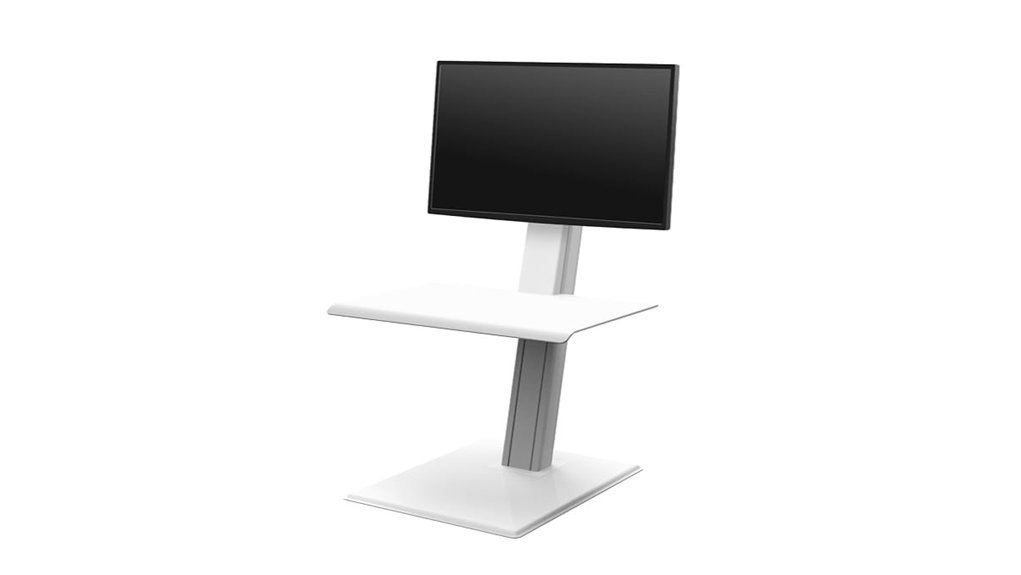
The Humanscale QuickStand Eco is more than a basic monitor riser: it is a sit-stand workstation designed to sit on an existing desk. The linked white version is configured for a single monitor and combines the monitor support with an adjustable work surface. Humanscale lists an 18.6-inch height adjustment range and a main-assembly capacity of up to 35 lbs.
Its compact design and built-in cable management can appeal to users who want a cleaner-looking workstation. The adjustment system uses a self-locking counterbalanced mechanism rather than a powered motor, allowing users to move between positions without a conventional crank or electric control panel. Buyers should confirm monitor dimensions, weight, desk depth, and the exact generation/configuration shown on Amazon before purchase.
Best For: Single-monitor users who prioritize a compact, integrated sit-stand workstation and cable management.
Why You’ll Like It: The monitor support, work surface, and height adjustment are integrated into one streamlined system.
Pros:
- 18.6-inch adjustment range supports substantial sit-to-stand movement.
- Integrated cable management helps reduce visible cord clutter.
- Self-locking manual mechanism avoids the need for electrical power.
- Compact visual design suits workspaces where appearance matters.
Cons:
- The linked configuration is intended for a single monitor, so multi-screen users need a different configuration.
- The 35 lb main-assembly capacity requires careful equipment planning.
- The integrated design offers less freedom to rearrange individual components than a simple flat-platform converter.
Factors to Consider When Choosing Standing Desk Converters for 2026
Choosing a standing desk converter involves more than comparing surface width. Height range, lift path, equipment weight, monitor configuration, keyboard position, desk dimensions, stability, assembly, and cable routing can all affect whether a converter works well in a particular workspace.
Adjustable Height Range
The correct adjustable height range depends on both your body dimensions and the height of the desk underneath the converter. Among the models reviewed here, adjustment ranges vary considerably. Measure where you need the keyboard and monitor to sit while seated and while standing. A large advertised range is useful only if the lowest and highest positions work with your existing desk.
For comfortable positioning, your keyboard should generally be at a height that lets you work without lifting your shoulders, while the monitor should be positioned so you are not repeatedly bending your neck to see the screen. Because desk height, footwear, monitor size, and keyboard thickness all affect the final position, measuring before buying is more reliable than choosing by user height alone.
Weight Capacity Considerations
Weight capacity is one of the most important specifications for a standing desk riser. The products in this article range from roughly 33 lbs of desktop capacity on the VIVO to 110 lbs of lifting capacity on the UPLIFT E7. Add the weight of monitors, monitor arms, laptops, docks, speakers, and other items that will move with the converter.
Also check whether the keyboard tray has a separate load limit. Exceeding the stated capacity can affect adjustment performance and stability. Leaving some margin below the maximum is sensible when your setup includes expensive monitors or frequently moved equipment.
Lift Path and Desk Depth
Not every converter moves in the same direction. Some models rise mostly straight upward, while others use a rowing or forward-moving lift path. A converter that moves toward you as it rises may require additional clear space behind and in front of the unit.
Measure your desk depth as well as its width. Make sure the converter’s entire base can sit securely on the desk without hanging over an edge, and consider how far the keyboard tray extends toward your chair.
Monitor Compatibility
Do not judge monitor compatibility only by the total weight rating. Some converters use a flat platform where you place a monitor stand, while others include or support dedicated VESA mounts. Check the number of screens, individual monitor weight, VESA pattern, monitor width, and whether an optional mount must be purchased separately.
For dual-monitor users, also consider how far the screens extend beyond the converter’s surface. Very wide screens can fit within the weight limit while still creating an awkward or unbalanced workstation.
Design and Aesthetics
Design affects both appearance and usability. A larger two-tier converter can provide more surface area, while a compact integrated workstation can preserve more of the surrounding desktop. Color, finish, visible support arms, and cable routing also influence how well the converter fits a home office or professional workspace.
Built-in cable management is especially useful on a moving work surface. Cables should have enough slack to reach the highest position without pulling on a monitor, laptop, dock, or power strip.
Ease of Assembly
Assembly requirements vary widely. The VariDesk Pro Plus 36 arrives fully assembled, while the VIVO requires minimal setup and the UPLIFT E7 involves more component assembly. Heavier converters can also require two people to position safely on a desk even when the product itself is straightforward to assemble.
Before setup, check that the underlying desk can safely support the converter’s own weight plus everything placed on it.
Stability and Durability
Stability becomes especially important at maximum standing height. A wide base, rigid frame, appropriate equipment placement, and staying within the load limit all help. Avoid placing heavy equipment close to an unsupported edge, and make sure the existing desk itself is stable before adding a converter.
Materials and lift mechanisms also affect long-term durability. Manual spring systems eliminate motors and electronics, while powered converters make frequent adjustment easier but add electrical components. Neither design is automatically better; the right choice depends on how often you expect to change positions and how much equipment the converter must lift.
Ergonomic Features Offered
A useful sit-stand desk converter should allow the keyboard, mouse, and monitor to reach workable positions in both sitting and standing modes. Tiered keyboard trays can help keep input devices lower than the monitor surface, while adjustable monitor mounts can make screen positioning easier.
Remember that standing all day is not the goal. A sit-stand setup is most useful when it makes it convenient to change posture periodically rather than forcing you into one position for the entire workday.
Warranty and Support
Warranty coverage can help distinguish otherwise similar products, particularly when a converter contains springs, bearings, motors, electronic controls, or monitor-mount components. Warranty periods differ substantially among manufacturers and may also vary by product generation, seller, or region.
Check the warranty on the exact model you are purchasing rather than assuming every product from a brand receives identical coverage. Also review the manufacturer’s return policy and replacement-parts support before purchasing a heavy converter that could be costly to ship back.
Space Efficiency Solutions
A standing desk converter can save the cost and floor space of replacing an entire desk, but it still occupies significant desktop area. Measure the converter’s base, work surface, keyboard tray, and movement path. Leave room for items that stay on the original desk, such as lamps, notebooks, speakers, or charging accessories.
If space is especially limited, prioritize a model with a straight-up lift, compact base, and integrated cable management. If workspace is more important than compactness, a wider two-tier design may be more comfortable.
Before You Buy: Quick Checklist
- Measure your existing desk’s width and depth.
- Estimate your required seated and standing keyboard heights.
- Add the weight of every item that will move with the converter.
- Check monitor count, VESA compatibility, and monitor-mount limits.
- Confirm whether the keyboard tray has a separate weight capacity.
- Check whether the lift moves straight up or outward toward you.
- Make sure monitor and power cables have enough slack at maximum height.
- Confirm assembly requirements and the converter’s own weight.
- Verify the exact Amazon configuration, included accessories, warranty, and return terms before ordering.
Frequently Asked Questions
How Do I Measure My Workspace for a Standing Desk Converter?
Measure your desk’s usable width and depth, then compare those measurements with the converter’s base and keyboard-tray dimensions. Also check overhead clearance, nearby walls, shelves, and the space needed for the converter’s lift path. Finally, measure the approximate keyboard and monitor heights you need while sitting and standing.
Are Standing Desk Converters Suitable for All Monitor Sizes?
No. Compatibility depends on the converter’s weight capacity, surface dimensions, monitor-mount design, VESA support, individual monitor weight, and maximum monitor width. Ultrawide and multi-monitor setups require especially careful checking.
Can I Use a Standing Desk Converter With a Laptop?
Yes. Most standing desk converters can hold a laptop as long as its weight and dimensions fit within the manufacturer’s limits. For extended use, an external keyboard, mouse, or raised laptop screen can make it easier to position the display and input devices independently.
What Is the Average Lifespan of a Standing Desk Converter?
There is no reliable universal lifespan for standing desk converters. Durability depends on construction quality, lift mechanism, equipment weight, adjustment frequency, environment, and maintenance. Warranty length and replacement-parts support are more useful comparison points than assuming a fixed number of years.
Do Standing Desk Converters Require Assembly or Installation?
It depends on the model. Some converters, such as the VariDesk Pro Plus 36, arrive fully assembled. Others require attaching a keyboard tray, work surface, monitor mount, base, or electronic components. Always check the product instructions and consider the unit’s weight before attempting setup alone.
Is a Manual or Electric Standing Desk Converter Better?
A manual converter is usually simpler and does not require power, while an electric converter can make frequent height changes easier and may provide greater lifting capacity. If you move between sitting and standing many times per day or use heavier equipment, powered adjustment can be convenient. If simplicity and portability matter more, a manual spring-assisted model may be the better fit.
Conclusion
The best standing desk converter for your 2026 workspace depends more on fit than on a single headline feature. The VIVO 32-inch offers a straightforward manual setup with a useful height range, while the VariDesk Pro Plus 36 gives dual-monitor users a wider, fully assembled platform. The UPLIFT E7 stands apart with electric adjustment, saved heights, and much higher lifting capacity, while the Humanscale QuickStand Eco provides an integrated single-monitor sit-stand workstation with a compact design.
Before choosing, measure your existing desk, total the weight of your equipment, check monitor compatibility, and compare the lowest and highest working positions. Those checks will do more to prevent buyer regret than choosing a converter based only on brand name or maximum height.