How often should you replace robot vacuum brushes? The answer depends on the brush type, how often your robot runs, and the amount of dirt it collects. Worn brushes can leave debris behind, miss corners, and put extra strain on moving parts. Knowing the right replacement schedule helps you maintain cleaning performance without buying parts too early.
Quick Answer
Replace robot vacuum main brushes every 6 to 12 months and side brushes every 3 to 6 months, depending on your model. Check them sooner if you have pets or run your vacuum daily. Replace brushes with damaged bristles, cracked rubber, or poor cleaning performance that does not improve after cleaning.
Key Takeaways
- Side brushes often wear first because their flexible arms repeatedly contact edges, furniture, and floor surfaces.
- Hair wrapped around brush ends can cause a jam even when the bristles look undamaged.
- Homes with shedding pets benefit from checking brushes twice weekly instead of relying only on replacement reminders.
- Reduced pickup does not always mean the brush is worn. A full bin, blocked filter, or clogged air path can cause similar problems.
- You usually need to replace only the worn brush, not the entire cleaning head module.
How Often to Replace Robot Vacuum Brushes
)
Most robot vacuum main brushes have a recommended replacement interval of 6 to 12 months. Side brushes generally need replacement every 3 to 6 months. These are maintenance guidelines rather than guaranteed lifespans.
For example, iRobot’s official main brush care guidance recommends cleaning the main brushes weekly and replacing them every 6 to 12 months, or sooner when necessary.
Side brushes usually have shorter service intervals. The official Roomba edge-sweeping brush guidance recommends replacement every 3 months or as needed. Other manufacturers and models may allow longer intervals.
Your actual replacement frequency depends on several conditions:
- Cleaning frequency: Daily vacuuming causes more wear than occasional use.
- Floor type: Carpets create friction, while hard floors expose brushes to grit and repeated contact.
- Pet hair: Long strands can wrap around rollers, end caps, and brush posts.
- Debris load: Sand, dust, and small particles can contribute to faster wear.
- Brush design: Bristle rollers, rubber rollers, and flexible side brushes wear differently.
Check your model’s maintenance guide before ordering replacement parts. A brush designed for another version of the same product family may not fit correctly.
Use the recommended interval as a reminder to inspect the brush, not as proof that every brush is worn out. Visible damage or poor performance after cleaning is a stronger reason to replace it.
Signs Your Robot Vacuum Brushes Need Replacing
Your robot vacuum brushes need replacement when their cleaning surfaces are damaged or their performance remains poor after maintenance. Look for frayed bristles, cracked rubber, missing brush arms, and repeated rotation problems.
Cleaning can remove a blockage, but it cannot restore bristles or rubber blades that have permanently worn down.
Visible Brush Damage
Remove the brush and examine its full length. Common signs include:
- Bent or frayed bristles: Bristles stay flattened or spread apart instead of returning to their normal shape.
- Missing bristles: Worn sections leave gaps that reduce contact with the floor.
- Cracked rubber fins: Rubber blades have splits, torn edges, or missing sections.
- Deformed side brushes: The flexible arms remain bent or no longer sweep debris toward the vacuum.
- Damaged fittings: A cracked hub or worn end cap prevents secure installation.
Hair and lint trapped in otherwise healthy bristles do not automatically mean the brush needs replacement. Remove the debris first and inspect the brush underneath.
Changes in Cleaning Performance
A worn brush may still rotate but collect less dirt. Watch for these changes during normal cleaning:
- More crumbs, hair, or dust remain after the robot passes.
- Debris collects along walls and in corners.
- The robot leaves narrow strips of dirt on carpets.
- Scraping, grinding, or clicking noises occur near the brush housing.
- The robot repeatedly reports a brush jam or stops its cleaning cycle.
These symptoms can also come from clogged filters, full dustbins, blocked suction openings, or debris beneath the brush caps.
Clean and inspect the brush before replacing it. If the problem continues and the brush is visibly damaged, replacement is usually the next practical step.
If a clean, undamaged brush still fails to rotate, the problem may involve the brush drive mechanism rather than the brush itself.
Which Brush Parts Wear Out First?
Side brushes often need replacement before main rolling brushes. Their flexible arms repeatedly bend as they sweep along walls, furniture, and corners. Main rollers handle more direct floor contact but usually have a longer recommended replacement interval.
Other maintenance parts also wear out, including filters and mop pads. Their lifespans depend heavily on the robot’s design.
The following table shows common replacement guidelines, including the official maintenance schedule for the Xiaomi Robot Vacuum X20+.
| Part | Typical life | Primary role |
|---|---|---|
| Rolling brush | 6–12 months | Main debris pickup |
| Side brushes | 3–6 months | Edge and corner cleaning |
| Filters | 2–6 months, depending on model | Fine dust capture |
| Mop pads | 3–6 months on some models | Hard-floor mopping |
These ranges are not interchangeable across all brands. For example, some Roomba filters have a two-month replacement recommendation, while the Xiaomi X20+ specifies 3 to 6 months for its filter and mop pads.
Check the condition of each part independently. A side brush may be worn while the main roller remains usable, or the roller may develop a damaged rubber fin before its expected replacement date.
Filters also require different cleaning methods. Some are washable, while others must stay dry. Follow the instructions for your specific filter before attempting to clean it.
What Pets Do to Brush Lifespan
Pet hair can shorten robot vacuum brush lifespan by causing tangles and increasing resistance during rotation. The effect is usually greater in homes with heavy shedding, long-haired pets, or frequent cleaning cycles.
However, having pets does not automatically mean every brush must be replaced after three months. The amount of hair collected and the condition of the brush matter more than a fixed calendar date.
Why Pet Hair Causes Faster Wear
Long strands can wrap around the main brush and collect beneath its end caps. As the buildup increases, the roller may become harder to turn.
This creates several problems:
- Restricted rotation reduces the brush’s ability to lift debris.
- Hair around the end caps increases friction and may strain moving parts.
- Repeated tangling can lead to brush stalls and cleaning interruptions.
- Pet dander and fine dust can clog filters, reducing airflow.
A brush with intact bristles may work normally again after you remove the trapped hair. Replace it if the rubber, bristles, hub, or other replaceable components show lasting damage.
Maintenance Schedule for Homes With Pets
If your pets shed heavily, inspect the brushes more often than you would in a low-debris household.
- Check the brushes twice weekly for wrapped hair and trapped fibers.
- Clear hair from the roller ends and side-brush posts before it becomes tightly packed.
- Inspect bristles, rubber fins, and attachments for wear during cleaning.
- Monitor filters for accumulated pet dander and reduced airflow.
- Replace worn brushes when cleaning no longer restores normal operation.
Regular pet grooming can reduce loose hair on your floors. Removing string, cords, and small toys before cleaning also helps prevent tangles and damage.
If you have two heavily shedding dogs, for example, your side brushes may require attention near the shorter end of the recommended replacement range. The actual timing still depends on their condition.
How to Clean Robot Vacuum Brushes So They Last Longer
Cleaning robot vacuum brushes regularly helps prevent tangles, poor debris pickup, and unnecessary wear. A weekly inspection is a useful starting point, with more frequent attention when hair and dust build up quickly.
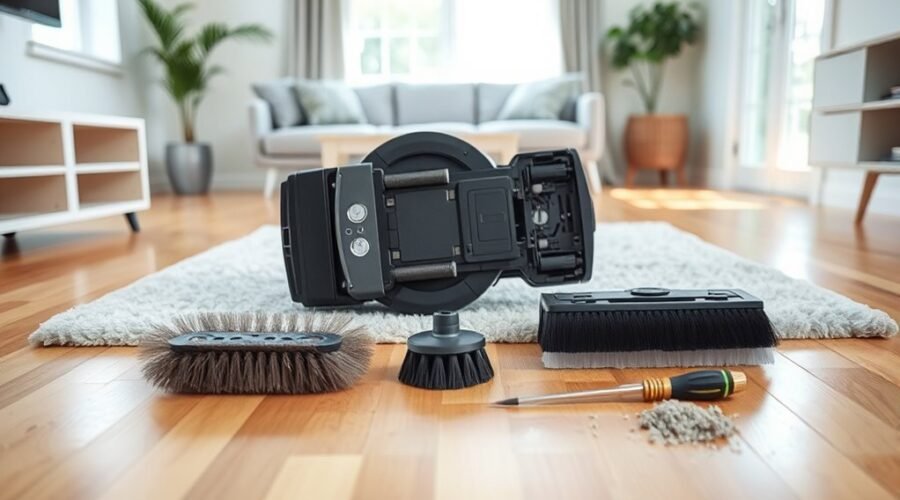
You need a soft cloth, the vacuum’s cleaning tool, and a small screwdriver if your side brush uses a screw. Small scissors may help with tightly wrapped hair.
Warning: Turn off the robot before removing any brush. Do not force brush covers, cut into rubber fins, or soak brushes and bearing assemblies unless the manufacturer specifically permits washing. Never reinstall damp components.
Step-by-Step Brush Cleaning
- Turn off the robot. Remove it from the charging dock and place it upside down on a clean, stable surface.
- Remove the main brush. Release the brush-cover clips and lift out the roller using the method specified for your model.
- Cut away wrapped hair. Use the supplied cleaning tool or carefully slide scissors beneath tangled strands without touching the rubber or bristles.
- Clean the end caps. Remove detachable caps if your model allows it, then clear trapped hair and dust from the ends and bearing areas.
- Remove the side brush. Unscrew or unclip it according to its design. Clear debris from the brush hub and mounting post.
- Inspect the cleaning surfaces. Look for damaged bristles, cracked rubber fins, loose fittings, and worn end caps.
- Reinstall the brushes. Return each part to its correct position, secure the cover, and make sure the side brush is firmly attached.
- Test the robot. Start a short cleaning cycle and check for normal rotation, unusual noises, and improved debris pickup.
The ECOVACS brush-cleaning instructions also recommend clearing the end caps and bearings while avoiding harsh chemicals and unnecessary soaking.
How to Tell Whether Cleaning Worked
After cleaning, the brushes should turn without obvious binding. Some resistance from the drive mechanism is normal, so do not force them to spin.
Run the robot over an area containing ordinary household dust or crumbs. Check whether it collects debris consistently and whether previously reported brush errors return.
If the robot still leaves debris behind, examine the dustbin, filter, and suction opening before assuming that the main brush needs replacement.
If the brush continues to jam, the Tapo main brush troubleshooting procedure recommends checking for foreign objects, cleaning the brush connections, and reinstalling the brush correctly.
Keep a simple cleaning log if you have frequent tangling or recurring brush errors. Recording maintenance and replacement dates can help you identify unusual wear over time.
Should You Replace the Brush Module?
You usually do not need to replace the entire brush module when a robot vacuum brush wears out. The main roller and side brush are often separate replacement parts.
A complete module replacement becomes relevant when the housing, drive mechanism, or another internal component is damaged or fails after normal cleaning and troubleshooting.
It helps to understand the difference between a worn brush and a failing module before buying replacement parts.
Module Wear Signs
A robot vacuum brush module contains the components that hold or drive the brush. Damage to these components can prevent normal rotation even when the brush itself is clean and undamaged.
Look for these warning signs:
- Persistent rotation failure: A clean brush repeatedly stalls or refuses to turn during operation.
- Unusual mechanical noise: Grinding or clicking continues after removing trapped debris.
- Damaged housing: The brush cover, mounting points, or internal fittings are cracked or broken.
- Loose brush mounting: A correctly matched replacement brush cannot remain securely attached.
- Repeated brush errors: The robot continues reporting faults after cleaning and correct reinstallation.
These symptoms call for closer inspection, but they do not prove that the whole module has failed. A damaged brush cover, removable bearing, or loose attachment may be the actual cause.
Some robots have replaceable brush motors or modules, while others require professional repair. The repair options depend on the exact model.
Replace or Repair
Cleaning or replacing an individual brush is usually the simplest solution when the problem involves hair buildup or worn bristles. Replace a larger assembly only when the fault has been traced to that component.
Use this comparison to decide what to do next.
| Check | Repair or Clean | Replace |
|---|---|---|
| Wear | Debris buildup or minor removable obstruction | Cracked, broken, or permanently worn components |
| Rotation | Improves after cleaning | Remains faulty after troubleshooting |
| Cost | Cleaning supplies or minor parts | Replacement component and possible labor |
| Result | Restores movement when debris caused the fault | Addresses a confirmed damaged component |
| Interval | Regular maintenance | When necessary, not automatically every 6–12 months |
The official Roomba cleaning head module instructions distinguish routine brush cleaning from replacing the cleaning head assembly.
That distinction matters because the brush and its motor assembly do not necessarily share the same service life.
For example, replacing a worn rubber roller may restore normal cleaning without changing the motor. A failed motor or damaged drive assembly requires a different repair.
Some newer Roomba configurations also have non-modular side-brush assemblies, which means a module cannot always be replaced separately by the owner.
Before purchasing a brush module, confirm the exact model and part number. If the robot is under warranty or the repair requires opening internal electrical components, contact the manufacturer or an authorized service provider.
Do not replace the complete robot vacuum solely because its brushes are worn. Routine brush replacement is part of normal maintenance.
Frequently Asked Questions
What Is the Average Lifespan of a Robot Vacuum?
A robot vacuum often lasts several years. ECOVACS estimates a typical lifespan of about 4 to 6 years. Build quality, battery condition, usage, and maintenance affect how long it works. Replacing brushes and filters regularly can help maintain performance without replacing the entire machine.
How Do You Tell if Brushes Need Replacing?
Robot vacuum brushes need replacing when bristles are missing, permanently bent, or frayed, or when rubber fins become cracked or torn. Poor debris pickup and repeated brush jams are additional warning signs. Clean the brushes first because trapped hair can cause similar symptoms without permanent damage.
What Are the Downsides of Using a Robotic Vacuum Cleaner?
Robot vacuum cleaners may struggle with thick carpets, cluttered rooms, stairs, and difficult corners. They also require regular brush and filter maintenance. Battery limitations, operating noise, and replacement-part costs are other drawbacks. Most models work best as a supplement to occasional deep cleaning rather than a complete replacement for a traditional vacuum.
Why Do My Roomba Brushes Keep Breaking Off?
Roomba brushes may break or come loose because of tangled hair, impacts, damaged mounting posts, worn fittings, or incorrectly installed replacement parts. Check the brush hub, retaining screw or clip, and compatibility with your exact model. If a correctly installed brush repeatedly detaches, contact iRobot support to inspect the mounting mechanism.
Conclusion
Robot vacuum main brushes generally need replacement every 6 to 12 months, while side brushes commonly last 3 to 6 months. Pets, frequent cleaning, and heavy debris can shorten those intervals.
Inspect the brushes regularly, remove trapped hair, and replace parts showing permanent damage. If cleaning does not restore normal movement or debris pickup, check for a mechanical fault before buying an entire brush module.
The simplest way to avoid unnecessary replacements is to follow your model’s maintenance schedule and judge each brush by its actual condition.
Sources
- iRobot: Main Brush Care, All Roomba Models: Main brush cleaning and 6–12-month replacement guidance.
- iRobot: Edge Sweeping Brush Care: Side-brush maintenance, replacement, and module repair considerations.
- Xiaomi: Robot Vacuum X20+ Maintenance: Manufacturer-specific replacement intervals for brushes, filters, and mop pads.
- ECOVACS: How to Clean a Vacuum Brush: Safe brush cleaning, maintenance frequency, and common mistakes.
- Tapo: Main Brush Jam Troubleshooting: Removing obstructions and checking brush connections.
- iRobot: Cleaning Head Module Care: Distinguishing brush maintenance from module replacement.
- ECOVACS: How Long Do Robot Vacuums Last?: Robot vacuum lifespan estimates and maintenance factors.