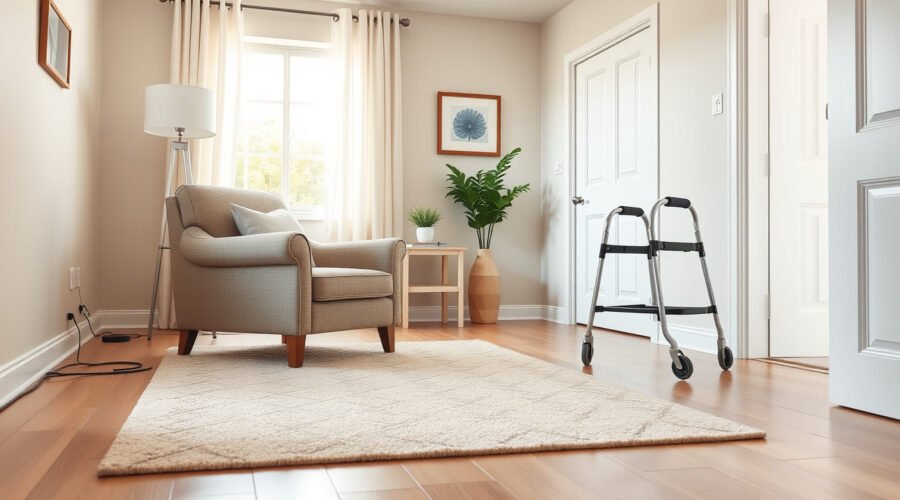
Creating a living room for aging in place means making the room easier to move through, easier to see in, and easier to use every day. Start with the basics: clear walking paths, stable flooring, supportive seating, reachable controls, and lighting that removes shadows without adding glare. Then add smart technology and transfer supports only where they truly improve safety and independence.
Quick Answer
To create a living room for aging in place, keep main pathways about 36 inches wide where possible, provide a 60-inch turning area for wheelchairs or walkers, improve lighting, remove trip hazards, choose firm seating with arms, and install rated supports only where wall structure can safely hold them.
Key Takeaways
- Use ADA accessibility dimensions as helpful planning targets, not as a one-size-fits-all rule for every private home.
- Remove throw rugs, loose cords, clutter, unstable tables, and sharp furniture edges before spending money on larger upgrades.
- Choose firm, supportive seating with arms so standing, sitting, and transfers require less effort.
- Add motion lights, reachable lamps, voice controls, and emergency-call options only after the room is physically safe to navigate.
- Have grab bars, transfer poles, electrical work, and wall-mounted supports installed or reviewed by qualified professionals.
At a Glance
| Time Required | 1–3 hours for a basic audit and decluttering; 1–3 days for lighting, furniture, and professional support upgrades |
| Difficulty | Easy to moderate; professional help recommended for electrical work, wall reinforcement, and mounted supports |
| Tools Needed | Tape measure, painter’s tape, notepad, cord covers, non-slip rug backing, brighter bulbs, nightlights, and furniture sliders |
| Cost | $0–$100 for decluttering and small safety fixes; $100–$800+ for lighting, seating, smart devices, and professionally installed supports |
The CDC reports that more than one out of four adults age 65 and older falls each year, and home hazards such as throw rugs, clutter, and uneven steps can increase fall risk.
Assess Your Living Room for Mobility and Safety
Before buying new furniture or smart devices, walk through the room the way it is used every day. Start at the main entrance, move to the favorite chair or sofa, continue to side tables, windows, remotes, outlets, and the route to the bathroom or bedroom. Notice where someone has to turn sideways, reach too far, step over a cord, or push off an unstable table.
For a safer layout, aim for these accessibility targets where the room allows:
- 36-inch main pathways: Keep the main route through the room about 36 inches wide when possible. This matches the ADA accessible-route clear-width target and gives walkers, canes, and caregivers more room.
- 60-inch turning area: Leave a 5-foot by 5-foot open space near the main seating area if someone uses a wheelchair, rollator, or walker.
- Reachable controls: Place lamps, remotes, phones, thermostats, and smart speakers where they can be used without bending, twisting, or standing on tiptoe.
- Stable contact points: Make sure chairs, arms, tables, and supports do not slide when someone uses them for balance.
Note: ADA dimensions are useful planning references, but private homes may not be legally required to meet every ADA rule. Use the numbers as practical targets and adjust them to the person’s height, mobility aid, strength, vision, and home layout.
Organize the Room for Clear Pathways
A well-organized living room can reduce everyday fall hazards and make the space easier to enjoy. The CDC home fall-prevention checklist recommends moving furniture so the walking path is clear, removing or securing throw rugs, picking up objects from the floor, and taping or coiling cords next to the wall.
Use this room-by-room pass to clean up the layout:
- Clear the main walking path. Move ottomans, plant stands, low stools, magazine baskets, and decorative tables out of the main route.
- Secure every rug. Remove loose throw rugs first. If a rug must stay, use a low-pile rug with a non-slip backing and edges that do not curl.
- Route cords along walls. Keep lamp, phone, internet, and extension cords out of walking paths. Use cord covers or have an electrician add outlets where needed.
- Create a landing spot. Put a sturdy table near the favorite chair for glasses, phone, water, medications, and remotes so the person does not rush across the room.
- Leave space for help. Make sure a caregiver can stand beside the main chair or sofa without moving furniture every time.
Enhance Lighting for Visibility and Safety
Good lighting helps older adults see changes in flooring, furniture edges, pets, cords, and thresholds. The CDC fall-prevention guidance recommends improving home lighting because older adults need brighter light to see well, while also reducing glare with lightweight curtains or shades.
Use Layered Lighting
One ceiling light is rarely enough. Build the room in layers:
- Ambient lighting: Use ceiling fixtures or floor lamps to brighten the whole room evenly.
- Task lighting: Put a lamp beside reading chairs, hobby tables, and game areas.
- Path lighting: Add plug-in nightlights or motion-sensor lights along the route to the hallway, bathroom, or bedroom.
- Glare control: Avoid shiny floors, exposed bulbs, and lamps pointed directly into the eyes.
Place light switches and controls where they are easy to reach from both standing and seated positions. Rocker switches, touch lamps, smart plugs, and voice-controlled lights can help people who have arthritis, limited grip strength, or trouble finding a small switch in the dark.
Add Smart Lighting Where It Solves a Real Problem
Smart lighting can make the living room easier to use, especially at night. Motion sensors can turn on lights when someone enters the room. Voice assistants can control lamps without walking across the room. Timers can turn on lights before sunset so the room is never dark when someone gets up.
Pro Tip: Test smart lights for one week before relying on them. Make sure the person can still turn lights on manually if Wi-Fi fails, the power flickers, or the voice assistant does not understand a command.
Select Comfortable and Accessible Furniture
The best living-room furniture for aging in place is comfortable, firm, and easy to get in and out of. Very soft sofas may feel cozy, but they can make standing harder because the body sinks too low. Choose seating that supports the hips, back, and arms.
Look for these features:
- Firm cushions: Cushions should compress slightly but not collapse. A firm seat helps with sit-to-stand movement.
- Sturdy arms: Chair arms give both hands a safe place to push from when standing.
- Appropriate seat height: The user’s feet should rest flat on the floor, with knees close to a 90-degree angle.
- Stable base: Avoid lightweight chairs that slide backward or swivel unexpectedly.
- Easy-clean fabric: Smooth, durable upholstery is easier to maintain and less likely to catch on clothing or mobility aids.
Power lift chairs can help some people stand with less strain, but they should not replace strength, balance, or medical guidance. If getting up from a chair is becoming difficult, ask a health care provider, physical therapist, or occupational therapist about safe transfer techniques and exercises.
Add Grab Bars and Transfer Supports Carefully
Grab bars and transfer supports can help in specific spots, but they must be chosen and installed correctly. In a living room, support may come from a wall-mounted grab bar, floor-to-ceiling transfer pole, sturdy chair arms, or a properly placed rail near a step or threshold.
For wall-mounted grab bars, use rated products rather than towel bars or decorative hardware. ADA grab-bar guidance places horizontal grab bars 33 to 36 inches above the floor in covered settings and requires structural strength for a 250-pound force. In a home, that means the bar must be fastened into studs, blocking, masonry, or another approved support—not just drywall.
Warning: Do not install grab bars, transfer poles, or wall-mounted rails into drywall alone. Poor installation can fail during a transfer. Hire a qualified contractor, handyman with accessibility experience, or occupational therapist-recommended installer when structural support is uncertain.
Recommended Products

Prevent Falls: The Floor-to-Ceiling Grab Bar provides safety and stability when standing and sitting, stepping over a bathtub edge or getting into bed; the transfer pole is perfect for seniors, elderly adults or anyone needing standing assistance at home

Rotating Grab Bar: The rotating assist handle swivels 360 degrees and locks into place every 45 degrees for versatile use from multiple angles; replace bulky toilet rails and mounted grab bars with the slim multi-purpose pole; supports 300 pounds

Fall Prevention Safe Support:Marudina floor-to-ceiling transfer pole supports up to 300 lbs with dual anti-slip rubber bases. This sturdy grab bar offers stable assistance for seniors to sit, stand and move, greatly lowering fall risks beside toilet, shower and kitchen for those with limited mobility
Best Places for Support
- Near the favorite chair: Add support only if it helps standing without blocking the pathway.
- At a step-down living room: Use handrails or a ramp solution if there is a sunken living room or threshold change.
- Near the room entrance: Support can help with balance when turning into the room.
- Beside a media cabinet or window seat: Add support only if the person regularly uses that area and the wall can be reinforced.
Design Options That Still Look Like Home
Safety features do not have to make the living room feel clinical. Many grab bars and support rails come in brushed nickel, matte black, bronze, white, and wood-look finishes. Choose a finish that blends with door hardware, lamps, or curtain rods. More important than finish, though, is the rating, grip surface, placement, and installation method.
Choose Safer Flooring, Rugs, and Thresholds
Flooring should be stable, smooth, and slip-resistant. Avoid thick area rugs, loose mats, high thresholds, and furniture arrangements that force people to step sideways. If the room has carpet, make sure it is firmly attached and not rippled. If the room has hard flooring, use non-slip backing under any rug that remains.
Pay special attention to transitions between rooms. A small raised threshold can catch a cane, walker wheel, slipper, or toe. If someone uses a wheelchair or rollator, consider a low-profile threshold ramp installed according to the product instructions.
Recommended Products

MAKING LIFE EASIER - The rubber threshold ramp provides an easy and smooth transition, allowing those in need to get up and down the threshold safely and efficiently. Furthermore the integrated design of the threshold ramp 1.5 inch rise requires no assembly at all and can be easily cleaned.

【Free Cutting】The ramps has 35.4" width which can be cut freely and flexibly to suit the threshold width of your different venues, and the remaining part can also be used as a door stop to protect your threshold from damage; the gentle angle allows the sweeping robot to easily climb slopes.

【Eco-Friendly Natural Material】Crafted from premium natural rubber, this ramp offers exceptional heat resistance, durability, and shape stability. It emits a mild, non-toxic rubber odor—simply place it in a well-ventilated area or outdoors briefly before use for a worry-free experience.
Use Smart Technology for Safety and Convenience
Smart technology works best when it supports simple daily routines. It should not make the living room harder to use. Start with practical tools:
- Voice-controlled lighting: Helpful when switches are across the room or grip strength is limited.
- Motion-sensor path lights: Useful for evening trips through the living room.
- Video doorbell or smart lock: Helps residents see visitors before getting up or rushing to the door.
- Medical alert device or fall-detection wearable: Adds a backup plan for people who live alone or have a fall history.
- Smart plugs: Let lamps and small devices turn off automatically on a schedule.
Keep privacy and usability in mind. Choose devices with clear controls, strong passwords, update support, and a backup manual option. Make sure family members or caregivers know how the system works, but do not add cameras or monitoring devices without the older adult’s informed consent.
Recommended Products

【400 Lumens Motion-Activated Security Pathway lights】ELECLINK solar pathway lights outdoor feature a sleek snake-like design with 3000K warm light and 26 bright LEDs. Motion sensing pathway light delivering up to 400 lumens of motion-activated brightness, these solar lights outdoor provide brighter illumination than ordinary solar pathway lights. The wide light coverage improves visibility for walkways, driveways, gardens, lawns, patios, and yards, creating a safer and more inviting outdoor environment

Solar Powered & Energy Saving: Solar spot lights use solar energy to charge, which can automatically sense light, automatically turn on at night, and automatically charge during the day, saving electricity and reducing energy consumption. No wires are required, which not only saves energy, but also saves you a lot of money on your electricity bill

2026 Upgraded Motion Sensor Solar Lights Outdoor Pathway: Equipped with a human motion sensor, it features a 16.5-foot detection distance and 150° wide sensing angle. The light turns on instantly once human movement is detected in dark and low-light environments, and automatically shuts off after about 30s of no motion. When fully charged, it delivers 12 hours of continuous lighting, ensuring you always have bright and reliable outdoor illumination after dark.
Make an Emergency and Maintenance Plan
A safe living room needs regular upkeep. Review the room every three to six months, and sooner after a fall, surgery, new diagnosis, medication change, or new mobility aid.
- Keep a charged phone, medical alert button, or voice assistant within reach of the main seat.
- Post emergency contacts where they are easy to find.
- Check that bulbs, nightlights, batteries, and smart sensors still work.
- Look for new clutter, loose rug edges, sliding furniture, and cords that have moved back into walkways.
- Re-test the path with the actual walker, cane, wheelchair, or rollator used in the home.
If falls, near-falls, dizziness, confusion, or difficulty standing are happening, treat the living-room update as one part of a larger safety plan. Talk with a health care provider about medications, vision, footwear, balance, strength, and whether a home safety assessment is needed.
Frequently Asked Questions
How do you design a living room for aging in place?
Design the room around safe movement first. Clear the main path, improve lighting, remove trip hazards, choose firm seating with arms, keep important items within reach, and add supports only where they can be installed securely. Use universal design principles so the room works for older adults, visitors, caregivers, and anyone using a mobility aid.
What are the 5 pillars of aging in place?
A practical way to think about the five pillars is safety, accessibility, comfort, connection, and support. In the living room, that means fewer fall hazards, wider pathways, supportive seating, good lighting, easy communication, and access to help when needed.
How wide should living-room pathways be for aging in place?
Aim for about 36 inches on main pathways where possible. If someone uses a wheelchair, rollator, or walker, also try to provide a 60-inch turning area near the main seating zone or at key turning points. Smaller homes may need creative furniture placement to get as close to these targets as possible.
Should I put grab bars in a living room?
Only put grab bars in a living room where they solve a specific transfer or balance problem and can be mounted into proper structure. For many living rooms, sturdy chair arms, better furniture placement, a transfer pole, or a handrail near a step may work better than a wall-mounted bar.
How often should I reassess the room?
Reassess the living room every three to six months, and immediately after a fall, near-fall, surgery, hospital stay, vision change, new medication, or new mobility aid. Aging-in-place design should change as the person’s needs change.
Conclusion
A safer living room for aging in place starts with simple, practical changes: clear the walking path, improve lighting, remove rugs and cords, choose supportive seating, and keep daily-use items within easy reach. After those basics are in place, add smart lighting, emergency-call tools, and professionally installed supports where they fit the person’s real routine. With thoughtful planning and regular reassessment, the living room can stay comfortable, welcoming, and easier to use for years to come.
Sources
- CDC: Facts About Falls — current fall statistics and fall-risk context for adults age 65 and older
- CDC STEADI: Check for Safety — home fall-prevention checklist covering rugs, clutter, cords, lighting, and grab bars
- CDC STEADI: What You Can Do to Prevent Falls — fall-prevention steps including home safety, lighting, footwear, and balance
- ADA.gov: 2010 ADA Standards for Accessible Design — accessibility measurements for clear routes, turning space, reach ranges, operable parts, and grab-bar strength