Disclosure: As an Amazon Associate, we earn from qualifying purchases. If you click a link on this page and make a purchase, we may receive a small commission at no extra cost to you.
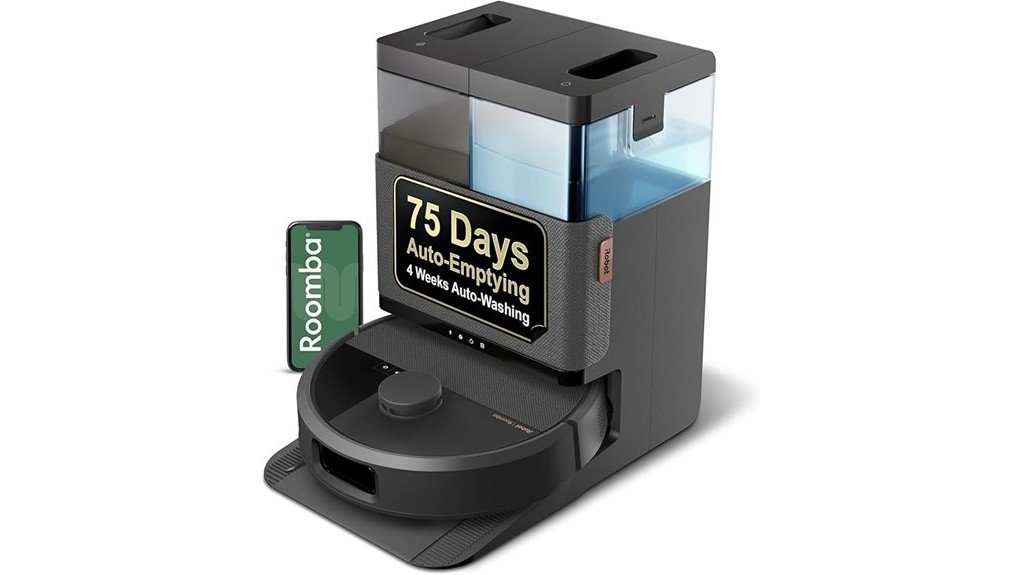
Robot vacuums can save you time, but the biggest question is how much work they truly remove from your routine. The iRobot Roomba Plus 505 Combo Robot + AutoWash Dock combines vacuuming, spinning mop pads, LiDAR mapping, AI obstacle recognition, and an automated dock in one system. Its biggest strengths are detailed hard-floor cleaning, edge mopping, and reduced day-to-day bin and mop-pad handling. You still need to maintain the water tanks, brushes, filter, and dock, so it is best viewed as a highly automated floor-cleaning system rather than a completely maintenance-free appliance.
Quick Verdict
Rating: Recommended with caveats
Best For: Busy homes with mixed hard floors and carpets, pets, frequent crumbs, and buyers who want automated vacuuming plus serious mopping.
Bottom Line: The Roomba Plus 505 combines strong automated vacuuming with spinning mop pads, obstacle recognition, edge cleaning, and a dock that handles much of the dirty work. The tradeoff is that you still need routine tank, filter, brush, and dock maintenance, and the advanced feature set may be more than a small or lightly used home needs.
| Specification | Detail |
|---|---|
| Brand | iRobot |
| Model | Roomba Plus 505 Combo |
| Item model | N185020, black variant |
| Product type | Robot vacuum and mop with AutoWash Dock |
| Robot dimensions | 14.1 × 13.8 × 4.2 inches |
| Robot weight | 9.44 lb |
| Battery type | Lithium-ion |
| Navigation | ClearView Pro LiDAR + PrecisionVision AI |
| Mopping | DualClean spinning mop pads, 200 RPM, SmartScrub, PerfectEdge extension |
| Cleaning modes | Vacuum, mop, vacuum + mop, or vacuum first then mop |
| Suction settings | 4 selectable levels in the Roomba Home app |
| Mapping | Supports up to 5 home maps |
| Smart control | Roomba Home app, Alexa, Siri, Google Assistant, and Matter-enabled Apple Home support |
| AutoWash Dock | Auto-empties debris, refreshes and washes mop pads, heat-dries pads, and runs self-cleaning cycles |
| Auto-empty claim | Up to 75 days |
| Included | Robot, AutoWash Dock, extra AutoEmpty bag, extra set of Dual Spinning Mop Pads, and line cord |
What Is the iRobot Roomba Plus 505 Combo?
The Roomba Plus 505 Combo is iRobot’s robot vacuum-and-mop system built around the AutoWash Dock. The robot handles dry debris with a multi-surface rubber brush, edge-sweeping brush, and suction system, while two spinning DualClean mop pads handle wet floor cleaning.
It also combines ClearView Pro LiDAR with PrecisionVision AI. LiDAR creates the room map and guides systematic navigation, while the vision system is designed to recognize common floor obstacles such as cords, socks, shoes, and pet waste. This makes the 505 particularly relevant for homes where floors are not perfectly clear before every cleaning cycle.
Key Takeaways
- Dual-purpose cleaning: You can vacuum, mop, vacuum and mop together, or vacuum first and then mop.
- Better edge coverage: PerfectEdge extends a mop pad closer to walls and corners, increasing floor-mopping coverage by 18% compared with the unextended pad.
- Detailed navigation: ClearView Pro LiDAR builds maps, while PrecisionVision AI helps the robot recognize and avoid everyday objects.
- Automated dock care: The AutoWash Dock can empty debris, refresh mop pads during cleaning, wash them afterward, heat-dry them, and run a self-cleaning cycle.
- Flexible app controls: You can select rooms and zones, choose from four suction levels, repeat passes, and add extra SmartScrub action where needed.
- Reduced manual emptying: iRobot rates the dock for up to 75 days of auto-emptying, although actual servicing frequency depends on your home and cleaning load.
Who Should Buy It?
Best For
- Homes that need both regular vacuuming and hard-floor mopping.
- Pet or family households where crumbs, hair, footprints, and small floor obstacles appear often.
- Buyers who want the dock to handle debris emptying and most mop-pad washing and drying.
Skip If
- You only need basic vacuuming and would rarely use the mopping or AutoWash features.
- You want a robot that requires virtually no tank, brush, filter, or dock maintenance.
- You prefer a newer compact Roomba platform and are willing to compare newer Plus-series alternatives.
Before You Buy: The 75-day figure refers to auto-emptying, not 75 days without maintenance. You still need to inspect and clean the water tanks, brushes, charging contacts, robot bin, filter, and dock as required.
Vacuuming and Mopping Performance
The Roomba Plus 505 combines a multi-surface rubber brush, an edge-sweeping brush, and suction designed for debris ranging from crumbs to pet hair. iRobot describes its suction as 70 times stronger than the Roomba 600 series, which is the correct comparison baseline for that claim.
Its biggest advantage over a vacuum-only robot is the mopping system. The two DualClean mop pads spin at 200 RPM, and SmartScrub can move the robot back and forth with additional downward action over stubborn messes. That makes the system better suited to kitchens, dining areas, entryways, and other hard floors that collect both dry debris and dried marks.
The robot can also lift its mop pads when it detects carpet. You can choose vacuum-only, mop-only, simultaneous vacuum-and-mop cleaning, or vacuum first followed by mopping. That flexibility matters in homes where carpeted rooms connect directly to tile, vinyl, or other hard surfaces.
DualClean Mop Pads and PerfectEdge
The DualClean Mop Pads with PerfectEdge are one of the strongest reasons to choose the 505 over a simpler Roomba. One mop pad can extend outward as the robot works along edges, improving coverage near walls and corners where a round robot body normally leaves a gap.
iRobot specifies an 18% increase in floor-mopping coverage when the extending pad is used compared with the unextended DualClean pad. That figure describes coverage, not a blanket 18% improvement in cleaning efficiency.
SmartScrub adds another layer of cleaning by making repeated scrubbing movements over tougher marks. You should still expect some deeply dried or sticky messes to require manual attention, but the spinning-pad design offers more active floor contact than a simple passive mop cloth.
Pro Tip: Use room or zone cleaning for kitchens and entryways instead of sending the robot through the entire home every time. You can add repeat passes or SmartScrub only where the extra cleaning is useful.
ClearView Pro LiDAR and PrecisionVision AI
ClearView Pro LiDAR scans the home to build a structured map that the robot can use during daytime or nighttime cleaning. iRobot says the system can create up to five maps and automatically name rooms in the Roomba Home app.
PrecisionVision AI complements the map by recognizing objects in the robot’s path. The manufacturer specifically lists cords, socks, shoes, and pet waste among the obstacles it can identify and navigate around.
Specialized sensors also help prevent the robot from falling down stairs. That is useful for multi-level homes, although each floor still needs an appropriate map and the robot must be physically moved between levels when there is no dock on that floor.
AutoWash Dock: What It Actually Automates
The AutoWash Dock is responsible for much of the 505’s convenience. After cleaning, it can auto-empty collected debris, wash the mop pads, heat-dry the pads, and run a self-cleaning dock cycle. During longer mopping jobs, it can also refresh the pads as needed.
iRobot rates the system for up to 75 days of auto-emptying. It also advertises approximately four weeks of mopping and pad washing based on one mopping run per week. These are usage-based estimates rather than guarantees for every household.
The dock does not remove all maintenance. iRobot recommends wiping the robot bin, rinsing the dock’s water tanks, cleaning brushes and charging contacts, and replacing the filter periodically, with the manufacturer suggesting a filter interval of roughly three to six months.
Roomba Home App and Smart Controls
The Roomba Home app gives you more control than a simple start-and-stop schedule. You can select specific rooms or zones, choose among four suction levels, request repeat cleaning passes in high-traffic areas, and turn on stronger SmartScrub action for difficult floor messes.
| Feature | How It Helps |
|---|---|
| Room and Zone Cleaning | Send the robot only to the rooms or areas that need attention. |
| 4 Suction Levels | Adjust vacuuming intensity to match the cleaning job. |
| Repeat Passes | Give high-traffic areas additional cleaning. |
| SmartScrub | Adds more active scrubbing for tougher hard-floor messes. |
Voice control is available through compatible Alexa, Siri, and Google Assistant devices. The 505 is also Matter-enabled for Apple Home integration when your Apple devices meet the required software and home-control requirements.
How It Performs in Real Use
For Kitchens and Dining Areas
This is where the vacuum-and-mop combination makes the most sense. The robot can collect crumbs first, then use its spinning mop pads and SmartScrub on hard-floor marks. PerfectEdge also helps it reach closer to baseboards and cabinet edges.
For Homes With Carpets and Hard Floors
The four cleaning modes let you decide how aggressively you want to combine vacuuming and mopping. Automatic mop lifting helps the robot transition to carpet without dragging wet pads directly across the carpet during appropriate mixed-floor modes.
For Pet and Family Clutter
PrecisionVision AI is designed to recognize objects including cords, socks, shoes, and pet waste. That reduces the need for a perfectly empty floor, although clearing fragile, sharp, or valuable objects before an automated run is still sensible.
For Multi-Level Homes
The mapping system supports up to five maps, making the 505 suitable for homes with more than one floor plan. The stair-detection sensors help protect against drops, but you will still need to carry the robot between floors when required.
Setup Tips and Common Mistakes to Avoid
iRobot recommends placing the AutoWash Dock on a hard-surface floor with enough open space for the robot to enter and exit. The manufacturer specifically advises keeping the dock at least four feet from stairs.
After positioning the dock, use the Roomba Home app to complete setup and mapping before creating detailed room routines. Giving the robot an accurate first map makes room-specific and zone-specific cleaning much more useful.
- Do not place the dock directly beside a staircase.
- Do not assume obstacle recognition means every small or delicate object can safely remain on the floor.
- Do not forget to service the clean- and dirty-water tanks simply because the dock washes the pads automatically.
- Check brushes and wheels regularly if your home has long hair or pets.
- Follow the iRobot maintenance instructions for filters, sensors, contacts, tanks, and mop pads.
Compatibility and Safety
The 505 is intended for mixed household floor cleaning, including vacuuming carpets and cleaning suitable hard floors. Its mop pads automatically lift when carpet is detected during the relevant cleaning modes.
Because this system combines water, charging hardware, batteries, sensors, and moving components, use the dock and robot according to the manufacturer’s setup and care instructions. Keep charging contacts clean, use compatible cleaning supplies, and do not treat the robot’s obstacle or stair sensors as a substitute for maintaining a safe floor area.
What Real-World Use Suggests
The design of the Roomba Plus 505 addresses several frustrations common with older robot cleaners: frequent dust-bin emptying, passive mopping, missed edges, limited obstacle recognition, and basic navigation. Its dock and spinning mop system reduce several repetitive chores that normally come with robot vacuum ownership.
The main tradeoff is that automation creates its own maintenance points. Dirty water still has to go somewhere, clean water must be available, filters and brushes wear, and the dock’s debris-emptying process is not silent. Buyers who expect a completely hands-off appliance may therefore find the maintenance requirements more noticeable than expected.
Pros and Cons
Pros
- Vacuuming and active 200 RPM spinning-pad mopping in one robot.
- PerfectEdge extends mopping coverage closer to walls and corners.
- ClearView Pro LiDAR and PrecisionVision AI combine mapping with object recognition.
- AutoWash Dock handles debris emptying, mop-pad washing, heated drying, and self-cleaning.
- Detailed app controls include four suction levels, rooms, zones, repeat passes, and SmartScrub.
Cons
- The dock reduces maintenance but does not eliminate tank, filter, brush, and contact cleaning.
- Buyers who mainly vacuum may pay for mopping and dock functions they rarely use.
- Newer Roomba Plus models are now available, so comparing features before buying makes sense.
Is It Worth the Price?
The Roomba Plus 505 makes the most sense as a premium automated floor-care system, not simply as a robot vacuum. Much of its value comes from the combination of active spinning mops, PerfectEdge, PrecisionVision AI, detailed mapping, carpet-aware mop lifting, and the AutoWash Dock.
You get the most value if you regularly use both vacuuming and mopping and would otherwise spend time emptying a robot bin, cleaning mop pads, and managing repeated floor-cleaning sessions. It is less compelling if most of your home is carpeted, you rarely mop, or you only need a basic robot for loose debris.
Because iRobot now sells newer Plus-series models, compare the current selling price and feature set before deciding. A substantial discount can make the 505 much more attractive than judging it only by its original premium positioning.
How It Compares to Alternatives
The Roomba Plus 405 Combo is the simpler alternative within the same generation. It also offers strong vacuuming, DualClean spinning mop pads, ClearView LiDAR, SmartScrub, carpet-aware pad lifting, and an AutoWash Dock. The 505 steps up with PrecisionVision AI obstacle recognition, PerfectEdge mop extension, and heated pad drying, making it the stronger fit when object avoidance and edge mopping matter.
The newer Roomba Plus 515 Combo is also worth comparing. It uses a smaller chassis and newer AutoWash system with hot-water mop-pad washing and heat drying. The 505 remains attractive if you specifically want its PrecisionVision AI and can find it at favorable retailer pricing, while the 515 may suit buyers who prioritize the newer compact platform.
Frequently Asked Questions
Can the Roomba Plus 505 vacuum and mop at the same time?
Yes. It has four cleaning modes: vacuum only, mop only, vacuum and mop together, or vacuum first and then mop. This gives you more control in homes with a mix of carpet and hard flooring.
Does the Roomba Plus 505 mop carpets?
The robot detects carpet and lifts its mop pads during the appropriate mixed-surface cleaning modes. You should still set up your maps and cleaning preferences correctly before relying on automated mixed-floor routines.
What does the 75-day AutoWash Dock claim mean?
It refers to up to 75 days of automatic debris emptying. It does not mean the entire robot and dock can run for 75 days without tank, filter, brush, pad, or general maintenance.
How close does the Roomba Plus 505 mop to edges?
PerfectEdge extends one of the DualClean mop pads outward near walls and corners. iRobot states that this provides 18% more floor-mopping coverage compared with using the DualClean pad without extension.
Can it avoid cords, shoes, and pet waste?
PrecisionVision AI is designed to recognize common objects including cords, socks, shoes, and pet waste and navigate around them. It is still sensible to remove fragile or hazardous items before starting an unattended cleaning run.
How much maintenance does the Roomba Plus 505 need?
The dock automates many repetitive jobs, but basic maintenance remains necessary. iRobot recommends cleaning the robot bin, water tanks, charging contacts, and brushes as needed and replacing the filter periodically.
Does the Roomba Plus 505 work with Alexa, Siri, and Google Assistant?
Yes, it supports compatible Alexa, Siri, and Google Assistant devices for voice-controlled cleaning commands. It also supports Matter-enabled Apple Home integration when your Apple hardware and software meet the required compatibility conditions.
Who should skip the Roomba Plus 505?
It may be excessive if you only want simple scheduled vacuuming or rarely mop your floors. Buyers considering a premium robot should also compare the 505 with newer Roomba Plus models before choosing.
The Bottom Line
The iRobot Roomba Plus 505 Combo is a strong choice for households that want vacuuming, active mopping, detailed navigation, obstacle recognition, and automated dock care in one system. Its PerfectEdge mopping, PrecisionVision AI, flexible cleaning modes, and AutoWash Dock are meaningful upgrades, but you should buy it knowing that routine maintenance is reduced rather than eliminated.
If you will use both the vacuuming and mopping features regularly, it earns a Recommended with caveats verdict. If you only need basic vacuuming or prefer iRobot’s newest compact platform, compare simpler or newer models first.