Disclosure: As an Amazon Associate, we earn from qualifying purchases. If you click a link on this page and make a purchase, we may receive a small commission at no extra cost to you.
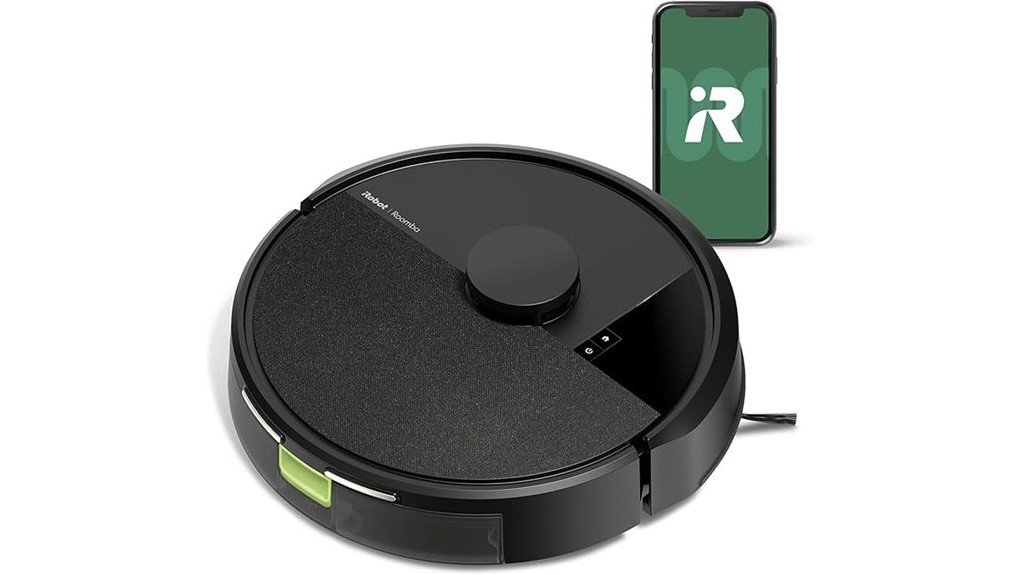
Robot vacuums save time only when they can clean reliably without creating another maintenance chore. The iRobot Roomba 205 DustCompactor Vac Robot tackles that problem with strong suction, ClearView LiDAR mapping, and an onboard DustCompactor that packs debris inside the robot instead of sending it to a large self-empty tower. Its biggest strengths are smart navigation and reduced bin-emptying, while its main tradeoffs are a roughly two-hour maximum runtime and LiDAR-based obstacle handling rather than camera-based object recognition. This review will help you decide whether those strengths match the way you clean your home.
Quick Verdict
Rating: 8.5/10, Recommended with caveats
Best For: Homes that want smart room mapping, strong everyday vacuuming, and fewer manual bin-emptying sessions without a bulky self-empty station.
Bottom Line: The Roomba 205 combines 7,000 Pa suction, ClearView LiDAR, and an unusual onboard debris-compacting system in one robot. It is a strong choice for routine floor maintenance, but you should not buy it expecting camera-level recognition of small cords or more than about two hours of runtime per charge.
Key Takeaways
- 7,000 Pa suction: The Roomba 205 has enough power for routine dust, crumbs, pet hair, and debris on hard floors and carpets.
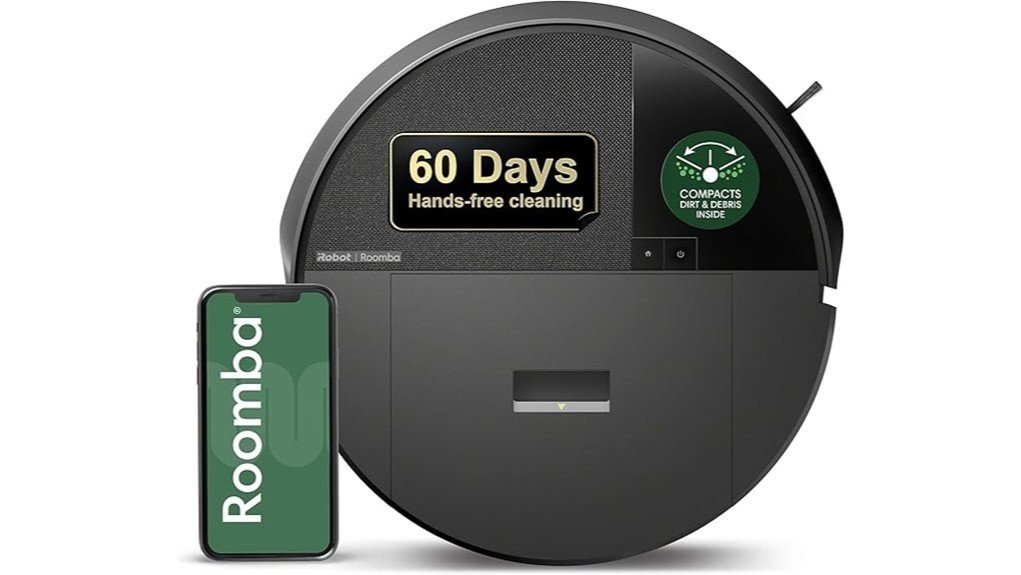
- DustCompactor system: Debris is compressed inside the robot, with iRobot promoting up to 60 days between manual emptying under suitable conditions.
- ClearView LiDAR: It maps rooms, cleans in organized paths, supports targeted room cleaning, and can navigate in low light.
- Up to 120 minutes runtime: This is considerably less than the previously claimed three-plus hours, although recharge-and-resume helps with larger layouts.
- No large self-empty tower: You still use a compact charging dock, but the debris stays inside the robot instead of being transferred into a tall base.
- Smart controls: Wi-Fi, app scheduling, room targeting, keep-out zones, and compatible voice commands give you more control over routine cleaning.
Key Specifications
| Specification | Detail |
|---|---|
| Brand | iRobot |
| Product | Roomba 205 DustCompactor Vac Robot |
| Product type | Robot vacuum |
| Suction | 7,000 Pa |
| Cleaning system | Suction, single multi-surface rubber brush, and edge-sweeping brush |
| Navigation | ClearView LiDAR |
| Dust management | Onboard DustCompactor |
| Dry debris capacity | Up to 1,820 mL with the DustCompactor bin |
| Battery | 3,000 mAh LFP |
| Runtime | Up to 120 minutes on hard floors under iRobot test conditions |
| Recharge time | About 5 hours |
| Recharge and resume | Yes |
| Robot dimensions | About 36.32 × 36.32 × 9.9 cm |
| Weight | About 3.83 kg |
| Cleaning width | 16.51 cm |
| Filter | Efficient air filter |
| Smart features | App scheduling, smart maps, targeted rooms, keep-out zones, Wi-Fi, Bluetooth, and voice commands |
| Charging setup | Compact charging dock, not a large self-empty tower |
What Is the iRobot Roomba 205 DustCompactor Vac?
The Roomba 205 DustCompactor Vac is a vacuum-only robot designed around two ideas: organized LiDAR navigation and less frequent debris disposal. Instead of relying on a large self-empty base to pull dirt out of the robot after each job, its built-in DustCompactor compresses collected debris inside the robot itself.
That design is especially useful if you do not want a tall self-empty station sitting beside a wall. The robot still returns to a compact charging dock for power, but the floor-space requirement around the charging setup is much smaller than many full-size auto-empty systems.
Cleaning comes from 7,000 Pa suction, a single rubber multi-surface brush, and an edge-sweeping brush. ClearView LiDAR handles mapping and systematic navigation, while the Roomba Home App gives you scheduling and room-level controls.
Before You Buy: The Roomba 205 does not eliminate charging hardware. It uses a small charging dock. What it eliminates is the need for a large self-empty tower because debris is compacted inside the robot.
Who Should Buy It?
Best For
- You want smart room mapping without a bulky self-empty station.
- You clean a mix of hard flooring and carpet and want automatic room-to-room navigation.
- You prefer fewer manual bin-emptying sessions and like app-based scheduling.
Skip If
- You need a robot that also wet-mops floors.
- You specifically want camera-based recognition of cords, shoes, or pet waste.
- You want a robot with several hours of uninterrupted runtime on one charge.
DustCompactor Design and Debris Storage
The feature that separates the Roomba 205 from many robot vacuums is its onboard DustCompactor. As debris enters the bin, the internal mechanism compresses it so more dry dirt can stay inside the robot before you need to empty it.
iRobot promotes the system as capable of storing debris for up to 60 days. Treat that as a best-case maintenance interval rather than a fixed schedule. A home with several shedding pets, tracked-in sand, or frequent crumbs can fill the available capacity faster than a lightly used home.
The current 205-series support specification lists the DustCompactor dry bin at up to 1,820 mL. That makes the design attractive if your main complaint about robot vacuums is constantly emptying a small onboard bin.
Cleaning Performance on Hard Floors and Carpet
The Roomba 205 uses 7,000 Pa suction together with a single rubber multi-surface brush and an edge-sweeping brush. The suction handles loose dust, crumbs, pet hair, and everyday debris, while the rubber roller keeps debris moving toward the intake.
Hard Floors
On tile, laminate, vinyl, and other hard surfaces, the organized LiDAR cleaning pattern helps the robot cover rooms in deliberate passes instead of wandering randomly. The edge brush also reaches along baseboards and into open corners where the main roller cannot reach.
Carpet
The 205 series supports increased carpet suction, making it better suited to carpet transitions than a basic fixed-power robot. Thick rugs, long fibers, and loose fringes can still be more difficult for any rotating brush system, so you should prepare problem rugs before starting an unattended cleaning job.
Pet Hair
The rubber roller and 7,000 Pa suction make the Roomba 205 useful for routine pet-hair pickup. However, the 205 does not use the dual anti-tangle brush system found on some more expensive Roomba models, so homes with heavy shedding should inspect the roller and edge brush regularly.
Pro Tip: Before an unattended cleaning job, pick up charging cables, thin socks, tassels, and lightweight toys. LiDAR helps the robot map and route around obstacles, but removing small items gives the brush and wheels fewer chances to snag.
How ClearView LiDAR Navigation Works
ClearView LiDAR is one of the Roomba 205’s strongest features. The robot scans its surroundings to build a map, then uses that map to travel through rooms in organized cleaning paths. Because LiDAR does not depend on normal room lighting, mapping can continue in dark or dim areas.
The smart map supports targeted room cleaning and keep-out zones. That means you can tell the robot to focus on a kitchen after dinner or keep it away from an area where cables, pet bowls, or delicate objects create problems.
There is an important distinction between LiDAR navigation and camera-based object recognition. The Roomba 205 uses LiDAR rather than the LiDAR-plus-camera systems found on some higher models. You should therefore treat floor preparation as part of reliable unattended cleaning, especially when small objects or cords are present.
App, Scheduling, Room Targeting, and Voice Control
The Roomba Home App gives you more control than simply pressing the start button. Once the robot has mapped your home, you can schedule cleaning sessions and direct it to specific rooms instead of cleaning the entire mapped floor every time.
| Feature | How It Helps You |
|---|---|
| Scheduling | Runs routine cleaning automatically at times you choose. |
| Room Targeting | Lets you clean a selected room instead of the full floor plan. |
| Keep-Out Zones | Helps keep the robot away from problem areas on the map. |
| Voice Commands | Allows basic hands-free commands when connected through a compatible voice-assistant setup. |
Battery Life and Recharge-and-Resume
The Roomba 205 uses a 3,000 mAh LFP battery. iRobot rates the 205 series for up to 120 minutes of runtime on hard floors under its test conditions. Real runtime can vary with suction demand, floor type, room layout, and how often the robot has to maneuver.
A full recharge is listed at about five hours. The useful feature for a larger home is recharge-and-resume. If the battery becomes low before a job is finished, the robot can return to its dock, recharge, and continue the cleaning task.
This means a large mapped area does not have to fit within one battery cycle, but it also means a large whole-home job may take longer than the raw cleaning time suggests.
Cleaning and Maintenance
The DustCompactor reduces how often you may need to empty loose debris, but it does not remove normal robot-vacuum maintenance. Hair can still collect around the roller, axle points, edge brush, and caster wheel. Dust will also build up on the filter and sensors.
Check the rubber roller frequently if you have pets or long hair in the home. Keep the charging contacts clean so the robot can charge reliably, and inspect the filter according to iRobot’s care instructions rather than waiting for suction performance to drop.
The compactor also means you should pay attention to the debris inside the bin. If you vacuum unusually large amounts of hair, dense dust, or bulky debris, emptying earlier can make more sense than trying to reach the maximum advertised interval.
What to Expect in Everyday Use
Daily Kitchen and Living-Room Cleaning
This is where the Roomba 205 makes the most sense. Schedule regular passes for crumbs, dust, hair, and tracked-in grit, then use room targeting when one area needs extra attention. Organized LiDAR navigation makes these repeat jobs more predictable than random-navigation robots.
Homes With Pets
Routine pet hair should be manageable with the rubber roller and 7,000 Pa suction. The DustCompactor is also useful because hair can consume bin space quickly. You should still clean the roller and edge brush more frequently in a shedding household.
Larger Floor Plans
The up-to-120-minute battery is not unusually long, but recharge-and-resume makes it workable for larger mapped areas. Expect a full-home clean to take longer if the robot has to recharge partway through the job.
Night or Low-Light Cleaning
ClearView LiDAR does not rely on bright room lighting to map the floor. That makes the Roomba 205 practical for scheduled cleaning in dark hallways or rooms after lights have been turned off.
Setup Tips Before First Use
- Give the charging dock a stable location: Put it on a flat surface where the robot can approach and leave without being blocked.
- Run an initial mapping cycle with clutter reduced: A cleaner floor layout can help the robot build a more useful map.
- Create keep-out zones: Mark areas where cords, pet bowls, fragile floor items, or unusual furniture create repeat problems.
- Secure rug fringes: Tuck long tassels away if they tend to catch rotating brushes.
- Use room targeting for frequent messes: Cleaning the kitchen or entryway separately can be faster than sending the robot through the whole home.
Pros and Cons
Pros
- 7,000 Pa suction for routine hard-floor and carpet cleaning.
- Onboard DustCompactor reduces reliance on frequent manual bin emptying.
- ClearView LiDAR provides organized mapping and low-light navigation.
- Room targeting and keep-out zones give you useful control through the app.
- Compact charging setup avoids the footprint of a large self-empty tower.
Cons
- Up to 120 minutes of runtime is much shorter than the three-plus-hour claim sometimes associated with this model.
- LiDAR navigation does not provide the same type of visual object recognition as a camera-equipped robot.
- It is vacuum-only, so you need the 205 Combo or another model if you also want wet mopping.
Is It Worth the Price?
The Roomba 205 makes the most sense when you value its DustCompactor rather than judging it only by suction power. Plenty of robot vacuums can navigate with LiDAR, but fewer combine smart mapping with debris compaction inside the robot itself.
You get the most value if you want to reduce routine bin handling but do not want a large self-empty tower. The 7,000 Pa suction, app controls, room targeting, and recharge-and-resume add practical value for everyday cleaning.
It is not the best fit if mopping, advanced camera-based object identification, or very long single-charge runtime is more important to you than onboard debris storage.
How It Compares to Alternatives
The Roomba 105 Vac is worth comparing if you want a simpler Roomba with ClearView LiDAR and strong everyday suction but do not need the 205’s onboard DustCompactor. The 205 is the more distinctive choice when reducing bin-emptying and avoiding a bulky self-empty tower are priorities.
At the higher end, newer Roomba vacuum models such as the Roomba Max 715 Vacuum Robot target buyers who want stronger premium cleaning features and an AutoEmpty dock. The 205 remains more appealing if you specifically prefer debris compaction inside the robot rather than automatic transfer into a larger base.
Frequently Asked Questions
How long does the Roomba 205 battery actually last?
iRobot lists up to 120 minutes of runtime for the Roomba 205 series on hard floors under its test conditions. If a job is not finished, recharge-and-resume allows the robot to return to its dock and continue later.
Does the Roomba 205 really go 60 days without emptying?
The DustCompactor is marketed for up to 60 days between emptying. Your actual interval depends on how much dust, pet hair, crumbs, and other debris the robot collects, so heavy-use homes may need to empty it sooner.
Does the Roomba 205 need a dock?
Yes. It uses a compact charging dock. The space-saving advantage is that it does not need a large tower-style self-empty station because collected debris is compacted inside the robot.
Is the iRobot Roomba 205 suitable for pet hair?
It is a practical option for routine pet-hair pickup because it combines 7,000 Pa suction with a rubber cleaning roller. In a heavy-shedding home, inspect and clean the roller, edge brush, and filter more frequently.
Can the Roomba 205 mop floors?
This specific Roomba 205 DustCompactor Vac is a vacuum-only model. If you want both vacuuming and wet mopping, compare it with the Roomba 205 DustCompactor Combo rather than assuming the Vac model includes a mop.
Can I use the Roomba 205 on stairs?
The robot is made to clean one floor level at a time and cannot travel up or down stairs. For a multi-level home, you need to move the robot between floors when you want another level cleaned.
How should I handle rugs with fringes?
Do not rely on a special fringe-detection feature. Long or loose tassels can interact with rotating brushes, so tuck them under or secure them before unattended cleaning if they have caused problems.
What warranty does the Roomba 205 have?
iRobot’s current limited warranty covers qualifying new products for one year from purchase or delivery, subject to its terms and purchase through iRobot or an authorized seller. Check the seller and current warranty terms before buying because unauthorized or refurbished purchases can have different coverage.
The Bottom Line
The iRobot Roomba 205 DustCompactor Vac is a strong fit if you want 7,000 Pa suction, useful LiDAR mapping, room-level control, and less frequent debris emptying without a large self-empty tower. Skip it if you need wet mopping, camera-based object recognition, or more than roughly two hours of uninterrupted runtime. For the right home, its onboard DustCompactor is the feature that makes it stand out.