Disclosure: As an Amazon Associate I earn from qualifying purchases. If you click a link on this page and make a purchase, we may receive a small commission at no extra cost to you.
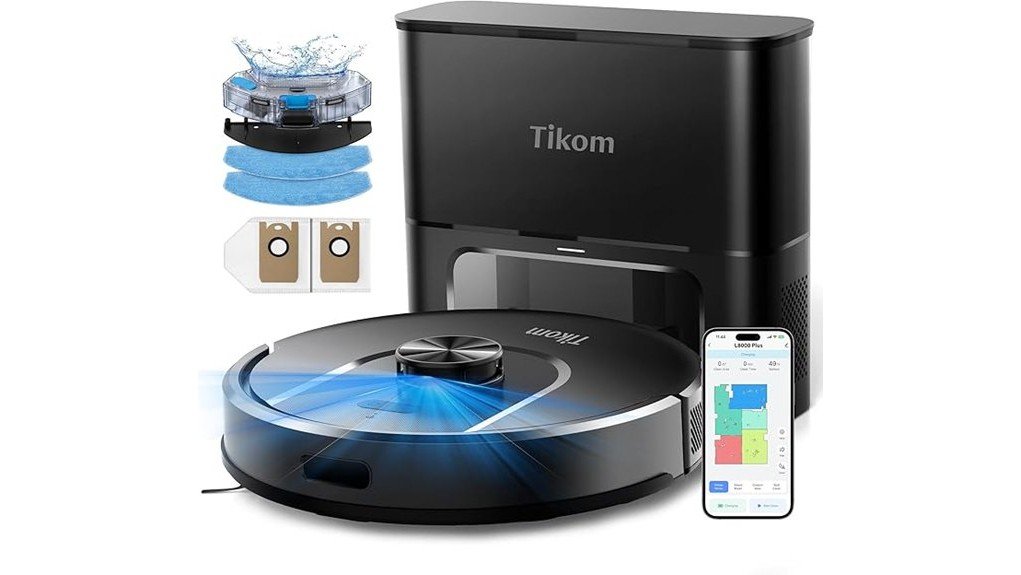
Robot vacuums are most useful when they reduce daily floor care without creating a new maintenance routine of their own. The Tikom L8000 Plus Robot Vacuum and Mop combines 6000Pa maximum suction, LiDAR mapping, vacuum-and-mop cleaning, and a 3L self-emptying base that Tikom says can hold debris for up to 90 days. Its strongest appeal is convenience for mixed hard-floor and carpet homes, but mopping still requires some planning around rugs and carpets. This review breaks down the features, setup, maintenance, and tradeoffs so you can decide if the L8000 Plus fits your home.
Quick Verdict
Rating: 8.6/10
Best For: Busy households that want LiDAR navigation, app-based room control, mopping, and a self-emptying dock in one system.
Bottom Line: The L8000 Plus offers a strong mix of 6000Pa max suction, five-map storage, 150-minute gentle-mode runtime, and a 3L self-emptying bag. The main tradeoff is that its mop system does not automatically lift away from carpet, so you need to remove the mop holder or set no-mop zones when cleaning mixed surfaces.
Key Takeaways
- 6000Pa maximum suction: The robot automatically increases suction to its maximum setting when it detects carpet.
- Vacuum and mop in one run: You can choose from three suction levels and three water-flow settings.
- 3L self-emptying bag: Tikom advertises up to 90 days of debris storage, reducing how often you handle the robot’s dustbin.
- 360° LiDAR mapping: The L8000 Plus can save up to five floor maps and supports room, zone, no-go, and no-mop controls in the app.
- Up to 150 minutes of runtime: This figure applies in Gentle suction mode, and the robot can recharge and resume an unfinished cleaning job.
- Important carpet limitation: When the mop holder is installed, use no-mop zones or remove the holder before sending the robot onto carpet.
Key Specifications
| Specification | Detail |
|---|---|
| Brand | Tikom |
| Model | L8000 Plus |
| Product type | Robot vacuum and mop with self-emptying base |
| Maximum suction | 6000Pa |
| Self-emptying capacity | 3L dust bag, advertised for up to 90 days |
| Navigation | 360° LiDAR navigation and smart mapping |
| Saved maps | Up to 5 |
| Suction settings | 3 levels |
| Water-flow settings | 3 levels |
| Runtime | Up to 150 minutes in Gentle suction mode |
| Controls | Tuya Smart app, robot buttons, Alexa voice control |
| Wi-Fi | Tikom advertises 2.4GHz/5GHz support; its Quick Mode setup instructions direct you to pair on 2.4GHz |
| Floor use | Hard floors and carpets; mopping requires carpet precautions |
| Filter care | HEPA filter should be tapped clean and not washed with water |
What Is the Tikom L8000 Plus?
The Tikom L8000 Plus is a robotic floor cleaner that combines dry vacuuming, wet mopping, LiDAR navigation, app control, and automatic dust collection. After cleaning, the robot returns to its self-emptying base, which transfers debris into a 3L bag. That setup is designed to reduce the number of times you need to empty the onboard dustbin by hand.
The system is aimed at homes where you want scheduled floor maintenance rather than occasional manual vacuuming. Its 360° LiDAR scanner builds a map of your rooms, and the app lets you select rooms or areas, create virtual walls, mark no-go or no-mop zones, and adjust suction or water output. Up to five maps can be saved, which is useful if you move the robot between floors.
Who Should Buy It?
Best For
- Homes with a mix of hard flooring and carpet that benefit from automatic carpet suction boost.
- Busy households that want a self-emptying base and up to 150 minutes of gentle-mode runtime.
- Multi-level homes where saving up to five maps makes room-by-room cleaning easier to manage.
Skip If
- You want a mop that automatically lifts itself over carpet without any zone setup or manual removal.
- You prefer a simple robot that does not depend on an app for advanced mapping and room controls.
- You want a dock that washes and dries the mop pad as well as emptying dust.
Before You Buy: The L8000 Plus does not automatically lift its mop holder over carpet. Tikom specifically advises you to remove the mop holder or create a no-go/no-mop zone before the robot crosses carpet during mopping.
Cleaning Performance: Suction and Carpet Boost
The L8000 Plus reaches a stated maximum suction of 6000Pa. Tikom also says the robot automatically increases suction to the maximum setting when it detects carpet. That gives you a practical advantage in a mixed-floor home because the robot can use lower power on easier surfaces and raise suction where carpet fibers hold more debris.
You can choose among three suction levels in the app. Higher suction is useful for heavier debris and pet hair, while a gentler setting is the one tied to Tikom’s maximum runtime claim of up to 150 minutes. As with most robot vacuums, actual runtime will vary with suction level, floor resistance, mapping, and how often the robot changes behavior during a run.
Vacuuming and Mopping in One Cleaning Cycle
The robot can sweep and mop at the same time. You get three water-flow settings, which lets you reduce moisture for lighter maintenance or increase output when the floor needs more attention. Tikom’s support instructions say to fill the tank with clean water only. Floor cleaner or disinfectant can damage the water tank, so you should not add those products unless Tikom updates its instructions for your exact unit.
The important limitation is carpet handling. The mop holder does not rise automatically. If a mapped route includes rugs or carpet, you need to define a no-mop/no-go area or remove the mop holder before the robot enters those surfaces. This makes the system better suited to planned mopping sessions than to fully unattended mixed-surface mopping.
Pro Tip: Complete your first map before creating no-mop zones. Once the room layout is saved, mark rugs and carpeted areas carefully so you can run vacuum-and-mop sessions without wetting the wrong surface.
Navigation and Mapping
The L8000 Plus uses 360° LiDAR navigation to scan the home and build maps. LiDAR-based mapping is useful because the robot can plan structured routes instead of relying only on random movement. Tikom says the system also detects hazards such as walls and stairs and can save up to five floor maps.
Within the app, you can select specific rooms or zones, create virtual walls, and set no-go or no-mop areas. Those controls matter most in homes with pet bowls, floor-length curtains, children’s play areas, cable-heavy corners, or carpet that should remain dry during mopping.
App, Voice, and Smart Home Controls
The Tuya Smart app gives you the most control over the robot. You can schedule cleaning, choose rooms or zones, adjust suction and water levels, and define restricted areas. Alexa support adds simple voice control for hands-free operation.
Wi-Fi setup needs careful wording. Tikom’s product page advertises support for both 2.4GHz and 5GHz Wi-Fi, but its L8000 Plus Quick Mode support instructions tell you to connect your phone to a 2.4GHz network during pairing. If setup fails on a dual-band router, using the 2.4GHz band first is the safer troubleshooting step.
You can also start or pause cleaning and send the robot home with its physical buttons, so basic cleaning does not require an active app connection.
Self-Emptying Base and 90-Day Capacity Claim
The self-emptying base is one of the biggest reasons to choose the L8000 Plus over a dock-only robot. Its 3L dust bag collects debris from the robot after cleaning, and Tikom advertises up to 90 days of storage. The real interval will depend on how much dirt, hair, and debris your household produces, so heavy-shedding pets or high-traffic rooms can fill the bag sooner.
This setup reduces day-to-day dustbin handling, but it does not eliminate maintenance. You still need to inspect the main brush, side brush, wheels, sensors, filter, and water system so hair or debris does not reduce cleaning performance.
Battery Life and Maintenance
Tikom rates the L8000 Plus for up to 150 minutes in Gentle suction mode. If the battery becomes low before the job is complete, the robot can return to the dock, recharge, and resume cleaning from where it stopped. That feature is particularly useful on larger mapped areas where a single charge may not cover every room at higher suction.
For maintenance, Tikom instructs you to remove the HEPA filter and gently tap dust from it. Do not wash the HEPA filter with water. The dustbin itself can be rinsed with clean water after the filter is removed, then it should be dried thoroughly before reassembly. Hair and string should also be removed from the side brush and main brush as needed.
The safer buying takeaway is that the robot supports automatic recharging and resume cleaning, not a guaranteed exact full-charge duration.
What to Expect in Everyday Use
For Mixed Hard Floors and Carpet
This is the L8000 Plus’s strongest use case. You can vacuum hard floors at a normal setting and let carpet detection raise suction when needed. When mopping, however, the same mixed layout requires no-mop zones or removal of the mop holder before carpeted areas are included.
For Pet Hair and Daily Debris
The 6000Pa maximum suction and self-emptying dock are useful for homes that collect hair, crumbs, and tracked-in dirt every day. The base reduces how often you touch the onboard dustbin, but pet owners should still inspect the main and side brushes for wrapped hair because self-emptying does not clean the brushes for you.
For Multi-Floor Homes
Saving up to five maps makes the L8000 Plus more flexible than a single-map robot. You can keep different room layouts and restricted zones for multiple levels. You still need to carry the robot between floors, and stairs should remain physically clear even though the robot has drop-avoidance sensing.
For Busy Households
Scheduling, room selection, auto-emptying, and recharge-and-resume can reduce the number of manual steps in routine cleaning. The tradeoff is setup time. You get the most benefit after you have mapped the home, named rooms, marked restricted zones, and selected sensible suction and water settings.
Setup Tips Before First Use
- Place the base in an open area: Give the robot a clear path to dock and self-empty.
- Charge before the first full run: Start mapping with enough battery for the robot to cover the intended area.
- Clear small hazards: Pick up cords, socks, lightweight toys, and other items that can tangle around a brush or wheel.
- Map before fine-tuning: Let the robot learn the layout, then add room names, virtual walls, no-go zones, and no-mop zones.
- Pair on 2.4GHz first: Tikom’s Quick Mode support instructions use a 2.4GHz network during initial connection.
- Use clean water for mopping: Tikom warns that floor cleaners and disinfectants can damage the water tank.
Pros and Cons
Pros
- 6000Pa maximum suction with automatic carpet boost.
- 3L self-emptying dust bag with an advertised capacity of up to 90 days.
- 360° LiDAR navigation with up to five saved maps.
- Three suction levels and three water-flow settings.
- Up to 150 minutes of runtime in Gentle mode with auto-recharge and resume.
Cons
- Mop holder does not automatically lift over carpet, so mixed-floor mopping needs zone setup or manual removal.
- Advanced room, zone, and scheduling features depend on app setup.
- The self-emptying dock handles dust, but you still need to clean brushes, sensors, the filter, and mop components.
Is It Worth the Price?
The L8000 Plus has a feature set that sits above basic dock-only robot vacuums. LiDAR mapping, five-map storage, mopping, a self-emptying base, app zoning, carpet boost, and 150-minute gentle-mode runtime give you several automation features in one system. That makes it worth considering if your priority is reducing routine floor-cleaning work rather than buying the simplest robot available.
The value is less convincing if you mainly need dry vacuuming in a small, single-floor space. You would be paying for mopping, multi-map management, and a self-emptying base that you may not fully use. It is also not the best fit if your priority is a fully automated mop station that can wash, dry, or lift the mop without your input.
How It Compares to Alternatives
The Tikom L8000 Pro is the closest same-brand alternative. Tikom lists it with LiDAR mapping, up to five maps, 5000Pa suction, three-level water output, and up to 150 minutes of quiet-mode runtime, but the L8000 Plus adds the 3L self-emptying base and a higher 6000Pa maximum suction claim. If self-emptying is the feature you care about most, the Plus is the more complete Tikom option.
The eufy L60 with Self-Empty Station is another laser-navigation alternative. Eufy lists 5000Pa suction, up to 120 minutes of runtime, smart mapping, and a self-emptying station. The Tikom L8000 Plus offers a higher stated suction figure and longer stated maximum runtime, while eufy may appeal if you prefer its app ecosystem or accessory availability. Compare current consumable costs and support before choosing.
Frequently Asked Questions
Can the Tikom L8000 Plus vacuum and mop at the same time?
Yes. Tikom describes the L8000 Plus as a 2-in-1 vacuum and mop that can sweep and mop during the same run. You can choose from three suction levels and three water-flow settings in the app.
Will the mop automatically lift when the robot reaches carpet?
No automatic mop-lift feature is stated for the L8000 Plus. Tikom advises removing the mop holder or setting a no-go/no-mop zone so the robot does not drag a wet mop across carpet.
How many floor maps can the L8000 Plus save?
It can save up to five maps. That is useful for multi-level homes because you can keep different room layouts and restricted zones instead of rebuilding the map every time you move the robot.
Does the self-emptying bag really last 90 days?
Tikom advertises the 3L bag for up to 90 days of debris storage. Your actual interval can be shorter if you have shedding pets, heavy foot traffic, or frequent cleaning because those conditions fill the bag faster.
Does the L8000 Plus support 5GHz Wi-Fi?
Tikom’s product page advertises 2.4GHz and 5GHz Wi-Fi support. However, Tikom’s Quick Mode setup instructions specifically tell you to use a 2.4GHz network during pairing, so start with 2.4GHz if connection setup is giving you trouble.
Can you put floor cleaner in the water tank?
Tikom says to use clean water only. Its mopping instructions warn that floor cleaner or disinfectant may damage the water tank, so avoid adding cleaning chemicals unless the instructions for your exact unit say otherwise.
How long does the battery last?
Tikom states up to 150 minutes in Gentle suction mode. Higher suction, carpet boost, floor resistance, and the size of the mapped area can reduce real-world runtime.
How long does a full recharge take?
Tikom confirms automatic recharging and resume cleaning, but the current official product information used for this review does not state an exact full-charge time. Plan around the recharge-and-resume feature rather than a fixed charging-time estimate.
The Bottom Line
The Tikom L8000 Plus is a good fit if you want strong stated suction, LiDAR mapping, multi-floor map storage, app zoning, mopping, and automatic dust collection in one robot. Skip it if you want completely hands-off carpet-aware mopping or a dock that also washes and dries the mop. Its best feature is the combination of a 3L self-emptying base and 6000Pa maximum suction, while the main limitation is the need to manage the mop around carpet.