Disclosure: As an Amazon Associate I earn from qualifying purchases. If you click a link on this page and make a purchase, we may receive a small commission at no extra cost to you.
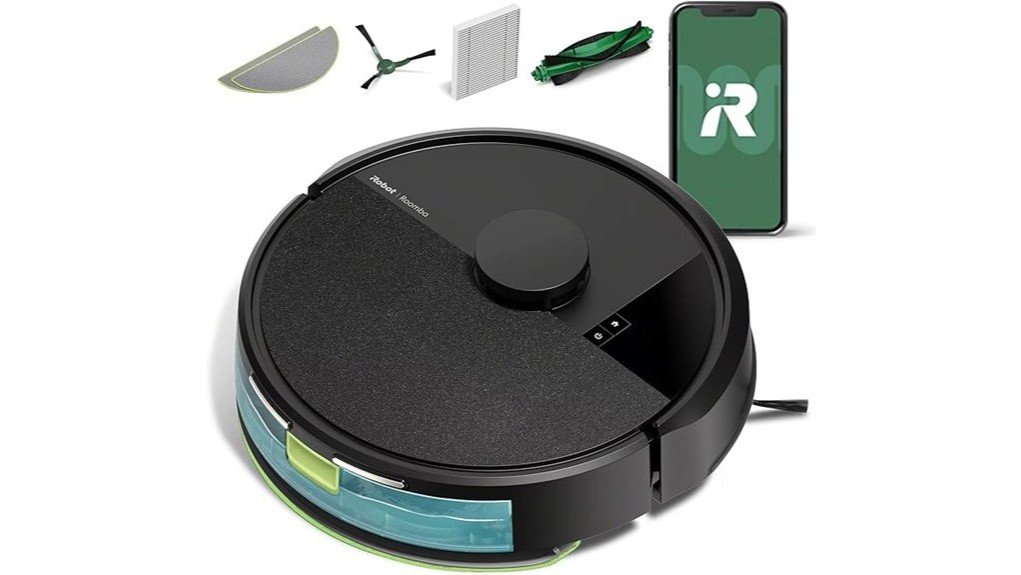
A robot vacuum can save you time, but the biggest question is whether it can clean reliably without creating more maintenance work. The iRobot Roomba 105 Vac Robot + AutoEmpty™ Dock addresses that problem with ClearView™ LiDAR mapping, a self-emptying base, app-based room controls, and a three-stage vacuuming system. Its strongest advantage is the combination of organized navigation and reduced bin emptying, while buyers should remember that this is a vacuum-only model rather than a vacuum-and-mop robot. This review explains where the Roomba 105 performs well, what you still need to maintain, and who gets the most value from it.
Quick Verdict
Rating: 8.5/10
Best For: Homes that need scheduled vacuuming, smart mapping, and less frequent dust-bin handling.
Bottom Line: The Roomba 105 Vac combines useful LiDAR navigation, strong multi-surface cleaning features, and an AutoEmpty dock that can reduce routine bin handling. It is less suitable if you want built-in mopping or a robot that eliminates regular brush, filter, and dock maintenance.
iRobot Roomba 105 Vac Key Specifications
| Specification | Detail |
|---|---|
| Brand | iRobot |
| Model | Roomba 105 Vac + AutoEmpty, Q352020 |
| Product type | Robot vacuum with self-emptying dock |
| Cleaning system | 3-stage system with suction, Multi-Surface bristle brush, and Edge-Sweeping brush |
| Suction claim | 70X more power-lifting suction compared with Roomba 600-series robots |
| Navigation | ClearView™ LiDAR smart mapping |
| Robot dimensions | 13.23 × 13.19 × 4.09 inches |
| Robot weight | 6.24 lb |
| Battery | LFP-type lithium-ion |
| Runtime | Up to 120 minutes under iRobot hard-floor test conditions; actual runtime varies |
| AutoEmpty capacity | Up to 75 days before dock-bag disposal, depending on cleaning conditions |
| Wi-Fi | 2.4 GHz required for robot setup and operation |
| Controls | Roomba Home App, robot buttons, Alexa, Siri, and Google Assistant-enabled devices |
| Suction settings | 4 selectable levels |
| In the box | Roomba 105 Vac Robot, AutoEmpty™ Dock, and extra filter |
What Is the iRobot Roomba 105 Vac?
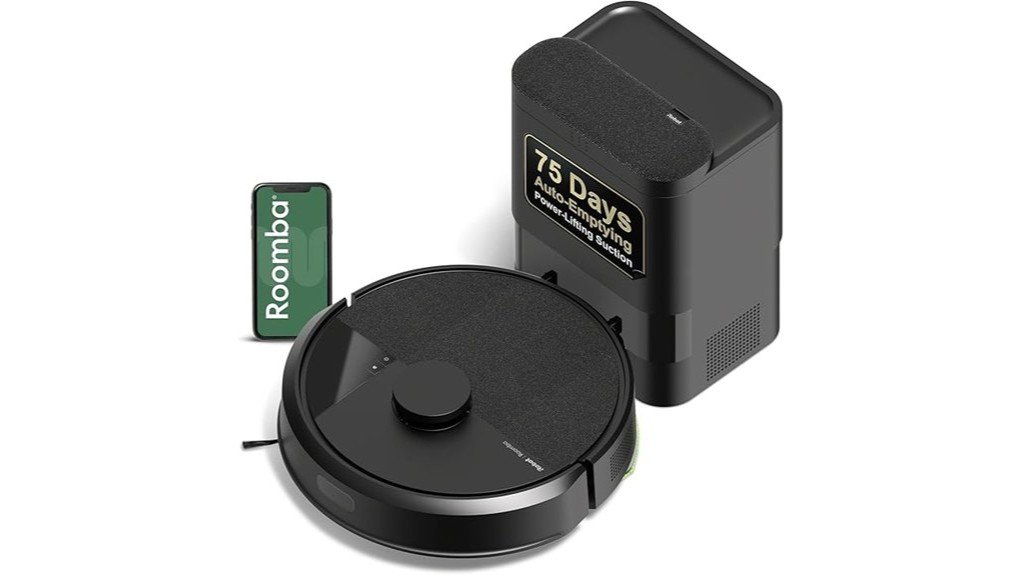
The Roomba 105 Vac is a vacuum-only robot paired with iRobot’s AutoEmpty™ Dock. It is designed for routine cleaning on carpets and hard floors, using a Multi-Surface bristle brush to loosen debris, an Edge-Sweeping brush for perimeter cleaning, and suction to lift dirt into the bin.
Its main convenience feature is the dock. When the robot returns after cleaning, debris can be transferred from the onboard bin into a disposable dock bag. iRobot says the dock can provide up to 75 days of hands-free debris storage, although the actual interval depends on how much dirt, dust, hair, and debris your floors produce.
The 105 Vac also uses ClearView™ LiDAR instead of relying only on basic bump-and-turn navigation. This allows it to map rooms, clean in organized rows, work in low-light conditions, and support room-specific cleaning through the Roomba Home App.
Who Should Buy It?
Best For
- Busy households that want scheduled vacuuming with less frequent bin emptying.
- Homes with a mix of hard floors and carpet that benefit from multi-surface cleaning.
- Buyers who want LiDAR maps, room targeting, keep-out zones, and app-based cleaning controls.
Skip If
- You want one robot that both vacuums and mops.
- You do not want to buy or replace disposable AutoEmpty bags.
- Your furniture has less than roughly 4.1 inches of floor clearance.
Before You Buy: The Roomba 105 Vac reviewed here is the vacuum-only Q352020 model with an AutoEmpty dock. iRobot also sells Roomba 105 Combo variants that add mopping, so check the model and included dock before ordering.
Cleaning Performance and the 3-Stage System
The Roomba 105 Vac uses three cleaning components rather than suction alone. Its Multi-Surface bristle brush stays in contact with carpet and hard flooring to loosen debris, while the Edge-Sweeping brush directs dirt from walls and corners toward the cleaning path. The vacuum then pulls loosened material into the robot’s bin.
iRobot advertises the model as having 70X more power-lifting suction than Roomba 600-series robots. That comparison is useful for understanding its position within iRobot’s lineup, but it should not be treated as a direct comparison with every competing robot vacuum.
You can also choose among four suction levels in the Roomba Home App. A higher setting makes sense for dirtier or high-traffic areas, while a lower setting can be used where aggressive cleaning is unnecessary.
How ClearView LiDAR Navigation Works
ClearView™ LiDAR scans the room so the robot can build a map and follow more organized routes. Instead of wandering randomly, the Roomba can clean in rows, identify rooms, and navigate around mapped areas even when the room is dark.
iRobot says the system can create up to three maps, which is useful if you carry the robot between different floors. Once your map is created, the app lets you choose specific rooms, create keep-out zones, or skip areas that you do not want cleaned.
LiDAR does not remove the need to prepare your floor. Loose charging cables, small toys, lightweight fabric, and other clutter can still interfere with a robot vacuum. Clearing those items before scheduled runs usually makes autonomous cleaning more dependable.
Pro Tip: Run the first mapping cycle with doors open and loose floor clutter removed. A clean initial map makes room targeting and keep-out zones easier to set up later.
App, Voice, and Manual Controls
You have three basic ways to start the Roomba 105 Vac: use its physical buttons, tap the Roomba Home App, or use a compatible voice-assistant device. iRobot lists support for Alexa, Siri, and Google Assistant-enabled devices.
The app provides more control than the buttons alone. You can schedule cleaning, target particular rooms, change suction levels, choose the number of cleaning passes, create keep-out zones, view cleaning time estimates, and check filter-life information.
There is also a spot-cleaning mode. When you need extra attention in one small area, iRobot says the robot can repeatedly clean that zone for up to five minutes.
Wi-Fi Setup Requirement
The robot requires a 2.4 GHz Wi-Fi network during setup and operation. Your phone can return to a 5 GHz connection after setup, but the robot itself continues to use 2.4 GHz. That is worth checking before you buy if your home network has unusual router settings.
AutoEmpty Dock and Everyday Maintenance
The AutoEmpty dock is the main reason to choose this version instead of a charge-only Roomba. After cleaning, the robot can transfer collected debris into the dock’s disposable bag. iRobot says the bag can hold debris for up to 75 days.
That figure is a maximum-use estimate rather than a fixed replacement schedule. Homes with pets, shedding, tracked-in dirt, or frequent cleaning may fill the bag sooner. The dock also does not make the robot maintenance-free.
iRobot recommends routine care that includes wiping the bin when needed, cleaning the brushes, wiping charging contacts, and replacing the filter periodically. Its official guidance lists filter replacement about every three to six months, with actual needs depending on use.
iRobot also states that the AutoEmpty bag traps 99% of allergens as small as 0.7 microns. That specification describes the dock bag’s particle-trapping performance and should not be interpreted as a medical or air-purification claim.
Size, Design, and Furniture Clearance
The robot measures approximately 13.23 inches long, 13.19 inches wide, and 4.09 inches high, with a listed robot weight of 6.24 pounds. Its round body is typical of a Roomba and keeps the footprint manageable for everyday floor cleaning.
The 4.09-inch height matters more than appearance. Measure the clearance beneath sofas, beds, cabinets, and other low furniture if under-furniture cleaning is important to you. A gap that looks large enough may still be too low for the LiDAR-equipped robot to enter safely.
Battery Life and Surface Compatibility
The original version of this review listed up to 200 minutes of battery life, but iRobot’s current support information lists the Roomba 105 series at up to 120 minutes of runtime under its hard-floor test conditions. Real runtime can vary with suction level, floor type, obstacles, battery condition, and cleaning pattern.
The Multi-Surface bristle brush is designed to work on both hard floors and carpet. This makes the 105 Vac useful in homes where the robot regularly moves between rooms with different floor coverings.
For larger homes, the practical advantage is not simply one uninterrupted battery run. Smart mapping and scheduled room cleaning let you divide cleaning into more manageable routines rather than expecting every room to be completed in one pass.
What to Expect in Everyday Use
For Daily Crumbs and Dust
A scheduled run can handle the light debris that builds up between manual cleanings. The AutoEmpty dock is particularly useful here because you do not need to empty the onboard bin after every routine cycle.
For Carpet and Hard-Floor Homes
The combination of the Multi-Surface brush and selectable suction levels gives you more flexibility when the robot moves between smooth floors and carpet. You can use stronger suction in higher-traffic areas through the app.
For Pet-Hair Households
The vacuum can collect loose pet hair along with ordinary dust and debris, but hair can still wrap around a bristle brush. Pet owners should expect to inspect and clean the brush rather than treating the AutoEmpty feature as a substitute for maintenance.
For Multi-Level Homes
Support for up to three maps is useful when you want mapped cleaning on more than one level. You still have to physically move the robot between floors because the dock and robot cannot travel between levels on their own.
Setup Tips Before First Use
- Check Wi-Fi first: Make sure a 2.4 GHz network is available for the robot.
- Give the dock room: Position the AutoEmpty dock where the robot can approach and leave without being blocked by loose objects.
- Remove small hazards: Pick up cords, socks, toys, and lightweight items before the first mapping run.
- Create useful zones: After mapping, use room labels and keep-out zones for areas where the robot should not enter.
- Inspect the brushes regularly: Hair and string around moving parts can reduce cleaning performance.
- Follow iRobot maintenance instructions: Clean the bin, contacts, filter, and brushes according to the owner’s guidance.
Pros and Cons
Pros
- AutoEmpty dock can reduce how often you handle the robot’s dust bin.
- ClearView LiDAR provides mapped, row-based navigation and room targeting.
- Three-stage cleaning system works across hard flooring and carpet.
- Four suction levels provide more control for different rooms.
- App, voice, and physical-button controls give you several ways to start cleaning.
Cons
- This model vacuums only, so you need a Combo model if mopping is important.
- The AutoEmpty system uses disposable bags that eventually need replacement.
- Brushes, filters, charging contacts, and the robot bin still require routine care.
Is It Worth the Price?
The Roomba 105 Vac + AutoEmpty Dock sits in the mid-range self-emptying robot-vacuum category rather than being a bare-bones robot. Much of its value comes from the combination of LiDAR mapping, app customization, four suction settings, and automated debris transfer.
It makes the most sense if you plan to use scheduled cleaning often enough to benefit from the dock. If you are comfortable emptying a robot bin manually, a charge-only model can provide similar basic vacuuming without paying for the self-emptying feature.
It is also not the best value for someone who already knows they need wet mopping. In that case, paying for the vacuum-only 105 and then buying a separate floor-cleaning device may be less convenient than choosing a Combo model from the start.
How It Compares to Alternatives
The Roomba 104 Vac charge-only version is worth comparing if you like the same general three-stage cleaning and ClearView LiDAR approach but do not need an AutoEmpty dock. You give up automated debris transfer, but the simpler dock can make sense if manual bin emptying does not bother you.
If you want wet-floor cleaning, the Roomba 105 Combo is the more relevant alternative. It adds a washable microfiber mop pad, a four-stage cleaning system, vacuum-only, mop-only, and combined modes, plus carpet detection during mopping. The 105 Vac reviewed here makes more sense when your priority is dedicated vacuuming and a self-emptying dock.
Frequently Asked Questions
How often do you need to empty the Roomba 105 AutoEmpty dock?
iRobot advertises up to 75 days of debris storage in the AutoEmpty dock. Your actual interval can be shorter in homes with pets, heavy debris, or frequent cleaning, so check the bag rather than treating 75 days as a guaranteed schedule.
Does the Roomba 105 Vac mop floors?
No. Q352020 is the Roomba 105 Vac, so it is designed for vacuuming. If you want vacuuming and wet mopping in one robot, compare it with a Roomba 105 Combo model.
What is the Roomba 105 Vac battery runtime?
iRobot support lists up to 120 minutes for the Roomba 105 series under hard-floor test conditions. Runtime can change with suction setting, floor type, battery condition, and the layout being cleaned.
Does it work on both carpet and hard floors?
Yes. Its Multi-Surface bristle brush is designed to maintain contact with carpets and hard floors, while the Edge-Sweeping brush helps direct debris from edges into the cleaning path.
What Wi-Fi network does the Roomba 105 require?
The robot requires a 2.4 GHz Wi-Fi connection for setup and operation. Your phone can return to a 5 GHz network after setup, while the robot remains connected through 2.4 GHz.
What maintenance does the Roomba 105 require?
You should periodically clean the brushes, wipe the charging contacts, inspect the bin, and maintain the filter. iRobot’s guidance says the filter should generally be changed every three to six months, but heavier use may require more frequent attention.
Who should skip the Roomba 105 Vac + AutoEmpty Dock?
Skip it if you require built-in mopping, dislike buying disposable dock bags, or have furniture that is too low for its approximately 4.09-inch height. A charge-only vacuum or Roomba Combo may fit those priorities better.
The Bottom Line
The iRobot Roomba 105 Vac Robot + AutoEmpty Dock is a strong fit when you want organized LiDAR navigation, scheduled multi-surface vacuuming, and less frequent dust-bin handling. Its main limitation is that the convenience of the AutoEmpty dock does not eliminate regular filter and brush maintenance, and the Q352020 model does not mop.
If those tradeoffs fit your cleaning routine, its smart maps, selectable suction, app controls, and self-emptying system make it a practical choice for routine floor care.