Disclosure: As an Amazon Associate I earn from qualifying purchases. If you click a link on this page and make a purchase, we may receive a small commission at no extra cost to you.
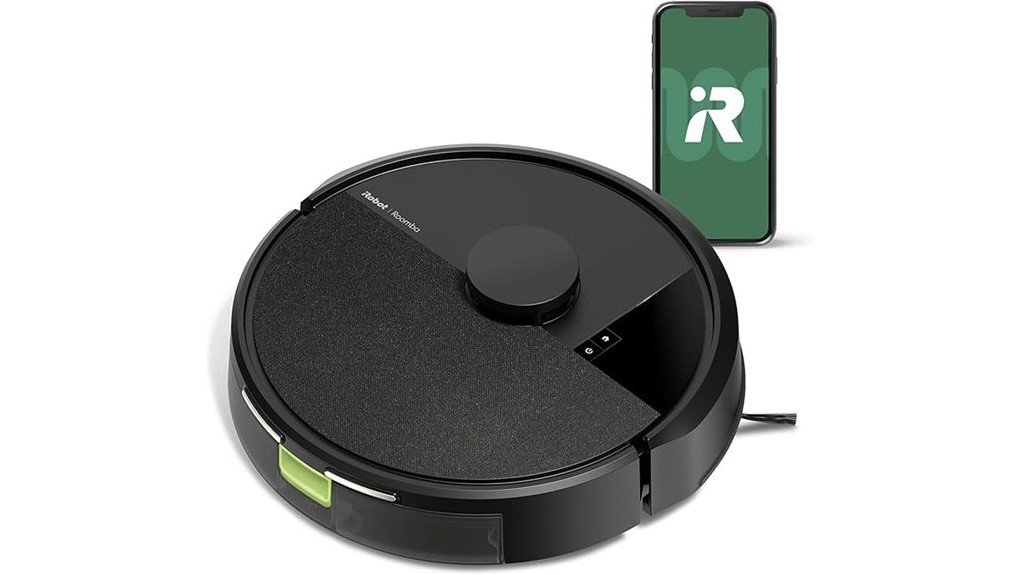
Robot vacuums are most useful when they can clean predictably without turning every run into a rescue mission. The iRobot Roomba 105 Vac Robot, model Q312020, focuses on that everyday job with 70X more power-lifting suction than Roomba 600 series robots, ClearView™ LiDAR mapping, room targeting, and app or voice control. It is a vacuum-only model, so you are not paying for a mopping system you may never use. Its main tradeoffs are the lack of self-emptying on this specific charge-only-dock version and a taller 4.1-inch body that may not fit beneath every piece of furniture.
Quick Verdict
Rating: 8/10, Recommended with caveats
Best For: Homes that want scheduled vacuuming, LiDAR room mapping, and straightforward app control without paying for a mop or self-empty dock.
Bottom Line: The Roomba 105 Vac gives you a strong mix of mapping, targeted cleaning, and multi-surface pickup for routine floor care. You still need to empty its onboard bin yourself, and its 4.1-inch height deserves a quick furniture-clearance check before you buy.
| Specification | Detail |
|---|---|
| Brand | iRobot |
| Model | Roomba 105 Vac, Q312020 |
| Product type | Vacuum-only robot vacuum |
| Dimensions | 13.2 x 13.2 x 4.1 in |
| Weight | About 6.1 lb |
| Cleaning path | 5.8 in |
| Dust bin | Bagless, about 380 mL |
| Cleaning system | 3-stage system with Multi-Surface brush and Edge-Sweeping brush |
| Navigation | ClearView™ LiDAR smart mapping |
| Battery runtime | Up to 120 minutes on hard floors, runtime varies |
| Wi-Fi | 2.4 GHz network required for robot operation |
| Controls | Roomba Home App, robot buttons, Alexa, Siri, and Google Assistant-enabled devices |
| Dock | Charge-only dock on model Q312020 |
| Warranty | 1-year limited warranty for qualifying purchases |
What Is the iRobot Roomba 105 Vac?
The Roomba 105 Vac is an entry-level smart robot vacuum in iRobot’s newer LiDAR-equipped lineup. Model Q312020 is built for dry vacuuming on carpet, hardwood, laminate, tile, and other common household flooring. It uses a bagless onboard bin and returns to a charge-only dock when it needs power.
The main appeal is not a single feature. It is the combination of 70X power-lifting suction compared with Roomba 600 series robots, structured LiDAR navigation, room-based cleaning, four selectable suction levels, and an app that lets you schedule or target cleaning. That makes it a better fit for routine maintenance than a basic random-navigation robot.
Who Should Buy It?
Best For
- Homes that want mapped, room-by-room vacuuming instead of random movement.
- Mixed hard-floor and carpet areas that benefit from adjustable suction and a multi-surface brush.
- Buyers who want app scheduling, keep-out zones, and voice control without a mopping system.
Skip If
- You want automatic dust-bin emptying. This Q312020 version uses a charge-only dock.
- You need vacuuming and mopping from the same robot.
- Your key furniture has less than about 4.1 inches of clearance underneath.
Before You Buy: Roomba 105 models are sold in several configurations. Confirm that the listing is model Q312020 if you want the vacuum-only robot with a charge-only dock. Do not assume this version includes AutoEmpty™ or mopping hardware.
Cleaning Power and the 3-Stage System
The Roomba 105 Vac combines suction with two brushes rather than relying on airflow alone. Its Multi-Surface brush loosens and lifts debris from the floor while the Edge-Sweeping brush reaches along walls and into corners. iRobot rates the platform at 70X more power-lifting suction than its Roomba 600 series robots.
You can choose among four suction levels, which is useful when you want more power in a high-traffic room or a lighter pass in an area that stays relatively clean. The robot also supports Dirt Detection, so it can give extra attention to dirtier areas instead of treating every patch of floor the same way.
The 5.8-inch cleaning path is narrower than the full width of the round body, which is normal for this style of robot. The practical advantage comes from repeatable navigation: the robot can make organized passes rather than depending on chance to reach the same area.
ClearView™ LiDAR Navigation and Mapping
ClearView™ LiDAR scans the room to build a map and lets the Roomba clean in neat rows, including in low-light conditions. Once your map is set up, you can target specific rooms, skip rooms, and create keep-out zones in the Roomba Home App.
That matters in real homes because not every room needs the same schedule. You might clean the kitchen after dinner, the entryway more often during wet weather, and bedrooms less frequently. Mapping also makes it easier to avoid problem areas such as a cable-heavy office corner or a pet-feeding zone.
LiDAR helps with navigation, but it does not remove the need for basic floor preparation. Small cords, lightweight objects, and clutter can still interfere with a robot vacuum.
App, Voice, and On-Robot Controls
The Roomba Home App gives you the most control. You can schedule cleaning, choose rooms, adjust the number of cleaning passes, select suction level, check cleaning-time estimates, monitor filter life, and manage keep-out zones.
You also have two simpler options. Press the robot’s button for direct operation, or use a compatible Alexa, Siri, or Google Assistant-enabled device for supported voice commands. The robot itself remains on a 2.4 GHz Wi-Fi network for operation, even if your phone later returns to a 5 GHz network.
The original idea of “manual control” can be misleading. This model is not designed like a remote-control car for continuous directional steering. Its intended controls are app commands, supported voice commands, and the physical buttons on the robot.
Battery Life, Recharging, and Resume Cleaning
Current iRobot support information lists the Roomba 105 series at up to 120 minutes of runtime on hard floors, with actual runtime varying by floor type, suction setting, battery condition, and cleaning behavior. This is lower than the 200-minute figure sometimes shown in older or third-party listings, so 120 minutes is the safer expectation for current buying guidance.
If a cleaning job outlasts the available battery, the Roomba can return to its dock, recharge, and continue the task. That Recharge and Resume behavior is especially useful in larger mapped spaces because a low battery does not automatically mean the entire job is abandoned.
What to Expect in Everyday Use
For Daily Crumbs and Dust
The combination of scheduled runs, room targeting, and a multi-surface brush makes the Roomba 105 well suited to everyday debris. Running it regularly can keep crumbs, tracked-in grit, and dust from building up between deeper manual cleanings.
For Mixed Carpet and Hard Floors
The robot is intended for common surfaces including carpet, hardwood, laminate, and tile. Four suction settings let you adjust cleaning intensity, while its mapping keeps the route structured as it moves between rooms and surfaces.
For Edges and Corners
The Edge-Sweeping brush is designed to pull debris away from walls and corners toward the main cleaning path. Like most round robot vacuums, it still cannot physically press a full-width brush squarely into every 90-degree corner, so occasional manual detail cleaning may still be useful.
For Larger Homes
Recharge and Resume is the feature that matters most when one battery cycle is not enough. The robot can recharge and continue instead of forcing you to start the entire cleaning job again. Multi-level homes still require you to move the robot between floors because this configuration does not include a second dock.
Setup Tips Before First Use
- Check clearance first. The robot is about 4.1 inches tall, so measure under low beds, sofas, and cabinets if under-furniture cleaning matters to you.
- Place the dock in an open area. Give the robot a clear approach so it can return for charging without furniture or loose objects blocking its path.
- Use 2.4 GHz Wi-Fi for the robot. Complete setup in the Roomba Home App on a compatible network, then follow the prompts to build and label your map.
- Pick up cords and very small objects. LiDAR improves navigation, but a cleaner floor still reduces interruptions.
- Start with a mapping-friendly run. Open the rooms you want included and keep temporary clutter to a minimum so your initial map reflects the spaces you actually want cleaned.
Pro Tip: After the map is stable, create separate routines for high-traffic and low-traffic rooms. Use a stronger suction level where grit collects and a lighter setting where you mainly need dust pickup.
Cleaning and Maintenance
The Q312020 version uses a bagless onboard bin, so you need to empty it manually. A smaller onboard bin is normal for a compact robot, and the practical emptying frequency depends on how much dust, hair, and debris your floors produce.
Brushes, charging contacts, wheels, and the filter need routine attention. Hair can wrap around moving parts, while dusty contacts can make docking or charging less reliable. The Roomba Home App can also help you monitor filter life. Follow the owner’s guide for cleaning and replacement intervals rather than waiting for suction or navigation to decline.
Compatibility and Safety
Use the Roomba 105 Vac for dry household floor cleaning and follow iRobot’s setup and maintenance instructions. Keep cords, liquids, fragile objects, and anything that could be pulled into the brushes out of its path. Its anti-fall sensing is designed to help near drop-offs, but stairs and unusual floor transitions should still be checked during early runs.
The robot depends on Wi-Fi and app services for its richer smart features, so buyers with weak 2.4 GHz coverage may not get the same convenience throughout a larger home. You can still use the robot’s physical controls for basic commands.
Pros and Cons
Pros
- ClearView™ LiDAR provides mapped, neat-row navigation and room targeting.
- 70X more power-lifting suction than Roomba 600 series robots.
- Four suction levels let you match cleaning power to the room.
- App, voice, and robot-button controls give you flexible ways to start a clean.
- Recharge and Resume helps finish cleaning jobs that exceed one battery cycle.
Cons
- The Q312020 package uses a charge-only dock, so you must empty the bin yourself.
- It vacuums only and does not mop.
- At 4.1 inches tall, it may not fit under low-clearance furniture.
Is It Worth the Price?
The Roomba 105 Vac makes the most sense as a value-focused smart robot vacuum. You are getting LiDAR mapping, customizable room cleaning, four suction levels, app scheduling, voice support, and recharge-and-resume behavior without moving into a more complex mop-and-dock system.
Its value drops if your priority is hands-off dust disposal. In that case, paying more for a 105 configuration with an AutoEmpty™ dock may save you more time. This Q312020 model is better for buyers who do not mind emptying a small bin in exchange for a simpler setup.
How It Compares to Alternatives
If you like the Roomba 105 cleaning platform but want less bin maintenance, the Roomba 105 Vac + AutoEmpty™ Dock adds automatic dirt disposal. If you want both vacuuming and mopping, the Roomba 105 Combo is the closer match. Buyers who want a different approach to dust management can also compare the Roomba 205 DustCompactor™ series, which focuses on compacting debris onboard rather than relying on the 105’s standard bin setup.
The Q312020 Roomba 105 Vac is the cleaner choice when your priority is straightforward mapped vacuuming without paying for extra floor-washing hardware or a larger self-emptying base.
Frequently Asked Questions
Is the Roomba 105 Q312020 a vacuum-only model?
Yes. Model Q312020 is the Roomba 105 Vac, which is intended for dry floor vacuuming. iRobot also sells 105 Combo configurations, so check the model and package contents before ordering.
Does this Roomba 105 empty itself?
Not in the Q312020 charge-only-dock package reviewed here. You empty its onboard bagless bin manually. Roomba 105 packages with an AutoEmpty™ dock are separate configurations.
How long does the Roomba 105 battery last?
iRobot’s current support guidance lists the 105 series at up to 120 minutes on hard floors. Runtime can change with suction level, flooring, battery condition, and how much navigation work the robot has to do.
Can the Roomba 105 clean pet hair?
Its suction, Multi-Surface brush, and Edge-Sweeping brush can pick up loose hair along with normal household debris. Homes with frequent shedding should expect to check the brush and bin more often because wrapped hair and a full bin can reduce performance.
Can I steer the Roomba 105 manually?
The normal control methods are the Roomba Home App, supported voice commands, and the buttons on the robot. It is designed to navigate from its map rather than act as a continuously steerable remote-control vacuum.
How noisy is the Roomba 105?
iRobot does not publish a useful decibel figure for this exact model in the sources reviewed. Expect normal robot-vacuum motor and brush noise, with perceived loudness changing by suction setting and floor surface.
What maintenance does the Roomba 105 need?
Empty the bin as needed, remove hair and debris from the brushes, keep the charging contacts clean, and monitor the filter. Follow the owner’s guide and app maintenance reminders for the correct cleaning and replacement intervals.
What warranty does the Roomba 105 have?
iRobot provides a one-year limited warranty for qualifying products purchased from iRobot or an authorized seller, subject to its warranty terms and exclusions. Keep your proof of purchase in case you need service.
The Bottom Line
The iRobot Roomba 105 Vac Q312020 is a strong choice if you want LiDAR mapping, organized room cleaning, adjustable suction, and app control in a simple vacuum-only package. Skip it if you want mopping or automatic bin emptying, but for routine carpet and hard-floor maintenance with a charge-only dock, it earns a Recommended with caveats verdict.