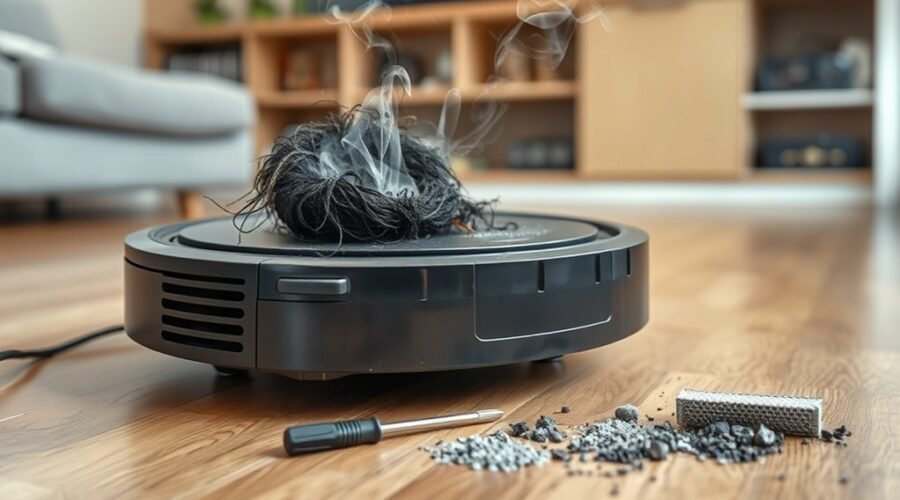
When your robot vacuum smells like burning, you need to find the cause before using it again. The odor may come from tangled brushes, blocked airflow, an overheating motor, or an electrical fault. Some problems are easy to spot, while others require professional repair. This guide helps you identify the warning signs and check your vacuum safely.
Quick Answer
If your robot vacuum smells like burning, stop cleaning and disconnect the charging dock if it is safe. Let the vacuum cool before inspecting the brush roll, wheels, dustbin, and filter for blockages. A burning rubber odor may indicate friction, while a sharp electrical smell or recurring overheating requires professional service.
At a Glance
| Difficulty | Easy for external cleaning; professional service for electrical or motor faults |
| Tools Needed | Soft cloth, small cleaning brush, scissors for tangled hair, and the manufacturer’s instructions |
Why Your Robot Vacuum Smells Like Burning
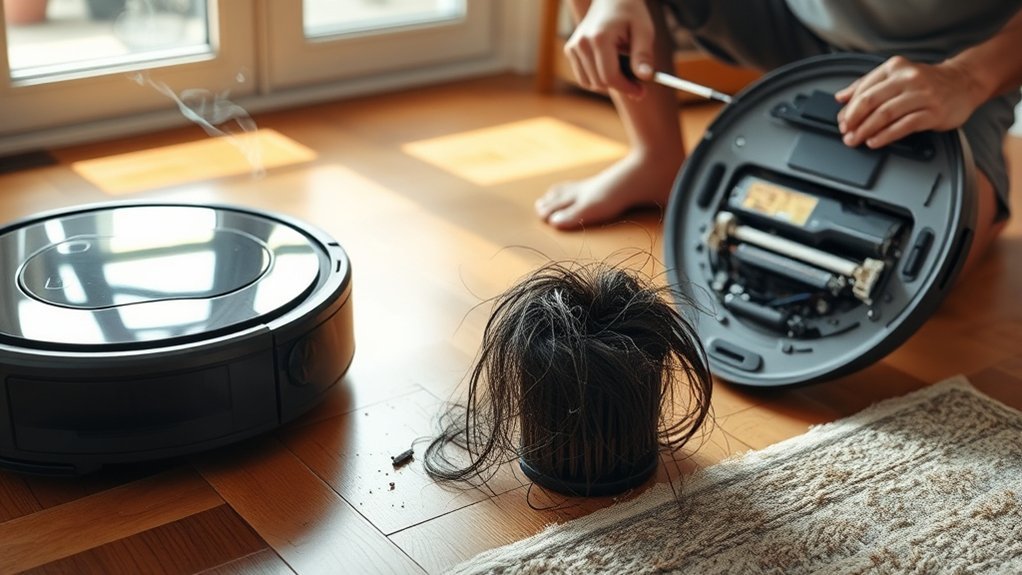
A robot vacuum usually develops a burning odor when moving parts generate excessive friction, airflow becomes restricted, or electrical components overheat. The smell may come from the brush system, suction motor, dust compartment, or charging equipment. Identifying when the odor appears helps narrow down the cause.
Different smells can provide useful clues, although they cannot confirm a diagnosis on their own.
- Burning rubber: Hair, string, or carpet fibers may be jamming the brush roll. On models with a drive belt, a slipping or damaged belt can produce a similar smell.
- Hot dust: A clogged filter, full dustbin, or blocked suction channel may reduce airflow and increase motor temperature.
- Burning plastic or electrical odor: Overheated wiring, a failing motor, damaged charging contacts, or another electrical fault may be responsible.
- Musty or stale odor: Damp debris, dirty filters, and moisture trapped in the bin or mopping system may cause an unpleasant smell without actual overheating.
According to LG’s robot vacuum odor troubleshooting guidance, blocked nozzles, dirty filters, full dustbins, and moisture are common causes of unusual odors. LG also recommends professional inspection when the machine develops a burning smell.
Warning: Stop using the robot vacuum immediately if you notice a burning smell. Turn it off and unplug its charging dock if you can do so safely. If you see smoke, flames, battery swelling, or rapidly increasing heat, move away and seek emergency assistance. Never handle or dismantle an appliance showing signs of an active battery or electrical failure.
If the vacuum is cool and shows no signs of electrical damage, you can inspect its accessible parts. Start with the brush roll because tangled debris is easy to identify without opening the motor housing.
Check the Brush Roll and Belt
A jammed brush roll can create friction and produce a burning rubber smell. Hair, thread, and carpet fibers often collect around the roller and its end caps. This buildup can prevent smooth rotation and place additional strain on the brush motor.
Follow these steps after turning off the robot and allowing it to cool.
- Remove the brush cover. Place the vacuum upside down on a soft, stable surface. Release the brush guard using the method shown in your model’s instructions.
- Lift out the brush roll. Look for wrapped hair, thread, carpet fibers, or other debris around the bristles and roller shaft.
- Remove tangled material. Carefully cut or unwind trapped hair. Avoid cutting the bristles or damaging rubber brush surfaces.
- Clean the end caps and bearings. Remove detachable end caps when the manufacturer permits. Hair packed beneath these parts may stop the roller from turning properly.
- Check the brush assembly. Inspect it for cracks, worn ends, damage, or binding. Reinstall the roller correctly and check that the assembly moves as intended.
Do not force a stuck roller. If the brush remains difficult to turn after cleaning, its bearings or drive mechanism may be damaged.
The iRobot main brush maintenance instructions recommend removing debris from brush ends and caps. They also warn that excessive hair buildup can permanently damage the cleaning mechanism.
Does Your Robot Vacuum Have a Drive Belt?
Some vacuum cleaners use a rubber belt to transfer power from the motor to the brush roll. A stretched, glazed, cracked, or slipping belt can generate heat and a burning rubber odor.
However, you should not assume every robot vacuum has an accessible drive belt. Many models use integrated brush-drive assemblies that require different servicing procedures.
If your model has a manufacturer-serviceable belt, inspect it only as directed in the manual. Replace it with the correct part when damage is present. Otherwise, leave the internal drive assembly closed.
The ECOVACS brush troubleshooting guide identifies tangled rollers, worn belts where fitted, and brush motor faults as possible reasons a vacuum brush stops spinning.
Check the Side Brushes and Wheels
The main roller is not the only moving part that can become jammed. Hair and debris can wrap around side-brush shafts, wheel axles, and the front caster wheel.
Inspect each accessible wheel and brush for trapped material. Remove visible debris and check for smooth movement without forcing the mechanism.
A wheel that still binds after cleaning may have a damaged bearing or motor. Stop troubleshooting that component and arrange service rather than attempting to force it loose.
Clean the Filters, Bin, and Airflow Paths
A dirty filter or full dustbin can restrict airflow and increase the load on a robot vacuum’s suction motor. You may notice weaker suction, unusual motor noise, or hot air before the burning odor becomes obvious. Cleaning these areas removes common obstructions and can restore normal airflow.
Start with the dustbin and work toward the intake opening.
- Empty the dustbin. Remove the container and discard collected dirt, hair, and debris. Check whether compacted dust is blocking the outlet.
- Inspect the filter. Remove loose dust using the cleaning method approved for your model. Replace the filter if it is damaged, heavily clogged, or due for replacement.
- Clear the suction path. Check accessible intake openings, dust channels, and the area behind the brush roll for lint or trapped objects.
- Clean removable parts. Wash the dustbin with warm, soapy water only if the manufacturer allows it. Dry every washable part completely before reassembly.
- Reinstall everything correctly. Check that the filter, dustbin, brush roll, and protective covers fit securely before considering reuse.
Can You Wash a Robot Vacuum Filter?
Some robot vacuum filters are washable, while others must remain completely dry. Washing a non-washable filter can damage the filter material and reduce its effectiveness.
For example, iRobot’s Roomba s Series maintenance guidance says to clean the filter by tapping away debris, not by washing it. The removable dustbin can be rinsed with warm water after the filter has been removed.
By comparison, the eufy X10 Pro Omni manual permits rinsing its dustbox and filter, provided both are completely dry before reuse.
Always follow the cleaning method specified for your filter. Never operate the vacuum without its required filter installed.
How Often Should You Replace the Filter?
Filter replacement intervals depend on the model, cleaning frequency, and amount of dust collected.
The original 3-to-6-month guideline applies to certain models, including the eufy X10 Pro Omni. However, iRobot recommends replacing the Roomba s Series filter every two months.
Check the maintenance schedule for your specific robot rather than applying one replacement interval to every brand.
If suction remains weak after cleaning, replace a visibly clogged or damaged filter and inspect the airflow passages again.
For robot vacuums with auto-empty stations, check the dock’s dust bag and accessible debris channel as well. A blockage in the station may affect dust collection or produce an odor during emptying.
Check for Overheating or Electrical Faults
Overheating can occur when a robot vacuum works against brush resistance, restricted airflow, or unusually demanding cleaning conditions. Electrical faults are more serious because they may involve the motor, battery, charger, or internal wiring. A strong burning odor should never be treated as normal operating heat.
Long cleaning sessions on thick carpets or heavily soiled areas can increase mechanical strain. However, repeated overheating during normal use may indicate a failing component.
Use the following signs to decide which area needs attention.
| Check | Diagnostic sign | Action |
|---|---|---|
| Motor | Excessive heat, grinding noise, or recurring burnt odor | Stop use and arrange service |
| Brush rolls | Tangled hair, binding, or damaged roller ends | Clean accessible parts and replace damaged components |
| Cords | Fraying, discoloration, or melted insulation | Disconnect power safely and replace or professionally repair |
| Wiring | Visible damage, suspected loose contact, or electrical odor | Do not open the housing; seek professional service |
What if the Burning Smell Comes From the Charging Dock?
A smell that appears while the robot is charging may point to the charging station, electrical contacts, power adapter, or battery rather than the brush roll.
Disconnect the dock from the outlet if it is safe to do so. Once everything has cooled, inspect accessible areas for obvious signs of damage.
- Look for discoloration or melted plastic around the charging contacts.
- Check the power cord and adapter for damaged insulation.
- Inspect the dock’s accessible airflow openings for dust or obstructions.
- Check whether the robot or dock has developed abnormal heat, swelling, or a strong chemical odor.
Do not reconnect damaged equipment to test whether the smell returns. Charging faults require inspection by the manufacturer or a qualified repair professional.
Could the Battery Be Causing the Burning Smell?
Yes. A failing lithium-ion battery may produce unusual heat, odors, swelling, or other warning signs. However, a burning smell alone cannot confirm a battery fault.
The U.S. Fire Administration’s battery safety guidance advises stopping battery use when you notice unusual odors, excessive heat, leaking, changes in shape, or unusual noises.
Warning: Never puncture, open, or attempt to repair a damaged lithium-ion battery. Do not continue charging a vacuum that shows swelling, leakage, smoke, or severe overheating. If there is an active fire or rapidly worsening condition, evacuate the area and contact emergency services.
When Should You Contact a Repair Technician?
Professional service is the safest choice when the smell continues after accessible parts have been checked or when electrical damage is suspected.
Stop troubleshooting and contact the manufacturer or an authorized technician if:
- The burning odor returns after cleaning the brush and airflow passages.
- The brush roll remains jammed despite removing visible debris.
- The suction motor makes grinding noises or repeatedly overheats.
- You notice damaged wiring, charging contacts, or melted plastic.
- The battery or charging equipment shows unusual heat or other warning signs.
- The vacuum continues displaying motor or airflow errors after the recommended maintenance.
For example, iRobot’s Error 26 guidance identifies insufficient airflow as a possible problem on certain Roomba models. The manufacturer recommends filter care and further diagnosis if the error continues.
Error codes differ between models. Record any displayed message and describe when the odor occurred when contacting support.
Note: Internal motor, battery, and electrical repairs should be handled by qualified service personnel. Cleaning accessible parts does not prove that an overheated robot vacuum is electrically safe. If the cause remains uncertain, keep the unit switched off and disconnected from charging.
Prevent Burnt Smells From Returning
Regular maintenance helps reduce the friction, airflow restrictions, and heavy operating loads that contribute to burning odors. You can prevent many avoidable problems by keeping the cleaning system free of debris and replacing worn parts before they fail.
The following habits are especially useful:
- Clean the main brush regularly. Remove accumulated hair and thread from the roller, end caps, and nearby moving parts.
- Empty the dustbin frequently. Avoid letting compacted dirt block the airflow opening.
- Maintain the filter. Clean or replace it according to your model’s schedule and the amount of dust collected.
- Inspect moving parts. Check side brushes, wheels, bearings, and any manufacturer-serviceable drive belt for wear or restricted movement.
- Manage demanding cleaning conditions. Avoid repeatedly forcing the robot through carpet or debris that causes its brushes to bind. Reduce prolonged operation in areas where overheating has occurred.
- Keep the charging station clean. Remove accessible dust and debris, and watch for unusual heat or contact damage.
- Store the vacuum properly. Use a dry, well-ventilated location to reduce moisture buildup and lingering odors.
iRobot recommends cleaning Roomba main brushes weekly, or twice weekly in homes with pets. Other models may have different maintenance needs.
For robots that also mop, remove dirty water and clean washable mop components as directed. Damp pads and wastewater tanks can develop odors that are easy to confuse with problems in the vacuum itself.
The eufy robot vacuum odor guide also identifies moisture, dirty mopping equipment, and accumulated debris as causes of persistent unpleasant smells.
Finally, pay attention to changes in operating sound, suction, brush movement, and temperature. These warning signs may help you identify a developing blockage before it causes further damage.
Key Takeaways
- Hair can collect beneath brush end caps and around wheels, even when the visible roller looks clean.
- A smell that develops during charging needs a different inspection from one that appears during floor cleaning.
- Filter washing and replacement intervals vary by model. Never assume every filter can be rinsed.
- Recurring burning odors, damaged electrical parts, or abnormal battery heat require professional attention.
Frequently Asked Questions
How Do You Fix a Vacuum That Smells Like It’s Burning?
Turn off the vacuum, disconnect its power source safely, and allow it to cool. Inspect accessible brushes, wheels, filters, and airflow passages for obstructions. Remove trapped debris and replace damaged maintenance parts. If the smell is electrical, returns after cleaning, or has no clear cause, stop using the vacuum and arrange professional service.
My Robot Vacuum Has a Bad Smell. How Can I Get Rid of It?
For ordinary stale or musty odors, empty the dustbin, remove trapped pet hair, and clean the removable parts according to the manufacturer’s instructions. Replace dirty filters when needed and dry washable components completely. Check mopping pads and water tanks if fitted. A genuine burning smell requires immediate shutdown rather than ordinary odor treatment.
My Roomba Smells Like Burning. What Could Be Causing This?
A Roomba may smell like burning because of tangled main brushes, blocked airflow, a dirty filter, motor overheating, or an electrical fault. Stop the robot and disconnect its dock safely. Once cool, inspect accessible parts for obstructions. If the odor persists or involves the battery or charging system, contact iRobot support or an authorized technician.
Why Does a Vacuum Have a Burning Smell?
A vacuum develops a burning smell when friction, overheating, or an electrical fault creates excessive heat. Common causes include blocked brushes, accumulated dust, restricted filters, worn belts where fitted, and failing motors. Poor maintenance can increase the risk, but electrical damage can also occur without a visible blockage.
Can I Use My Robot Vacuum Again After It Smells Burnt?
Do not restart a robot vacuum while the cause of its burning smell is unknown. Cleaning a visible obstruction may solve a mechanical problem, but it does not rule out internal damage. If you notice strong electrical odors, melted parts, battery problems, or repeated overheating, keep the unit disconnected until it receives professional inspection.
Conclusion
A robot vacuum that smells like burning may have a jammed brush roll, blocked airflow, an overheating motor, or an electrical problem. Start by stopping the vacuum and identifying whether the smell came from cleaning or charging. Inspect accessible parts only after the unit is safe and cool. Regular maintenance can reduce avoidable strain, but recurring burning odors and suspected electrical faults require professional inspection before further use.
Sources
- iRobot: Main Brush Care: Brush cleaning, hair removal, and recommended maintenance frequency.
- ECOVACS: Vacuum Brush Troubleshooting: Brush obstructions, belt problems, and motor-related faults.
- LG: Robot Vacuum Odor Troubleshooting: Dustbin, filter, moisture, airflow, and burning-odor safety guidance.
- iRobot: Roomba s Series Essential Care: Filter replacement, non-washable filters, washable bins, and roller maintenance.
- eufy: X10 Pro Omni User Manual: Filter washing, drying, and recommended replacement intervals.
- iRobot: Error 26 Support: Insufficient airflow, filter care, and cleaning-head troubleshooting.
- eufy: How to Reduce Robot Vacuum Bad Smells: Burning odors, pet debris, moisture, dock odors, and maintenance.
- U.S. Fire Administration: Battery Fire Safety: Lithium-ion battery warning signs and safe handling.