When a robot vacuum wheel stops turning, the cause is often mechanical rather than electronic. Hair, dust, and small debris can bind the axle, while blockages in the wheel housing can add friction. A quick manual spin can reveal whether the wheel moves freely or feels stiff. If cleaning does not restore motion, the issue may be deeper, and the next checks become more specific.
Why the Robot Vacuum Wheel Gets Stuck

Robot vacuum wheels often get stuck when debris such as hair or dust wraps around the axle and restricts rotation.
A stuck robot vacuum wheel can also result from toys, cords, or thick rugs blocking the path, forcing the machine to veer, hesitate, or circle.
Wear on the wheel itself, including damaged tread or bent components, increases friction and reduces smooth motion.
In some cases, the wheel motor fails internally because of damaged wires, loose connections, or other electrical faults, leaving the wheel unable to spin.
These conditions limit independent movement and reduce cleaning freedom.
Practical maintenance tips include routine inspection, prompt removal of obstructions, and checking for signs of wear before the problem worsens.
When the wheel motor or mounting parts show repeated resistance, the unit may need service or replacement to restore reliable motion.
Check the Robot Vacuum Wheel for Hair and Debris
A quick inspection of the wheels should be the first step, since tangled hair and trapped debris can greatly restrict rotation and slow overall movement.
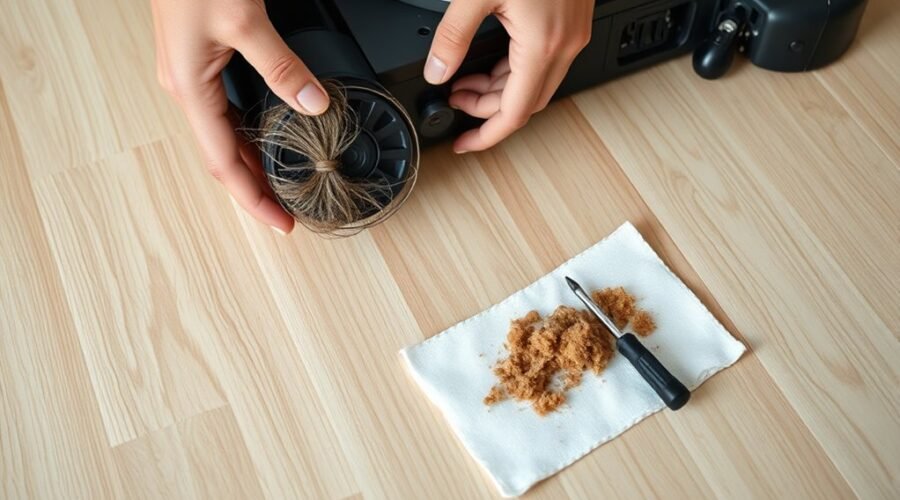
To check the front assembly, the front caster wheel should be lifted and rotated by hand, looking for strands, lint, or grit that limit motion. Any visible buildup around the axle or tire edge should be cleared with tweezers or a small brush, taking care to remove hair without forcing the parts.
The same process should be applied to the drive wheels, because even minor wheel issues can reduce traction and navigation accuracy. Cleaning the wheels on a routine basis helps keep movement free and predictable.
The same process should be applied to the drive wheels, as even minor buildup can affect traction and navigation.
After each pass, the wheel should spin smoothly and return without resistance. Frequent attention also supports a longer service life by preventing small obstructions from becoming operational faults.
Inspect the Wheel Housing for Buildup
After the wheels themselves are cleared, the wheel housing should be inspected for hair, dirt, and debris that can build up around the axle and restrict movement.
A careful inspect of the wheel housing helps identify obstruction before it becomes a larger fault. Any debris caught near the axle should be removed with a soft brush or tweezers, keeping the area clean without forcing parts out of alignment.
Dust buildup inside the housing can raise friction and reduce wheel response, so this space should be clean and free of packed residue.
The casing around the wheel housing should also be checked for wear, cracks, or deformation, since damaged parts can create drag and compromise navigation.
Regular maintenance preserves mechanical freedom and supports reliable movement.
When the housing is clear, the wheel can operate with less resistance and the vacuum can move with greater autonomy across the floor.
Test Whether the Robot Vacuum Wheel Spins Freely
With the robot vacuum powered off, the wheel should be rotated by hand to confirm that it spins freely without binding or resistance. This test gives immediate evidence of mechanical drag and helps isolate the fault before any deeper diagnosis. The wheel should move with consistent, light motion; stiffness suggests obstruction, misalignment, or wear.
Rotate the wheel by hand with power off; it should spin freely without binding or resistance.
- Inspect the wheel axle for tangled hair or trapped debris that can restrict motion.
- Verify the wheel assembly is secure, because loose mounting can stop proper rotation.
- Check for cracks, flat spots, or motor damage that may require replacement.
If the wheel does not spin freely after this inspect step, internal motor issues or sensor faults may be present. A clear, free-moving wheel supports reliable travel and restores operational independence.
Clean the Caster Wheel and Axle
If the wheel still shows resistance or uneven motion, the caster wheel and axle should be cleaned next. The caster wheel supports steering and balance, so debris here can block movement and weaken obstacle avoidance.
Power off the vacuum, remove the caster wheel, and inspect the axle for hair, dust, or other buildup. Use a soft brush or cloth to clean the caster wheel and wipe the axle thoroughly. Any obstruction around the axle should be cleared, and the shaft should spin smoothly before reassembly.
This maintenance step reduces friction, restores freer motion, and helps the machine move without unnecessary strain. Regular attention to the caster assembly can prevent navigation faults and extend service life.
For an audience seeking liberation from repeated failures, this small task removes a common source of drag and keeps the robot vacuum ready to travel efficiently across the home.
Reset the Vacuum and Test It on a Flat Floor
A reset may clear navigation faults that keep the robot vacuum from driving correctly. To reset the robot, hold the designated buttons, often SPOT and DOCK, for about 10 seconds until the indicator lights change. This action can remove navigation errors and restore normal drive commands.
Hold SPOT and DOCK for 10 seconds to reset navigation faults and restore normal driving.
- Place the unit on a flat surface with no cords, rugs, or clutter.
- Run the vacuum straight ahead and observe whether the wheel assembly tracks evenly.
- Repeat the test on a flat floor to separate internal faults from room layout issues.
Testing in an open area gives a clean baseline. If the machine still circles or hesitates after the reset, the problem is not likely environmental.
In that case, inspect the wheel assembly and sensors for debris or damage that could block movement. Regularly test the vacuum on a flat surface to catch drift, preserve performance, and keep the path to independent cleaning clear.
How to Tell If the Wheel Motor Is Failing
After the reset and flat-floor test, a persistently poor drive response points toward a wheel motor fault rather than a navigation issue. A failing wheel motor often feels stiff or refuses to rotate freely when turned by hand, suggesting internal wear or damage.
During operation, unusual sounds such as grinding or clicking are strong indicators of mechanical failure or a trapped component. Temperature also matters: overheating during a short run means the motor may be drawing excessive current and nearing collapse.
Electrical connections should be inspected for loose plugs, bent pins, or corrosion, because weak power delivery can mimic a dead wheel.
If the motor remains suspect, a direct battery test can confirm whether it runs correctly outside the robot’s control system. When the wheel still performs poorly under direct power, the fault lies within the wheel motor itself, not the software.
That evidence supports decisive action and frees the machine from further false diagnosis.
How to Replace a Robot Vacuum Wheel
Replacement begins by powering off the robot vacuum, removing the top cover, and accessing the wheel assembly from inside the chassis.
The assembly is then unscrewed and the wheel is pulled free from the motor; if only the tire is worn, the rubber can be pried off and replaced separately.
A compatible replacement wheel or tire should be installed and secured, then tested for proper movement before the unit is reassembled.
Wheel Removal Steps
To remove a robot vacuum wheel, the device should be powered off and flipped upside down to expose the wheel assembly. These wheel removal steps let the technician clear the wheel path and restore obstacle avoidance without unnecessary delay.
A suitable screwdriver is then used to unscrew the assembly, with screw positions noted for later reassembly.
- Pull the wheel gently from its housing.
- Avoid stressing sensors or connected wiring.
- Pry off the rubber tire only if replacement is required.
The clean the wheel process should remain careful and controlled so the motor area is not damaged.
If the goal is to replace the motor or wheel base, the assembly is handled as a single unit, then set aside for the next stage.
Installing Replacement Wheel
With the wheel assembly removed, a replacement wheel can be installed by first powering off the robot vacuum and flipping it over for access.
During installing replacement wheel, any remaining screws should be checked, and the wheel assembly opened enough to pull the old part free. If a rubber tire is still attached, it should be detached before fitting the new wheel.
The wheel housing must be inspected for dust, hair, or packed grit, then cleaned thoroughly to restore unrestricted motion.
Next, align the new wheel with the axle and secure it firmly in place, confirming it spins freely without binding.
After reassembly, power on the unit and test the wheel movement. Smooth rotation indicates the repair has released the mechanism and restored independent operation.
When to Contact Robot Vacuum Support
When basic troubleshooting has been completed and the robot vacuum still fails to move properly, support should be contacted. If cleaning, debris removal, and wheel sensors checks do not restore wheel motion, the fault may be a motor failure or another internal component issue. At that point, continued DIY efforts add delay without improving liberation from the problem.
If basic cleaning and sensor checks fail, contact support; the problem may be a motor or internal component issue.
- Persistent circling or erratic navigation signals a deeper fault.
- A wheel that spins freely by hand yet fails under power may need diagnosis.
- Warranty coverage should be verified before authorizing repairs.
Customer support can confirm whether the unit requires service, part replacement, or factory evaluation. They may also provide instructions for documenting symptoms and serial details.
If the robot vacuum has exhausted basic cleaning and inspection steps with no success, contact support promptly to avoid further wear and unnecessary expense. Timely escalation keeps the path to repair direct and practical.
Prevent Robot Vacuum Wheel Problems
Regular inspection and cleaning of the drive wheels and wheel housing helps prevent hair, dust, and debris buildup from restricting movement. Each drive wheel should be checked for hair or dirt wrapped around the axle and removed before it hardens or binds the mechanism.
Users should clean the drive wheels with a soft brush or cloth, then inspect the housing for packed debris that can block rotation or steering. Wheel axles should be lubricated periodically with a manufacturer-approved product to reduce friction and preserve smooth travel.
The wheel motor harness should also be examined to check for loose wires, cracks, or abrasion that may cause intermittent loss of power. A clear docking area supports correct alignment and reduces impact stress during charging cycles.
Worn or damaged wheels should be replaced promptly, since delayed replacement can worsen imbalance, strain motors, and limit autonomous coverage. Consistent maintenance protects mobility and keeps operation independent.
Frequently Asked Questions
My Roomba Wheels Won’t Turn. What Can I Do to Fix This?
They should remove hair from the axles, rotate each wheel, and clean sensors. These wheel maintenance tips support troubleshooting robot common wheel issues, cleaning robot wheels, preventing wheel jams, then reset or inspect wiring.
What Are the Most Common Problems With Robot Vacuums?
Common robot vacuum problems include weak suction power, short battery life, clogged filter maintenance, navigation issues, and app connectivity failures. Wheel wear, debris buildup, and sensor faults also reduce performance, mobility, and cleaning autonomy.
My Roborock Main Wheels Are Jammed. What Should I Do?
A Roborock stopped by tangled hair, and the main wheels freed after obstruction removal. He should do wheel cleaning, verify wheel alignment, apply light wheel lubrication if needed, then follow troubleshooting tips or seek motor replacement.
Why Is My Vacuum Roller Not Spinning?
The vacuum roller is usually not spinning because of roller brush issues, debris, or a failed motor. Obstruction removal, maintenance tips, and troubleshooting steps improve performance enhancement; worn brushes or loose wiring may also be responsible.
Conclusion
In conclusion, a robot vacuum wheel that does not turn is usually hindered by debris, a clogged housing, or insufficient lubrication rather than immediate motor failure. Careful inspection of the axle, caster, and wheel assembly often restores normal motion. If manual testing reveals resistance or electrical faults remain, replacement or support may be required. As the adage goes, “an ounce of prevention is worth a pound of cure,” and routine cleaning helps avoid recurring drivetrain issues.