You want smart home products that make daily life easier, safer, or more convenient without creating unnecessary setup headaches. These three smart-home picks for 2026 cover different needs: entry monitoring, plug-in automation, and physical lighting control. Focus on compatibility, privacy, local versus cloud control, installation requirements, and ongoing subscription needs so you choose the device that actually fits your home.
Quick Verdict
Nest Doorbell: best for front-door video and smart alerts. Wyze Plug: best for inexpensive plug-in schedules and remote control. Lutron Pico: best for dependable physical lighting control in a compatible Caséta setup. These products are not direct substitutes for one another, so start with the problem you want to solve.
Affiliate disclosure: This roundup is reader-supported. When you click through qualifying Amazon links, we may earn a referral commission at no additional cost to you.
Top Picks
|
Category |
Product |
Best For |
|---|---|---|
|
🏆 Doorbell Camera Pick |
Front-door monitoring and smart alerts |
|
|
💰 Budget Automation Pick |
Schedules, voice control, and remote switching |
|
|
🎯 Lighting Control Pick |
Physical Caséta lighting control without extra wiring |
Selection Criteria
We compared these products based on platform compatibility, installation effort, everyday usefulness, reliability considerations, recurring costs, and how clearly each device solves its intended smart-home problem.
Because these products belong to different categories, they should not be compared by one universal performance score. For the doorbell, important factors include video quality, alerts, battery and storage limitations. For the smart plug, focus on electrical rating, Wi-Fi compatibility, scheduling, and integrations. For the remote, focus on Caséta compatibility, local control, placement flexibility, and battery life.
Before You Buy
Check the ecosystem you already use before ordering. The Nest Doorbell is managed through Google Home, the Wyze Plug requires a compatible 2.4 GHz Wi-Fi network for normal app connectivity, and the Pico remote is designed primarily for compatible Lutron systems.
Nest Doorbell

You get a battery-powered video doorbell built for convenient front-door monitoring without requiring a wired-only installation. The Nest Doorbell (battery) uses a 960 × 1280 vertical video format with HDR, night vision, a 145-degree diagonal field of view, and up to 6x digital zoom, making it useful for checking visitors, deliveries, and activity near the entrance.
The rechargeable design works without existing doorbell wiring, although compatible wiring can also be used for charging and chime-related setups. Management runs through the Google Home app, and Google also supports selected Alexa functions through its Nest skill.
One important limitation is recording history. The battery model includes a limited amount of event video history without a paid plan. Longer event history requires Google Home Premium, and 24/7 continuous recorded video history is not available on the Nest Doorbell (battery), even when it is connected to compatible wiring.
What People Say
Common positive themes include convenient remote viewing, straightforward installation, useful motion or visitor alerts, and the ability to speak with someone at the door. Common concerns include battery charging frequency, dependence on cloud features for longer video history, and the size of the unit compared with some alternatives.
Overall Sentiment: Generally positive
Note: Treat the sentiment visual below as a qualitative summary rather than a live Amazon star rating or current review count.

|
Pros |
Cons |
|---|---|
|
✅ HDR video, night vision, and a tall 3:4 view help cover the doorstep |
❌ Longer recorded event history requires a paid Google Home Premium plan |
|
✅ Built-in alerts can identify common event types such as people, packages, animals, and vehicles |
❌ Battery life varies with activity, settings, and temperature |
|
✅ Can operate without existing doorbell wiring |
❌ No 24/7 continuous recorded video history on the battery model |
|
✅ Google Home integration plus supported Alexa features |
Long-Term Cost Considerations
The hardware can be used without a monthly monitoring contract, but buyers who want longer recorded event history should factor a Google Home Premium subscription into the long-term cost. Charging frequency also depends on activity levels and camera settings.
Value for the Right Buyer
The main value is convenience and awareness rather than a guaranteed financial return. Remote viewing, doorbell notifications, two-way audio, and event alerts can reduce unnecessary trips to the door and make it easier to respond to visitors or deliveries while away.
Situational Benefits
|
Situation |
How It Helps |
|---|---|
|
No Existing Doorbell Wiring |
The rechargeable battery allows installation without relying on an existing wired doorbell circuit. |
|
Frequent Deliveries |
Package and person alerts can help you notice activity at the door and check the live view remotely. |
|
Nighttime Monitoring |
Night vision and HDR help you check the entryway after dark. |
|
Remote Monitoring While Away |
On-demand live viewing and two-way audio let you see and communicate with someone at the door from a supported device. |
Time-Saving Benefits
Doorbell and motion notifications can reduce unnecessary trips to the entrance because you can check the live feed before deciding whether you need to respond in person.
Ease of Use
|
Feature |
Ease Level |
|---|---|
|
Battery Installation |
Easy to Moderate |
|
Google Home Setup |
Moderate |
|
Daily Interaction |
Easy |
|
Charging and Settings |
Moderate |
Versatility
The weather-resistant doorbell is designed for outdoor entry monitoring and can be viewed through compatible Google Home devices and supported Alexa displays. It can work from its rechargeable battery or with compatible existing doorbell wiring.
Energy and Battery Considerations
Charging frequency is not fixed. More detected activity, frequent live viewing, temperature conditions, and camera settings can shorten the time between charges, so high-traffic entrances may require more maintenance.
Problem Solving Ability
The Nest Doorbell addresses common front-door needs such as checking unknown visitors, seeing when a delivery arrives, and communicating with someone remotely. Buyers who need continuous recorded surveillance should choose a product designed specifically for that requirement instead.
Why You’ll Like It
- 960 × 1280 HDR video with night vision for a tall doorstep view
- Smart alerts for common event types including people and packages
- Rechargeable installation that does not require existing doorbell wiring
- Two-way audio plus Google Home and supported Alexa functionality
Who Should Buy This
Choose it if you want a recognizable smart-home doorbell with battery-powered installation, useful visitor and delivery alerts, and strong Google Home integration.
Who Should Avoid This
Skip it if you specifically need 24/7 continuous recorded history, want to avoid cloud subscriptions for longer event history, or do not want to recharge a battery-powered doorbell periodically.
Check Product Details on Amazon
Wyze Plug
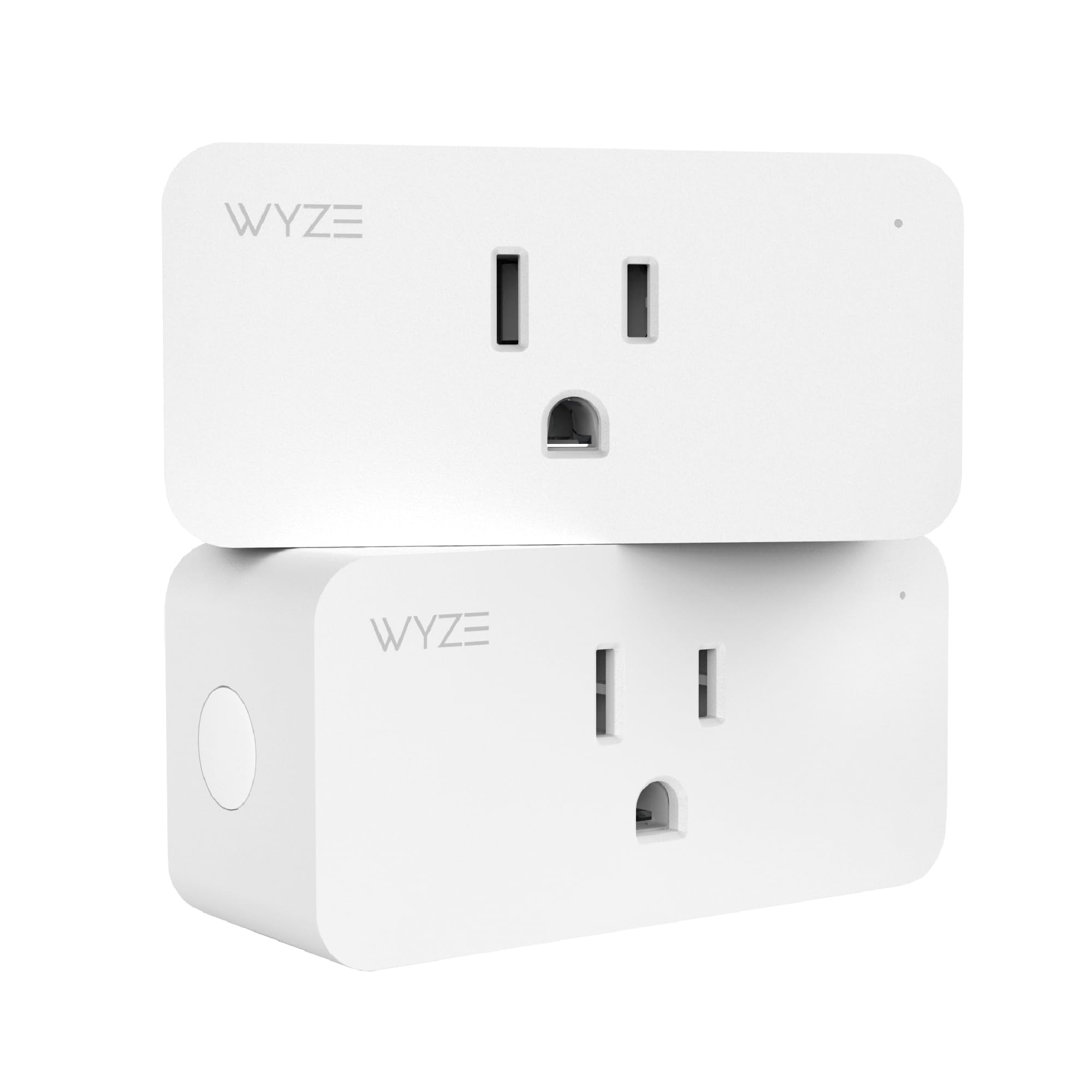
You get a compact indoor smart plug that turns compatible plug-in devices into remotely controlled or scheduled devices without requiring a separate hub. It connects through 2.4 GHz Wi-Fi and supports Alexa, Google Assistant, and IFTTT integrations.
Its official electrical rating is 100–120 VAC, 60 Hz with a 15A maximum output. That makes it useful for appropriately rated indoor devices such as many lamps, fans, chargers, and seasonal lights, but you should always confirm the connected device stays within the plug’s electrical limits and follow the appliance manufacturer’s instructions.
If you want low-cost automation for simple on/off routines, scheduled lighting, or voice commands, this is the most straightforward product in this roundup.
What People Say
Common positive themes include easy setup, compact size, convenient scheduling, and useful voice-assistant integration. Connectivity after router or power interruptions can be a frustration with Wi-Fi-dependent smart devices, so a stable 2.4 GHz network matters.
Overall Sentiment: Generally positive
Note: Treat the sentiment visual below as a qualitative summary rather than a live Amazon star rating or current review count.

|
Pros |
Cons |
|---|---|
|
✅ Straightforward plug-in setup with no separate hub required |
❌ App and voice features depend on a working Wi-Fi/network connection |
|
✅ Supports Alexa, Google Assistant, and IFTTT |
❌ Requires a 2.4 GHz Wi-Fi network |
|
✅ Compact indoor design for common household outlets |
❌ Indoor use only |
|
✅ Scheduling and vacation-mode features support simple automation |
Long-Term Cost Considerations
The Wyze Plug does not require a separate smart-home hub for basic use, which helps keep the initial setup simple. Scheduling devices off when they are not needed may reduce unnecessary electricity use in some situations, but actual savings depend on what you connect and how you use it.
Value for the Right Buyer
The main return is convenience. Remote switching, schedules, vacation routines, and voice control can automate repetitive tasks without replacing existing lamps or small plug-in devices.
Situational Benefits
|
Situation |
How It Helps |
|---|---|
|
Vacation Or Travel |
Schedules and remote control can automate selected indoor lights or devices while you are away. |
|
Small Apartments |
The compact plug adds smart control without installing a hub or replacing in-wall wiring. |
|
Hard-To-Reach Devices |
App or voice control can make compatible plug-in devices easier to switch without reaching the physical outlet. |
|
Routine Automation |
Timers and schedules can give lamps or other appropriate loads consistent on/off times. |
Time-Saving Benefits
Voice commands, remote control, and schedules can eliminate small repetitive tasks such as manually switching selected lamps or seasonal decorations on and off.
Ease of Use
|
Feature |
Ease Level |
|---|---|
|
Physical Installation |
Easy |
|
App Setup |
Easy to Moderate |
|
Voice Integration |
Easy |
|
Network Troubleshooting |
Moderate |
Versatility
The plug works with many suitable indoor devices that stay within its 15A maximum rating. It can be included in schedules, voice routines, and supported IFTTT automations, making it a flexible building block for simple smart-home tasks.
Energy Efficiency
Schedules can prevent selected devices from remaining on longer than intended. Do not assume that every connected device will produce meaningful energy savings, because savings depend on the device’s standby draw and your usage pattern.
Problem Solving Ability
The plug is useful when you want remote switching or timed control but do not want to replace the appliance, lamp, or wall outlet itself. Its biggest limitation is dependence on a compatible Wi-Fi network for smart features.
Why You’ll Like It
- No separate smart-home hub is required for basic setup
- Compact indoor format for simple plug-in automation
- Works with Alexa, Google Assistant, and IFTTT
- Scheduling and remote control support everyday routines
Who Should Buy This
Choose it if you want an inexpensive way to automate suitable lamps or plug-in devices and already have reliable 2.4 GHz Wi-Fi.
Who Should Avoid This
Skip it if you need outdoor use, fully local offline automation, or control of equipment that exceeds the plug’s electrical rating.
Check Product Details on Amazon
Lutron Pico

You get a compact wireless remote designed primarily for compatible Lutron lighting systems. The PJ2-3BRL format provides on/off, raise/lower, and a favorite preset when used with a compatible Caséta dimmer, giving you familiar physical buttons instead of making every lighting adjustment through a phone.
A major advantage is local control. Compatible Caséta dimmers and switches can communicate directly with Pico remotes without requiring Wi-Fi or a Smart Hub for basic operation. A Lutron Smart Hub becomes important when you want app control, schedules, smart-speaker integrations, and broader connected-home functions.
The Pico uses a replaceable CR2032 coin-cell battery, and Lutron specifies a typical battery life of about 10 years. It can be handheld or used with compatible mounting accessories for wall or tabletop placement.
What People Say
Common positive themes include responsive physical control, simple pairing with compatible Lutron devices, flexible placement, and the convenience of adding another control point without pulling new control wiring. The main limitation is that the Pico is primarily useful inside compatible Lutron ecosystems rather than as a universal remote for unrelated smart-home devices.
Overall Sentiment: Generally positive
Note: Treat the sentiment visual below as a qualitative summary rather than a live Amazon star rating or current review count.

|
Pros |
Cons |
|---|---|
|
✅ Physical on/off, dimming, and favorite-level controls |
❌ Primarily intended for compatible Lutron products |
|
✅ Flexible handheld, tabletop, or wall-mount placement options |
❌ Wall-mount accessories may be separate depending on the package purchased |
|
✅ Can directly control compatible Caséta devices without Wi-Fi or a hub |
❌ A Smart Hub is needed for many app, scheduling, and third-party integration features |
|
✅ Replaceable CR2032 battery with long typical battery life |
Long-Term Cost Considerations
The Pico can add another lighting control point without running new control wiring when paired with the right Caséta equipment. Its replaceable battery and simple local operation also keep routine maintenance low.
Value for the Right Buyer
The strongest value comes from adding convenient physical control to an existing or planned Lutron setup. It is especially useful when you want another switch location but do not want a conventional rewiring project.
Situational Benefits
|
Situation |
How It Helps |
|---|---|
|
Additional Lighting Control Point |
Adds wireless control of compatible Lutron lighting without running a new control wire to the desired location. |
|
Entryway Or Bedside Control |
Can be positioned where a physical lighting control is convenient, using the appropriate accessory or mounting method. |
|
Home Theater Or Living Room |
The favorite button can recall a preset dimming level when paired with a compatible Caséta dimmer. |
|
Homes Wanting Local Control |
Compatible Caséta dimmers and switches can respond directly to Pico commands without relying on Wi-Fi for basic operation. |
Time-Saving Benefits
Physical buttons and a favorite preset can make repeated lighting adjustments faster than opening an app or walking to the original wall control.
Ease of Use
|
Feature |
Ease Level |
|---|---|
|
Pairing With Compatible Caséta Device |
Easy |
|
Setting Favorite Level |
Easy |
|
Daily Operation |
Easy |
|
Mounting Options |
Easy to Moderate |
Versatility
The Pico can function as a handheld remote or be positioned as a more permanent control with compatible accessories. The exact functions depend on the Pico model and the Lutron device it is paired with, so confirm model compatibility before buying.
Energy Efficiency
The remote itself does not guarantee energy savings. However, convenient dimming and easier access to lighting controls may help some households reduce unnecessary lighting use.
Problem Solving Ability
The Pico is especially good at solving one specific problem: adding convenient physical control for compatible Lutron devices without installing another conventional wired control point.
Why You’ll Like It
- Physical on/off, raise/lower, and favorite controls for compatible lighting
- Multiple placement options with the appropriate accessories
- Direct local control of compatible Caséta dimmers and switches
- Replaceable CR2032 battery with long typical battery life
Who Should Buy This
Choose it if you already use, or plan to install, compatible Lutron Caséta lighting and want a dependable physical control point without conventional switch wiring.
Who Should Avoid This
Skip it if you need a universal remote for unrelated smart-home products or do not have compatible Lutron equipment.
Check Product Details on Amazon
FAQ
How Do I Choose The Right Smart Home Product?
Start with the specific problem you want to solve, then check whether the product works with the ecosystem and network you already use. For security cameras and doorbells, examine video history, subscriptions, power, privacy, and notification features. For smart plugs, check Wi-Fi requirements and electrical limits. For lighting controls, confirm exact model and ecosystem compatibility before ordering.
Are The Nest Doorbell, Wyze Plug, And Lutron Pico Directly Comparable?
No. They solve different smart-home problems. The Nest Doorbell provides front-door video and alerts, the Wyze Plug automates suitable plug-in devices, and the Lutron Pico provides physical wireless control for compatible lighting. Choose by use case rather than treating one as universally better than the others.
Will These Devices Work With My Voice Assistant And Network?
The Nest Doorbell is primarily managed through Google Home, and selected Nest doorbell features also work with Alexa through Google’s Nest skill. The Wyze Plug connects through 2.4 GHz Wi-Fi and supports Alexa, Google Assistant, and IFTTT.
The Lutron Pico is different: compatible Caséta dimmers and switches can communicate directly with the remote without Wi-Fi or a Smart Hub for basic local operation. A Lutron Smart Hub is needed for many app, scheduling, and broader smart-home integrations.
How Do Subscriptions, Privacy, And Video Storage Work?
The Nest Doorbell (battery) includes limited event video history without a subscription. Longer event history requires Google Home Premium, while 24/7 continuous recorded video history is not available on the battery model. Review Google’s current plan details before buying because subscription features can change.
The Wyze Plug and Lutron Pico do not perform video recording. For any connected device, use strong account credentials, enable available account-security protections, and keep apps and device firmware updated.
What Should I Check Before Buying?
Confirm the exact product model, your Wi-Fi setup, available power or wiring, ecosystem compatibility, subscription expectations, placement, and whether the device requires a hub or other compatible hardware. For the Wyze Plug, also confirm that the connected appliance remains within the plug’s electrical rating. For the Pico, confirm that your Lutron device supports the functions you want.
Customer Preferences
Buyers choosing among these three products are really choosing among three different priorities: entry monitoring, low-cost plug-in automation, or tactile lighting control. Compatibility should come first, followed by installation effort, cloud dependence, ongoing fees, and how often you expect to use the feature.

Wrapping Up
Choose the Nest Doorbell if your priority is front-door video, smart alerts, and remote visitor interaction. Choose the Wyze Plug if you want a simple, inexpensive way to add schedules, remote switching, and voice control to suitable indoor plug-in devices.
Choose the Lutron Pico if you use compatible Lutron lighting and want reliable physical controls without installing another conventional wired control point. The best pick depends on the smart-home problem you are trying to solve, not on a single overall ranking.
| Google Nest Doorbell (Battery) – Ash | Wyze Plug, 2.4GHz WiFi Smart Plug | Lutron Pico Remote for Caseta Smart Dimmer Switch | |
|---|---|---|---|
|
|
|
|
|
| Best For | Front-door video, smart alerts, and remote visitor interaction | Simple schedules, voice control, and remote switching | Physical control of compatible Lutron lighting |
| Key Highlights |
|
|
|
| Connectivity |
|
|
|
| Main Limitation | No 24/7 continuous recorded history on the battery model; longer event history requires a subscription | Requires 2.4 GHz Wi-Fi and is designed for indoor use | Not a universal smart-home remote; requires compatible Lutron equipment |
| Check Details on Amazon | Check Details on Amazon | Check Details on Amazon |
This Roundup is reader-supported. When you click through links we may earn a referral commission on qualifying purchases.