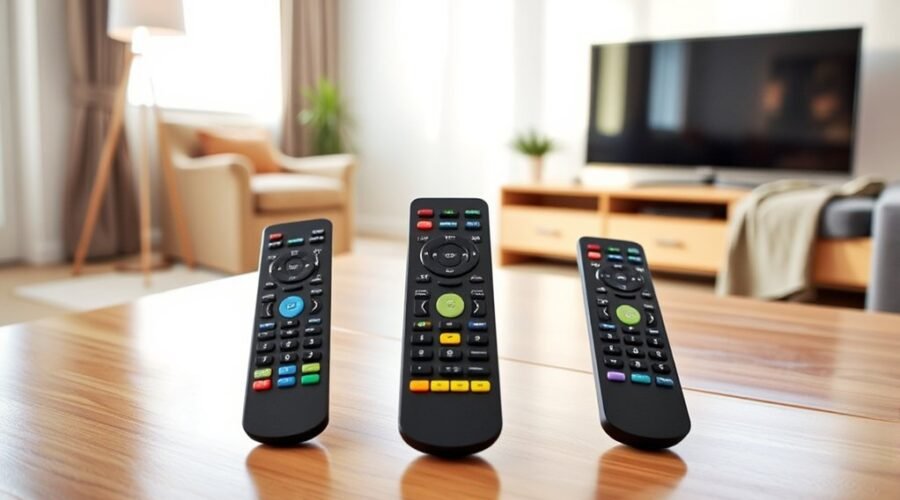
If you’re comparing universal TV remotes for seniors in 2026, three useful big-button options to consider are the GE Big Button Universal Remote Control, the Flipper Big Button TV Remote, and the Continu.us PC101 EasyClean Universal TV Remote. All three simplify everyday television control, but they solve slightly different problems. The GE focuses on straightforward two-device control, the Flipper emphasizes a senior-friendly layout and favorite channels, and the PC101 adds a water-resistant, easy-clean design. Before buying, confirm that the remote supports your exact TV, cable box, satellite receiver, or other device, especially when the equipment uses Bluetooth or RF instead of infrared (IR).
Disclosure: As an Amazon Associate, we may earn from qualifying purchases made through links on this page, at no additional cost to you.
Quick Verdict
- GE Big Button Universal Remote: A practical choice for simple control of up to two compatible devices.
- Flipper Big Button Remote: Best suited to shoppers who want very few everyday buttons plus programmable favorite channels.
- Continu.us PC101 EasyClean: A strong option when large buttons, simple operation, and easier cleaning are priorities.
Quick Comparison of the Best Big-Button Universal TV Remotes
| Remote | Best For | Device Control | Standout Feature | Before You Buy |
|---|---|---|---|---|
| GE Big Button Universal Remote | Simple two-device setups | Up to two compatible devices | Large keypad and master volume control | Check IR compatibility, especially for streaming devices. |
| Flipper Big Button TV Remote | Senior-focused simplicity | TV plus compatible set-top box | Up to 25 programmable favorite channels | Some provider boxes may require IR settings or additional setup. |
| Continu.us PC101 EasyClean | Easy cleaning and simple controls | TV and compatible set-top box | Water-resistant body and learning function | Water-resistant does not mean waterproof; confirm device compatibility. |
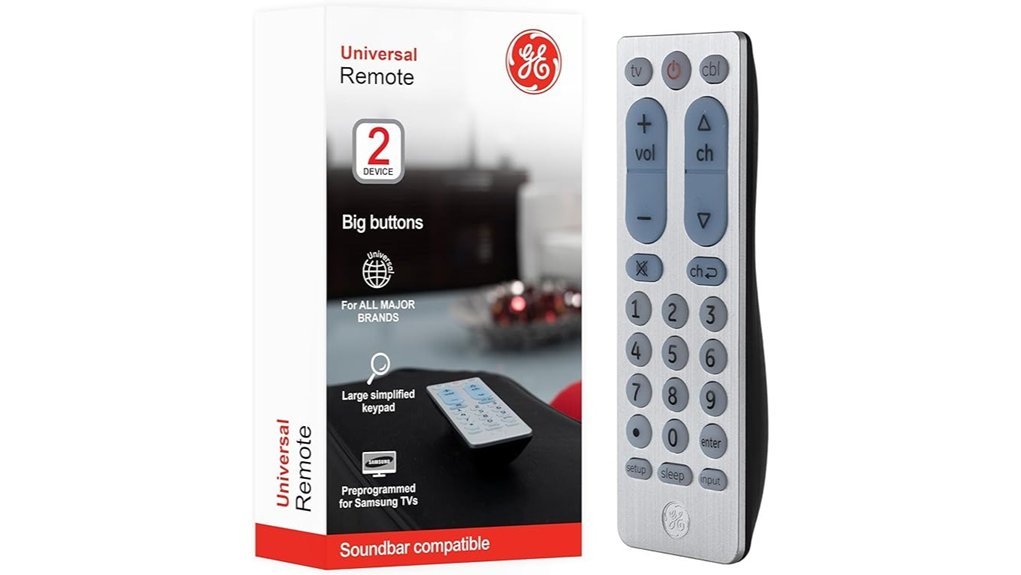
GE Big Button Universal Remote Control for Samsung, Vizio, Lg, Sony, Roku
Best for Simple Two-Device Control
The GE Big Button Universal Remote Control is a practical option for seniors, people with impaired vision, or anyone who wants fewer complications when controlling a television setup. Its ergonomic design and large, simplified buttons make essential controls easier to identify than on many crowded smart-TV remotes.
The remote can operate up to two compatible audio/video devices, such as a TV and cable or satellite box. It supports major television brands and offers both direct code entry and automatic code-search programming. It is also preprogrammed for Samsung TVs, although users should still confirm that all required commands work with their particular model. Master volume control can make everyday operation easier by keeping volume adjustment assigned to the preferred audio device.
Why You’ll Like It: It reduces a basic two-device entertainment setup to one large-button remote without adding complicated smart-home features.
Who Should Buy This: Seniors, users with impaired vision, and households that mainly need to control a TV plus one compatible second device.
Who Should Avoid This: Buyers who need to control three or more components, rely heavily on Bluetooth/RF streaming sticks, or need advanced smart-TV shortcuts.
Best For: Seniors and individuals with impaired vision seeking an easy-to-use remote control for a simple entertainment system.
Pros:
- Large, easy-to-read buttons improve everyday navigation.
- Controls up to two compatible devices from one remote.
- Offers direct code entry and automatic code-search setup options.
- Master volume control can simplify audio adjustment.
Cons:
- Requires two AA batteries, which are not included.
- Limited to two devices.
- IR operation means it will not control every Bluetooth- or RF-based streaming device.
Flipper Big Button Universal TV Remote for Seniors
Best Senior-Focused Layout
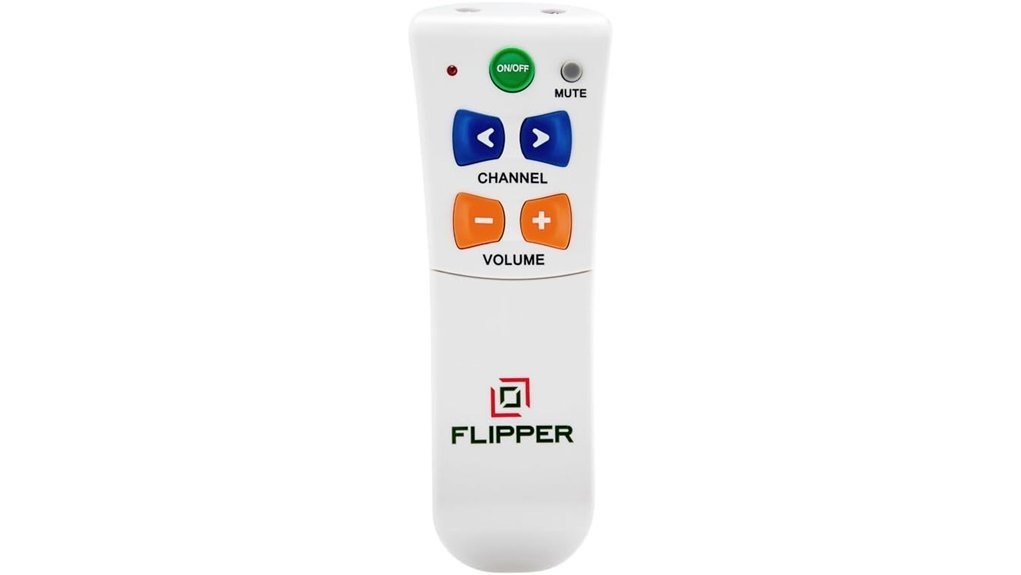
The Flipper Big Button Universal TV Remote is designed around a simple idea: keep the controls people use most and hide much of the complexity found on conventional television remotes. Its large buttons and simplified everyday controls can be especially useful for seniors, users with impaired vision, and households where accidentally pressing the wrong button causes frequent frustration.
Flipper can combine control of a compatible TV and cable, satellite, or DTV set-top box. One of its most useful features is the ability to program up to 25 favorite channels, allowing users to move through selected channels instead of browsing a large channel lineup. The setup can also be locked to help reduce accidental changes after a caregiver or family member has configured the remote.
Why You’ll Like It: The everyday control surface stays focused on essentials such as power, channel, volume, and mute instead of presenting a crowded smart-TV keypad.
Who Should Buy This: Seniors or caregivers who want a simplified TV experience, especially when favorite-channel programming would reduce unnecessary channel surfing.
Who Should Avoid This: Users who frequently need app navigation, voice commands, gaming controls, or numerous smart-TV shortcut buttons.
Best For: Seniors and older adults who want a simplified remote for basic television viewing and quick access to favorite channels.
Pros:
- Large buttons improve visibility and reduce clutter.
- Can combine compatible TV and set-top-box controls.
- Supports programming of up to 25 favorite channels.
- Settings can be protected to reduce accidental reprogramming.
Cons:
- The simplified layout is not ideal for users who regularly need advanced smart-TV functions.
- Set-top-box compatibility can vary by provider and hardware generation.
- Initial favorite-channel and device setup may be easier with help from a family member or caregiver.
Universal Water-Resistant Big Button TV Remote
Best Easy-Clean Design
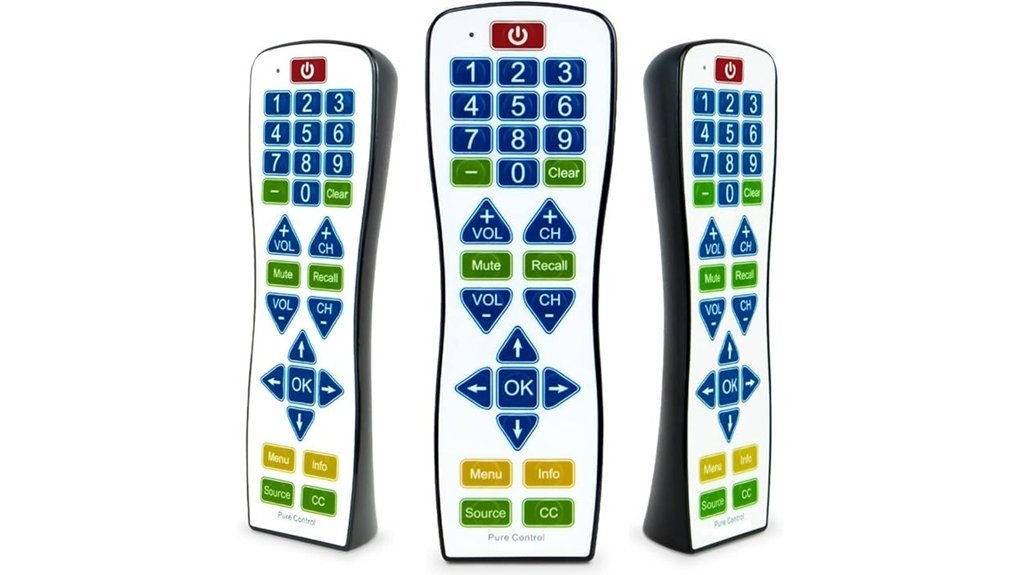
For seniors and households that prioritize simple controls and easier maintenance, the Continu.us PC101 EasyClean Big Button TV Remote offers a useful combination. Its water-resistant design helps protect it from everyday spills and makes the exterior easier to wipe clean than a remote with numerous small buttons and deep gaps.
The PC101 is designed to control a television and compatible set-top box. It also includes a learning function that can copy supported IR commands from an existing remote, which may help when a standard programming method does not provide every command a user needs. Large buttons and a straightforward layout keep the focus on common viewing functions.
Why You’ll Like It: It combines big-button operation with a surface designed to be easier to clean after normal household use.
Who Should Buy This: Seniors, families, care environments, or shared spaces where simple controls and wipe-clean maintenance are especially useful.
Who Should Avoid This: Buyers who need Bluetooth/RF control, advanced smart-TV navigation, or a remote for several different entertainment components.
Best For: Seniors and users who want straightforward TV control with an easy-to-clean, water-resistant remote body.
Pros:
- Large buttons make common functions easier to identify.
- Water-resistant construction helps with everyday spills and cleaning.
- Supports compatible TV and set-top-box control.
- Learning functionality can copy supported commands from an existing IR remote.
Cons:
- Water-resistant construction should not be treated as waterproof protection.
- IR-based operation will not support every Bluetooth- or RF-controlled device.
- Learning or initial programming may require assistance for users uncomfortable with remote setup.
Factors to Consider When Choosing Universal TV Remotes for Seniors or People With Disabilities in 2026
When selecting a universal TV remote for a senior or a person with a disability, ease of operation matters just as much as the number of supported devices. Consider button size and layout, visibility, grip comfort, device compatibility, programming complexity, and whether the remote includes features that reduce accidental changes.
Before You Buy Checklist
- Confirm the exact TV brand and model.
- Check whether any cable, satellite, or streaming device uses IR, RF, or Bluetooth.
- Decide whether one or two-device control is enough.
- Look for large, high-contrast buttons if visibility is limited.
- Consider favorite-channel programming if channel surfing causes confusion.
- Check whether setup can be locked after programming.
- Choose an easy-clean design if spills or frequent wiping are concerns.
Button Size and Layout
A universal TV remote intended for seniors or users with limited vision should make important controls easy to find. Larger buttons can improve visibility and give users a larger target to press. A simplified button layout also reduces the chance of accidentally opening menus or changing settings.
High-contrast labels can make controls easier to distinguish, while dedicated volume, channel, power, and mute buttons reduce the number of steps required for routine viewing. Users with limited hand strength or dexterity should also consider the remote’s overall size, grip shape, and the amount of force required to press each button.
Compatibility With Devices
Compatibility is one of the most important checks before ordering a universal TV remote. A product may support many television brands but still fail to control a particular streaming stick, cable box, or smart-TV feature.
Most traditional universal remotes communicate through infrared (IR). Some newer devices rely on Bluetooth or RF instead. A remote advertised for Roku, streaming players, cable boxes, or satellite receivers should therefore be checked against the exact model you own rather than relying only on a general brand name.
If you have a basic TV-and-cable-box setup, a two-device remote may be enough. More complicated home-theater systems may require a different type of universal controller.
Usability for Impaired Vision
For users with impaired vision, look beyond button size alone. A useful senior-friendly remote combines large buttons, clear labels, strong visual contrast, and a logical layout. Tactile differences between commonly used buttons can also make it easier to operate the remote by touch.
Favorite-channel functionality can be particularly helpful because it reduces the need to enter channel numbers or navigate long on-screen guides. A remote that minimizes unnecessary controls can also be less frustrating than one that simply enlarges a conventional crowded keypad.
Multi-Device Control Options
Multi-device control can reduce the number of remotes a user must keep track of. For many seniors, controlling the TV and a cable or satellite box from one remote is more useful than having dozens of advanced functions.
Consider exactly which devices need control before choosing. If the television handles volume while a set-top box handles channels, confirm that the remote can be programmed so those everyday functions work naturally without constant device switching.
Customization and Favorites
Customization can turn a basic universal TV remote into a much easier everyday tool. Favorite-channel programming allows users to move among preferred channels without scrolling through a full channel lineup. This can be useful for seniors who repeatedly watch a small number of stations.
Some remotes also provide learning functions that copy supported commands from an original IR remote. When available, setup-lock features can help prevent accidental reprogramming after a family member or caregiver has finished configuring the controls.
Programming Ease
A remote is only useful if it can be set up successfully. Look for straightforward programming options such as direct code entry, automatic code search, or a learning mode. Preprogramming for popular brands may shorten setup, but it should not be treated as a guarantee that every function will work on every model.
Clear instructions, available code lists, setup videos, and manufacturer support can be valuable if the intended user is uncomfortable troubleshooting electronics. In some cases, having a family member or caregiver complete the initial programming may create a much easier long-term experience.
Durability and Maintenance
Remotes are handled daily, dropped, and exposed to dust or occasional spills, so durability and maintenance deserve attention. A simple layout can be easier to wipe down than a remote packed with tiny buttons.
If water resistance is important, check exactly what the manufacturer promises. Water-resistant does not automatically mean waterproof or safe for submersion. Follow the cleaning directions provided with the remote.
Support and Resources
Good support can make a major difference when programming a universal remote. Before choosing a model, check whether the manufacturer provides a current code list, downloadable manual, setup instructions, troubleshooting information, or customer support.
Warranty details should also be checked at the time of purchase rather than assumed, because terms may differ by seller, model, or purchase date.
Frequently Asked Questions
Are Universal Remotes Compatible With All TV Brands?
No. Universal remotes often support many major television brands, but compatibility varies by remote, TV model, and the type of signal the device accepts. Check the manufacturer’s code list or compatibility information for your exact TV and any cable, satellite, or streaming equipment before buying.
How Do I Program a Universal Remote?
Programming depends on the model. Common methods include entering a device code, running an automatic code search, or using a learning function to copy compatible commands from the original remote. Install fresh batteries first, follow the manufacturer’s instructions, and test important functions such as power, volume, input, mute, and channel control before considering setup complete.
Can Seniors Use Voice Control Features?
Voice control can be useful for some seniors, but the three remotes reviewed here are primarily designed around simplified physical-button control rather than built-in voice operation. If voice control is important, check whether the television, streaming device, or its original remote provides a compatible voice-accessibility feature.
How Long Do Batteries Usually Last in a Universal Remote?
Battery life varies with the remote, battery quality, and how frequently it is used, so there is no reliable lifespan that applies to every model. Replace the batteries when button response becomes inconsistent, the operating range decreases, or the remote’s indicator light becomes weak.
What Should Hearing-Impaired Users Look for in a TV Remote?
A big-button remote does not directly improve hearing, but simple access to mute, volume, and television accessibility settings can make everyday operation easier. If closed captions are important, check whether the universal remote provides a suitable caption control or whether captions can be left enabled through the TV’s accessibility menu. Some advanced settings may still require the television’s original remote.
Conclusion
The best universal TV remote for a senior depends less on the number of features and more on which complications need to be removed. The GE Big Button Universal Remote is a sensible choice for straightforward two-device control. The Flipper stands out when a minimal everyday layout and programmable favorite channels are the priority. The Continu.us PC101 EasyClean is particularly appealing when large buttons and easier cleaning matter.
Final Recommendation
Choose the GE if you mainly want a conventional universal remote with bigger buttons for two compatible devices.
Choose the Flipper if reducing button clutter and simplifying channel access are the biggest priorities.
Choose the PC101 EasyClean if simple operation plus a water-resistant, wipe-friendly design best fits the user’s environment.
Whichever model you choose, verify compatibility with the exact television and set-top box before ordering. That one check can prevent most of the frustration associated with universal remotes and help ensure the final setup is genuinely easier to use.