For 2026, three floodlight cameras stand out for different smart-home needs: the Eve Outdoor Cam for Apple Home users who prioritize privacy, the Arlo Wireless Floodlight Security Camera 2K HDR for flexible wire-free placement, and the Google Nest Cam with Floodlight for Google Home households. The best choice depends on your power setup, preferred smart-home ecosystem, video resolution, recording plan, and whether you want battery-powered or hardwired installation.
Affiliate disclosure: This article contains affiliate links. We may earn a commission from qualifying purchases made through these links, at no extra cost to you.
Quick Verdict
- Best for Apple Home: Eve Outdoor Cam — privacy-focused HomeKit Secure Video, 1080p recording, and a 157° field of view.
- Best for Wire-Free Installation: Arlo Wireless Floodlight Security Camera 2K HDR — rechargeable battery power, 2K HDR video, and a 160° field of view.
- Best for Google Home: Google Nest Cam with Floodlight — built-in intelligent alerts, 1080p HDR video, and a bright hardwired floodlight.
Quick Comparison
| Camera | Video | Camera View | Power | Best Fit | Recording / Plan Note |
|---|---|---|---|---|---|
| Eve Outdoor Cam | 1080p / 24 fps | 157° | Hardwired AC | Apple Home / HomeKit Secure Video | HomeKit Secure Video recording requires an eligible iCloud+ plan. |
| Arlo Wireless Floodlight Security Camera 2K HDR | 2K HDR | 160° | Rechargeable battery | Flexible wire-free placement | Live view and basic alerts can work without a plan; advanced detection and cloud history depend on the selected Arlo Secure plan. |
| Google Nest Cam with Floodlight | Up to 1080p / 30 fps HDR | 130° diagonal | Hardwired AC | Google Home households | Includes up to 3 hours of event video history; longer history requires a compatible paid plan. |
Eve Outdoor Cam – Secure Floodlight Camera
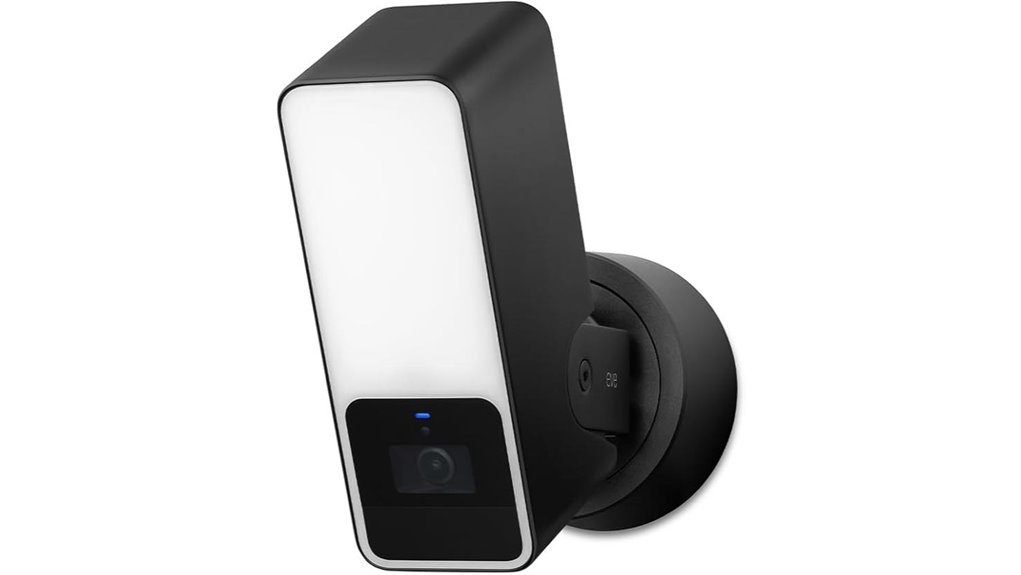
Best For: Apple Home users who want a hardwired floodlight camera with strong privacy controls and HomeKit Secure Video.
Eve Outdoor Cam combines a motion-activated floodlight with 1080p/24fps video, infrared night vision, a 157° field of view, and two-way audio. It is designed specifically for Apple HomeKit Secure Video and uses a HomePod or Apple TV as the home hub for supported video analysis and remote features.
Key Features
- Privacy-focused platform: Designed for Apple HomeKit Secure Video with encrypted recording stored through iCloud.
- Detection: HomeKit Secure Video can distinguish people, animals, vehicles, and packages when the required Apple home hub and service setup are in place.
- Night monitoring: Infrared night vision and an integrated dimmable floodlight support after-dark monitoring.
- Two-way audio: Built-in microphone and speaker allow real-time communication.
- Weather protection: IP55-rated enclosure for outdoor installation.
Installation Requirements
- Requires AC power with both a neutral wire and a ground connection.
- Requires a compatible iPhone or iPad, Apple Home, and a HomePod or Apple TV home hub.
- HomeKit Secure Video recording requires an eligible iCloud+ plan.
Why You’ll Like It
The main advantage is a privacy-first setup inside the Apple ecosystem. There is no separate Eve camera cloud account required for normal Eve use, while HomeKit Secure Video provides encrypted recording through your Apple setup.
Who Should Avoid This
Skip it if you do not use Apple Home, do not have the required home hub, or want a battery-powered installation. The hardwired electrical requirements can also make professional installation the safer choice for some homes.
Pros:
- Strong Apple Home integration and privacy controls.
- Wide 157° field of view with infrared night vision.
- Two-way audio and smart event classification through HomeKit Secure Video.
Cons:
- Limited to the Apple ecosystem.
- Hardwired installation requires neutral and ground connections.
- An eligible iCloud+ plan is required for HomeKit Secure Video recording.
Arlo Wireless Floodlight Security Camera 2K HDR – 1-Cam
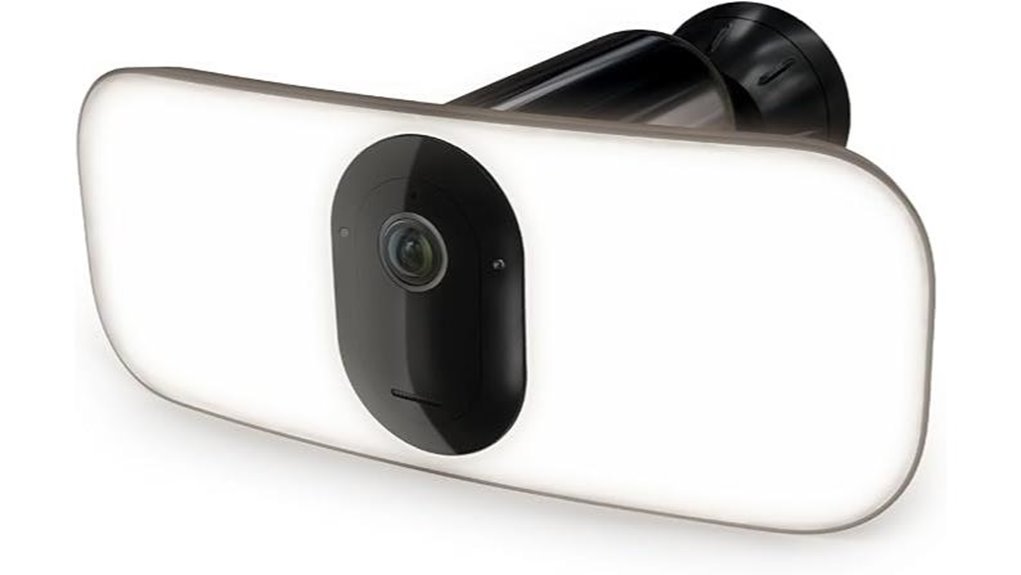
Best For: Homeowners who want a wire-free floodlight camera with 2K HDR video and flexible placement around a driveway, side yard, garage, or alley.
The Arlo Pro 3 Floodlight combines a rechargeable battery with 2K HDR video, a 160° field of view, color night vision, two-way audio, and a built-in siren. Its biggest advantage over the hardwired picks here is installation flexibility.
Key Features
- Video: Up to 2K resolution with HDR and a 160° diagonal field of view.
- Lighting: The wire-free battery setup provides a 2,000-lumen floodlight.
- Power: Removable rechargeable battery with direct Wi-Fi connectivity.
- Smart-home support: Works with Apple HomeKit, Amazon Alexa, and Google Assistant.
- Audio and deterrence: Two-way audio and a built-in siren.
Subscription Note
Live streaming, two-way audio, and basic alerts can be used without a paid plan. Features such as longer cloud video history, activity zones, and advanced detection depend on the Arlo Secure plan you choose. Avoid assuming every advertised AI or history feature is included for free.
Why You’ll Like It
If you do not have existing floodlight wiring where you want coverage, Arlo’s rechargeable design is easier to place than a hardwired model. It also offers the highest video resolution among the three cameras retained in this guide.
Who Should Avoid This
Choose a hardwired model instead if you want to avoid battery maintenance or if you need advanced cloud features without an ongoing subscription.
Pros:
- Wire-free installation with rechargeable battery.
- 2K HDR video and wide 160° field of view.
- Broad smart-home compatibility.
Cons:
- Battery requires periodic recharging.
- Advanced detection and extended cloud history require a paid plan.
- Brightness and runtime can depend on power configuration and activity level.
Google Nest Cam with Floodlight Security Camera
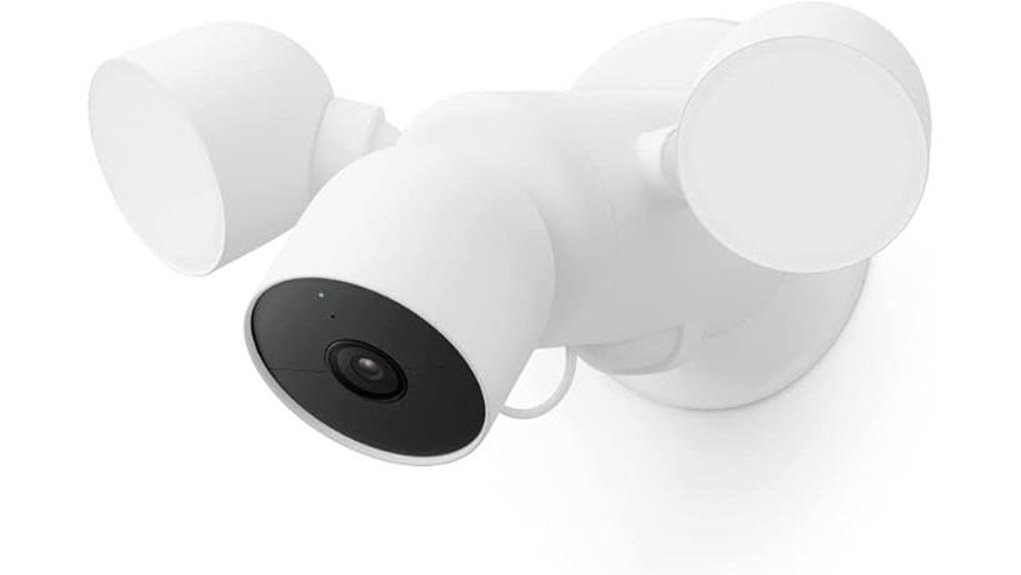
Best For: Google Home users who want a hardwired floodlight camera with useful built-in intelligent alerts and simple app-based control.
The Google Nest Cam with Floodlight records up to 1080p at 30 fps with HDR and has a 130° diagonal camera field of view. Its floodlight uses separate motion sensors with a 180° horizontal detection field, so the 180° figure should not be confused with the camera’s viewing angle.
Key Features
- Intelligent alerts: Can distinguish people, animals, and vehicles without requiring a subscription for those basic classifications.
- Floodlight: Two adjustable lights with up to 2,400 lumens maximum brightness.
- Video history: Includes up to 3 hours of event video history.
- Two-way audio: Built-in speaker and microphone with full-duplex communication.
- App control: Uses the Google Home app for monitoring, alerts, routines, and light settings.
Installation Requirements
This is a hardwired camera designed to replace an existing wired floodlight. It requires household AC power and appropriate mounting. If a suitable junction box or power connection is not already present, professional electrical installation may be appropriate.
Why You’ll Like It
Google Home users get useful person, animal, and vehicle alerts without needing a subscription just for those basic detections. The floodlight controls and camera feed also live in the same Google Home app.
Who Should Avoid This
Skip it if you need wire-free placement, 2K video, or longer included video history. Extended event history and continuous recording require a compatible paid Google Home Premium plan.
Pros:
- Useful intelligent alerts without a subscription for basic person, animal, and vehicle detection.
- Up to 1080p/30fps HDR video with night vision.
- Up to 2,400-lumen adjustable floodlight.
Cons:
- Hardwired installation is less flexible than a battery model.
- Only up to 3 hours of event video history is included.
- Longer history and continuous recording require a compatible paid plan.
How to Choose a Floodlight Camera for 2026
The best floodlight camera is not simply the model with the highest resolution. Your wiring, smart-home platform, storage preferences, detection needs, privacy priorities, and tolerance for subscriptions all affect the decision.
Key Features to Evaluate
Video Quality: 1080p is enough for general monitoring, while 2K can provide more detail for faces, vehicles, and activity farther from the camera. HDR can help balance bright and dark areas.
Detection Capabilities: Look for useful classifications such as people, vehicles, animals, or packages. Check which detections are included and which require a paid plan.
Lighting: Compare brightness, motion activation, dimming, and whether maximum brightness changes with the power source.
Recording History: Review whether footage is stored locally, in the cloud, or through a platform such as HomeKit Secure Video. Also check how much history is included before a subscription is required.
Smart-Home Integration: Match the camera to the ecosystem you already use. A camera that works well with your existing app, hub, and voice assistant is usually easier to manage.
Video Quality Standards
Resolution matters, but it should be considered alongside field of view, night vision, compression, Wi-Fi quality, and lighting.
Resolution and Frame Rate
- 1080p: Suitable for general driveway, entryway, and yard monitoring.
- 2K: Provides more image detail when the camera, network, and recording settings support it.
- Frame rate: The cameras in this guide range from 24 fps to 30 fps. Higher frame rates can make moving subjects look smoother, but resolution and lighting also affect usable detail.
Night Vision Features
- Infrared night vision: Useful when the floodlight is off and you still need visibility in darkness.
- Color night view: A bright floodlight can help compatible cameras capture more color detail at night.
- Light placement: Avoid aiming the floodlight at reflective walls or surfaces that can wash out the image.
Field of View
A wider camera field of view can reduce blind spots, but do not confuse camera viewing angle with a floodlight’s motion-sensor detection angle. They are different specifications. The three cameras retained here range from 130° to 160° for camera view.
Recording Options
Recording systems differ significantly. Eve relies on HomeKit Secure Video and an eligible iCloud+ plan for recorded events. Arlo offers basic live features without a plan but reserves cloud history and advanced detection features for paid tiers. Google includes up to 3 hours of event video history and offers longer history through a compatible paid plan. Compare these ongoing requirements before buying.
Smart Detection Capabilities
Smart detection can reduce irrelevant alerts by identifying specific event types. Before choosing a camera, check:
- Which object types the camera can identify.
- Whether detection happens on-device, through a home hub, or in the cloud.
- Whether activity zones are available.
- Whether advanced alerts require a subscription.
- How quickly notifications reach your phone under normal network conditions.
Installation Requirements Explained
Hardwired cameras: Eve Outdoor Cam and Google Nest Cam with Floodlight require household power and proper outdoor mounting. Confirm the required wires, junction box, voltage, and local electrical rules before installation.
Battery-powered cameras: Arlo’s rechargeable design is easier to place where floodlight wiring is unavailable, but battery maintenance becomes part of ownership.
Before You Buy: Check Wi-Fi signal strength at the mounting point, mounting height, weather exposure, wiring, app compatibility, and whether you are comfortable with the camera’s recording plan.
Data Security Measures
Security cameras handle sensitive video, so privacy features deserve the same attention as image quality. Consider:
- Encryption: Check how live and recorded video is protected.
- Account security: Use a strong unique password and enable multi-factor authentication when the platform supports it.
- Local vs. cloud processing: Understand where detection and recordings are processed or stored.
- Retention controls: Review how long footage remains available and how it can be deleted.
- Sharing controls: Limit access to trusted household members and review permissions regularly.
Integration With Smart Home
Compatibility can be a deciding factor. Eve is built around Apple HomeKit Secure Video. Arlo supports several major ecosystems, including Apple HomeKit, Alexa, and Google Assistant. Google Nest Cam with Floodlight is centered on the Google Home app. Choosing a camera that fits your existing setup usually makes alerts, routines, viewing, and device management simpler.
Frequently Asked Questions
How Do Floodlight Cameras Improve Home Security?
Floodlight cameras combine lighting, motion detection, video monitoring, and phone alerts in one outdoor device. The light can make activity easier to see, while the camera records or streams what is happening so you can review events and respond when needed.
Can Floodlight Cameras Detect Motion at Night?
Yes. Outdoor floodlight cameras commonly use motion sensors and night-vision features to detect and record activity after dark. Detection range and reliability vary by model, mounting height, sensitivity settings, weather, and the layout of the area being monitored.
Are Floodlight Cameras Weather-Resistant?
Most outdoor floodlight cameras are designed for outdoor exposure, but weather protection varies. Check the manufacturer’s weather-resistance or IP rating, supported operating temperatures, mounting instructions, and whether electrical connections need additional protection.
How Much Storage Do Floodlight Cameras Require?
There is no universal storage requirement. Some floodlight cameras rely mainly on cloud history, some use local storage, and others use an ecosystem service such as HomeKit Secure Video. Resolution, event frequency, clip length, and retention period all affect how much storage is needed. Check the specific recording system before buying rather than relying on a fixed GB estimate.
Do Floodlight Cameras Integrate With Smart Home Systems?
Many do, but compatibility differs by brand and model. Verify support for the ecosystem you actually use—such as Apple Home, Amazon Alexa, or Google Home—and check whether a hub, subscription, or specific app is required for the features you care about.
Which Floodlight Camera Is Best for Renters?
A wire-free model such as the Arlo option may be easier to place without replacing an existing floodlight circuit, but renters should still get permission before drilling, mounting, or making exterior changes. Hardwired models generally require more permanent installation.
Do I Need a Subscription for a Floodlight Camera?
Not always, but the answer depends on the camera and the features you want. Basic live view or alerts may be included, while longer cloud history, advanced recognition, or continuous recording can require a paid plan. Review subscription requirements before purchase so ongoing costs do not come as a surprise.
Conclusion
For 2026, the best choice comes down to your ecosystem and installation needs. Eve Outdoor Cam is the strongest fit for Apple Home users who prioritize privacy. Arlo Wireless Floodlight Security Camera 2K HDR is the most flexible choice when you want wire-free installation and higher-resolution 2K video. Google Nest Cam with Floodlight makes the most sense for Google Home households that want built-in intelligent alerts and a bright hardwired light. Before buying, confirm your wiring or battery needs, Wi-Fi coverage, recording-plan requirements, and smart-home compatibility.