Robot vacuum wheels gradually wear down as they move across hard floors, carpets, and thresholds. Damaged rubber, poor traction, or unusual wheel noise can make your vacuum struggle to clean properly. Knowing the difference between normal dirt buildup and actual wheel damage helps you avoid unnecessary repairs.
Quick Answer
Replace robot vacuum wheels when the rubber tread is cracked, torn, badly flattened, or too worn to grip the floor. Persistent slipping, uneven movement, or grinding after cleaning can also indicate replacement is needed. If hair or debris is causing the problem, clean the wheels first. Replace the tire or complete wheel module only when necessary.
What Robot Vacuum Wheel Wear Looks Like
)
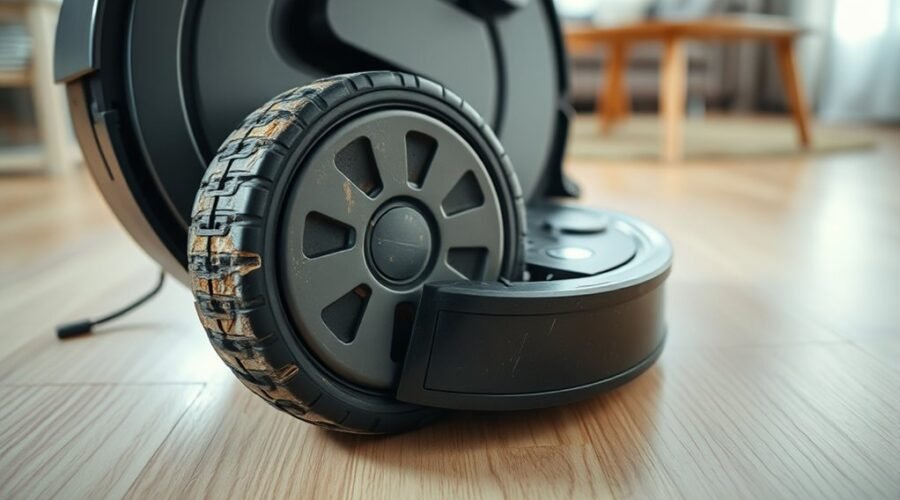
Robot vacuum wheel wear usually appears as cracked rubber, flattened tread patterns, or uneven surfaces. These changes reduce the wheel’s ability to grip the floor and move the vacuum smoothly.
Healthy drive wheels have a consistent rubber surface with enough tread to maintain traction. Worn wheels may appear polished, bald, or noticeably different from each other.
Look for these common signs:
- Cracked or torn rubber: Visible splits, loose sections, or missing pieces of tread.
- Flattened tread: Worn patterns that no longer provide reliable grip.
- Uneven wear: One side or edge appears thinner than the other.
- Wheel deformation: Rubber looks swollen, warped, or out of round.
- Loose or unstable movement: The wheel wobbles or fails to maintain consistent contact with the floor.
Check the rubber on both powered side wheels. One wheel may wear faster if it repeatedly slips, drags, or encounters obstacles.
Also inspect the front caster wheel. This smaller wheel helps support and steer the robot. Damage or trapped hair around its axle can cause dragging and floor scratches.
A little surface polishing does not automatically mean replacement is necessary. However, visible cracks, missing rubber, or repeated slipping indicate that the wheel needs closer attention.
Robot Vacuum Wheel Problems That Mean Replacement
Robot vacuum wheels usually need replacement when cleaning no longer restores reliable movement. The clearest warning signs are damaged tread, repeated slipping, persistent grinding, and poor wheel rotation.
These problems can affect navigation even when the vacuum’s sensors and software work normally.
1. The Vacuum Slips or Struggles on Thresholds
A worn wheel may spin without moving the robot forward. This can happen on smooth tile, hardwood, or raised thresholds where dependable traction matters.
The vacuum may also struggle to climb its charging dock. According to iRobot’s docking troubleshooting guidance, torn or damaged wheel treads can interfere with docking.
Before buying a replacement, remove any hair or debris and check that the dock is level and unobstructed.
2. The Robot Drifts, Turns Unevenly, or Spins in Circles
A robot that repeatedly pulls to one side may have uneven wheel traction or resistance. One wheel might grip normally while the other slips or struggles to rotate.
However, these symptoms can also result from blocked wheels, dirty sensors, or obstacles. They do not prove that the rubber needs replacement.
Compare both drive wheels after cleaning them. If one remains damaged or moves differently, inspect its wheel assembly.
3. Grinding or Clicking Continues After Cleaning
Grinding, clicking, or squeaking may come from debris, a damaged gear, a worn bearing, or a faulty wheel motor.
Remove visible obstructions first. If the noise continues, the problem may be inside the wheel module rather than on the outer tire.
A complete wheel module replacement or professional repair may be necessary.
A wheel that continues sticking or grinding after cleaning may have internal damage that requires repair or replacement.
4. The Robot Leaves Black Marks on Floors
Black marks or dark wheel tracks deserve inspection, especially when they appear repeatedly along the vacuum’s path.
They may come from rubber transfer, accumulated dirt, or a wheel dragging against the surface. Marks alone do not prove that the rubber is melting or decomposing.
Wipe the wheels and test the vacuum on a clean, suitable floor. If marks continue and the rubber is visibly deteriorating, replacement may be appropriate.
5. Wheel Errors Keep Returning
Persistent wheel warnings can indicate excessive resistance or a mechanical problem.
For example, Roborock’s Error 7 troubleshooting instructions recommend pressing and rotating the wheels to check for a blockage.
If the wheel remains stuck after removing debris, Roborock advises contacting customer support.
Do not automatically replace a wheel whenever an error appears. Confirm whether the problem comes from a blockage, damaged tread, or internal hardware.
Why Robot Vacuum Wheels Wear Out So Fast
Robot vacuum wheels wear faster when they face frequent friction, trapped debris, heavy carpet resistance, or repeated contact with difficult thresholds.
Several conditions can accelerate damage:
- Mixed flooring: Repeated movement between carpet, tile, and hard flooring places changing demands on the wheels.
- Hair and debris: Wrapped fibers and packed dirt increase resistance around wheel axles.
- Rough surfaces: Abrasive grit and uneven flooring can wear rubber more quickly.
- Thick carpets: Dense fibers may increase rolling resistance and make movement harder.
- Poor material quality: Less durable rubber or plastic may crack, harden, or lose shape sooner.
- Temperature and humidity: Unfavorable storage conditions can contribute to material deterioration over time.
Pet hair and long fibers deserve particular attention because they can become tightly wrapped around moving parts.
Trapped grit can also create friction inside the wheel housing. Over time, this may contribute to sticking, uneven movement, and added strain on the drive system.
Regular inspection helps you identify these problems before the wheel loses reliable traction.
How to Check Robot Vacuum Wheels for Damage
You can check robot vacuum wheels by inspecting the rubber, testing rotation, and comparing both drive wheels. Start with the vacuum powered off and placed on a clean, soft surface.
Use the following steps to separate ordinary debris buildup from physical wheel damage.
- Turn off the robot. Remove it from the charging dock and follow the manufacturer’s power-off instructions. Place it upside down on a soft towel.
- Inspect the rubber treads. Look for cracks, missing rubber, flat spots, thinning, or uneven wear.
- Remove visible debris. Check around the wheel axles and inside the wheel wells for hair, thread, and packed dust.
- Test wheel movement. Rotate each drive wheel by hand. Some resistance from the internal gears is normal, but both wheels should feel reasonably consistent.
- Check wheel suspension. Gently press each powered wheel inward and release it. Look for smooth movement and a normal return to position.
- Inspect the front caster. Check for a worn surface, trapped hair, a loose axle, or a wheel that no longer sits securely in its housing.
- Run a short test. Return the robot to an open, level floor. Check whether it drives normally without slipping, dragging, or making unusual noises.
If one wheel remains stiff after cleaning, the problem may involve the bearing, gearbox, or drive motor.
Persistent grinding, loose components, or an uneven suspension response can also indicate internal damage.
If the vacuum runs normally after cleaning, you probably do not need a new wheel yet.
Clean or Replace Robot Vacuum Wheels?
Clean robot vacuum wheels when dirt or hair is restricting movement. Replace them when physical damage remains or the wheel cannot operate properly after cleaning.
The following comparison helps you choose the correct action.
| Wheel Condition | Recommended Action |
|---|---|
| Hair or dust around the axle | Clean the wheel and remove trapped debris. |
| Dirty but undamaged rubber | Wipe clean and test traction. |
| Cracked, torn, or severely worn tread | Replace the tire if supported, or replace the wheel module. |
| Grinding or sticking after cleaning | Inspect for internal damage and consider module replacement or repair. |
| Repeated wheel errors without visible damage | Check for obstructions and obtain further diagnosis before replacing parts. |
Clean Wheels Regularly
Regular wheel cleaning removes debris that interferes with rotation and traction. A weekly inspection is a useful routine, especially in homes with pets or long hair.
To clean the drive wheels:
- Power off the vacuum and place it on a soft surface.
- Remove loose hair, thread, and dust with a soft brush or tweezers.
- Press and rotate each wheel gently to expose trapped debris.
- Wipe the rubber using a soft cloth, following your model’s cleaning instructions.
- Allow any damp surfaces to dry before restarting the robot.
For example, ECOVACS recommends turning off the robot, pressing and rotating the driving wheels, and using a slightly damp mop to clean them.
Do not pour cleaning solutions into the wheel housing or allow moisture to enter the motor assembly.
Front caster wheels may need separate care. iRobot recommends cleaning the front caster every two weeks and replacing it every 12 months or as needed.
On compatible Roomba models, you can remove the caster, clear the wheel cavity, clean hair from the axle, and reinstall it securely.
Some models, including Roomba Essential, have a front caster that cannot be removed in the same way. Follow the instructions for your exact robot rather than forcing the wheel out.
Replace Worn Treads
Replace worn rubber treads when cracks, tears, or excessive flattening reduce traction. A damaged tread may cause slipping even when the axle and motor work correctly.
Some robot vacuum designs allow replacement of the rubber tire without changing the entire wheel module. Others require a complete assembly.
Before purchasing replacement rubber:
- Confirm the exact robot model and wheel position.
- Check whether the tire is designed to be replaced separately.
- Choose a replacement with the correct size, profile, and fit.
- Inspect the underlying wheel for cracks, wobbling, or other damage.
A tire-only repair can avoid replacing a functioning motor and gearbox. However, an incompatible or poorly fitted tire may slip, detach, or interfere with movement.
Use manufacturer-approved parts whenever possible.
Check for Motor Damage
A wheel motor or gearbox problem may cause grinding, clicking, hesitation, or repeated movement errors. Cleaning the tread cannot fix damaged internal components.
If the wheel remains difficult to rotate or fails to move correctly, inspect the surrounding area for visible obstructions.
Persistent faults may involve the motor, gears, bearings, or electrical connections inside the module.
Do not assume lubrication will solve these problems. Oil or grease can attract dust, contaminate parts, or create additional resistance when used incorrectly.
Warning: Do not force a jammed wheel, open a sealed motor assembly, or apply lubricant unless the manufacturer specifically permits it. Disconnect the robot from charging before maintenance. If the wheel module is not designed for user replacement, contact an authorized repair provider.
If cleaning does not resolve the issue, check whether the manufacturer offers a replaceable wheel module or an approved repair service.
Replace the Wheel Module or Just the Tire?
Replace only the tire when the rubber is damaged but the wheel rotates and moves normally. Replace the complete wheel module when the motor, gearbox, bearing, or wheel mechanism is defective.
The distinction matters because a wheel module contains more than the outer rubber tread. It can also include the drive motor, gears, axle, housing, and suspension components.
Tire-only replacement may be suitable when:
- The rubber is cracked, torn, or badly worn.
- The wheel rotates normally after cleaning.
- No grinding or mechanical fault remains.
- Your specific model supports separate tire replacement.
Complete wheel module replacement may be necessary when:
- The wheel binds or drags even after cleaning.
- The gearbox or motor appears damaged.
- The wheel wobbles because of internal wear.
- Repeated wheel faults continue after other causes are ruled out.
For compatible Roomba e, i, j Series, and Combo 10 Max models, iRobot provides an official wheel module replacement procedure.
On models covered by that procedure, the repair involves removing the edge-sweeping brush, loosening five bottom-cover screws, and removing two screws that secure the wheel module.
The replacement module is then installed, and the cover and brush are reattached.
However, not every model with a similar name supports this procedure.
For example, some newer Roomba i1, i3, i5, and Combo i5 versions have a non-modular design. iRobot explains that versions with a battery door on the bottom cover cannot have their wheel modules replaced using the standard procedure.
Compatible versions instead have an original bottom cover secured by five screws without that separate battery door.
If your model is non-modular, contact iRobot support rather than attempting to remove a fixed assembly.
Before ordering any part, confirm the exact model, wheel side, and service compatibility. A replacement that fits one robot series may not fit another.
How to Make Robot Vacuum Wheels Last Longer
Regular maintenance can reduce premature wear on robot vacuum wheels. Clean treads, clear wheel housings, and suitable floor conditions help the robot move without unnecessary resistance.
Follow these practical habits:
- Inspect the wheels weekly. Look for early cracks, thinning rubber, uneven tread patterns, and hair buildup.
- Remove trapped debris promptly. Clear fibers and grit before they interfere with wheel rotation.
- Keep floors free of small obstacles. Loose cords, threads, and small objects can become trapped around wheels.
- Watch difficult transitions. If the robot repeatedly struggles with thick rugs or raised thresholds, restrict access to those areas when appropriate.
- Clean the wheel housing and nearby sensors. Use the cleaning method recommended for your model, and avoid getting moisture into electrical parts.
- Use lubricant only when approved. Follow the manufacturer’s exact instructions instead of applying oil on a fixed monthly schedule.
Also pay attention to changes in the robot’s usual movement. Repeated drifting, sticking, or trouble climbing the dock can reveal wheel problems before a complete failure occurs.
Replace damaged parts when cleaning no longer restores normal operation. This helps maintain reliable navigation and reduces unnecessary mechanical strain.
Frequently Asked Questions
How Often Should I Replace Roomba Rollers?
Roomba main cleaning rollers generally need replacement every 6 to 12 months, depending on the model and usage. The Roomba i-series care schedule recommends this interval for its brushes. Inspect them sooner if cleaning performance declines or the rubber becomes damaged.
What’s the Average Lifespan of a Robot Vacuum?
A robot vacuum can typically last around 4 to 6 years, according to Dyson’s robot vacuum lifespan guidance. Battery performance may decline after 2 to 4 years. Actual lifespan depends on the model, maintenance, usage, and availability of replacement parts.
Can I Trade in My Old Roomba for a New One?
Yes. The iRobot Trade-In Program offers credit toward an eligible new Roomba or Braava purchase. The program is available to qualifying US residents aged 18 or older. Credit depends on the model, and eligibility is subject to the program’s terms.
How Do I Clean the Front Wheel on My Roomba?
Power off your Roomba and place it upside down on a soft surface. On models with removable front casters, pull out the wheel, clear debris from its housing, and remove wrapped hair from the axle. Wipe the parts clean and reinstall them securely. Some newer models require a different cleaning method.
How Often Should Robot Vacuum Wheels Be Replaced?
Powered robot vacuum wheels usually need replacement based on wear and performance rather than a fixed calendar interval. Replace them when the tread is badly damaged or the wheel mechanism fails. Some Roomba models have a separate recommendation to replace their front caster wheel every 12 months or as needed.
Conclusion
Replace robot vacuum wheels when cracked rubber, severe tread wear, or persistent mechanical problems affect movement. If the wheels are only dirty or tangled with hair, cleaning may restore normal function without buying new parts.
Inspect both drive wheels and the front caster before deciding. When replacement is necessary, choose the correct tire or wheel module for your specific model to maintain traction, reliable navigation, and consistent cleaning performance.
Sources
- iRobot: Error 18 Troubleshooting: Supports identifying damaged wheel treads and docking problems.
- Roborock: Error 7 Support: Explains wheel blockage checks and when to contact customer support.
- ECOVACS: Driving Wheel Cleaning: Provides official cleaning instructions for stuck or dirty driving wheels.
- iRobot: Front Caster Wheel Care: Explains cleaning, replacement intervals, and model-specific restrictions.
- iRobot: Wheel Module Replacement: Covers replaceable Roomba wheel modules and non-modular model exceptions.
- iRobot: Roomba i-Series Maintenance Schedule: Supports recommended cleaning brush and caster replacement intervals.
- Dyson: How Long Do Robot Vacuums Last?: Provides general robot vacuum and battery lifespan estimates.
- iRobot: Trade-In Program: Explains trade-in eligibility, available credit, and program conditions.