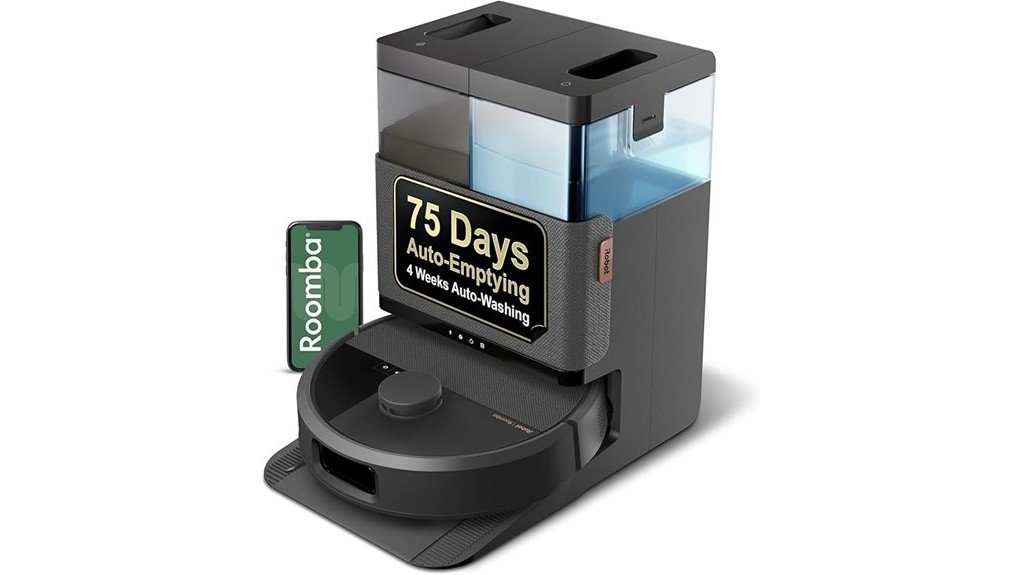
Dust, hair, and dirty water can collect inside a robot vacuum dock, even when your floors look clean. Learning how to clean a robot vacuum dock helps prevent charging problems, weak auto-emptying, unpleasant odors, and blocked water lines. The right method depends on whether your dock only charges, automatically empties dust, or also washes mop pads.
Quick Answer
To clean a robot vacuum dock, unplug it and remove the robot. Empty the dustbin or replace a full bag, then rinse approved removable tanks and trays. Wipe sensors with a dry microfiber cloth, clean charging contacts as directed by the manufacturer, clear accessible clogs, and dry washable parts before reconnecting power.
At a Glance
| Difficulty | Easy for routine cleaning; deeper blockage removal depends on the model |
| Tools Needed | Microfiber cloth, soft brush, clean water, mild dish soap for approved washable parts, and an optional handheld vacuum |
1. Gather Supplies to Clean Your Robot Vacuum Dock
)
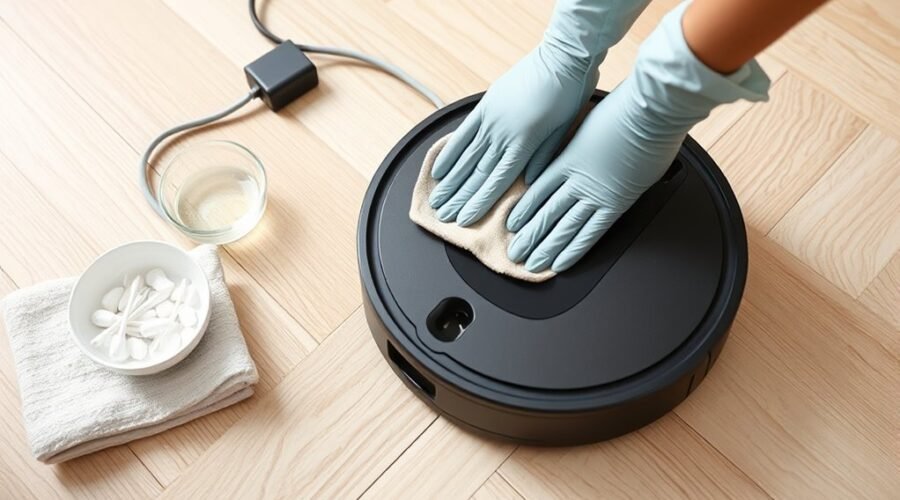
Start with tools that remove dust and residue without scratching the dock. Most routine maintenance needs only a few household supplies, although washable components may require additional cleaning.
- Microfiber cloth: Wipes dust from the dock, charging area, and sensor windows without rough scrubbing.
- Soft brush: Removes loose debris from corners, tray grooves, and approved removable filters.
- Clean water: Rinses removable water tanks and washing trays when the manufacturer permits.
- Mild dish soap: Helps remove stubborn residue from washable plastic parts when allowed by the manual.
- Dry cloth: Removes moisture before components go back into the dock.
- Handheld vacuum: Collects loose dust from accessible openings and dry compartments.
- Small container: Keeps removable screws or other small parts together if the manufacturer’s instructions require disassembly.
Keep the cleaning supplies within reach before starting. This prevents unnecessary movement while the dock is open.
Use a separate cloth for wet cleaning and electronics. This helps keep moisture away from sensitive components.
2. Unplug the Dock and Prepare the Cleaning Area
Disconnect the dock from its power source before cleaning. This reduces electrical risk and prevents the station from starting a charging, emptying, or mop-washing cycle while you work.
Remove the robot and place it on a clean, stable surface. Turn the robot off when its instructions allow.
Warning: Never spray water or cleaning solution directly onto the dock, charging pins, sensor openings, or electrical connections. Do not immerse the station or wash the entire dock under running water. Only wash components specifically approved for rinsing.
Unplug Before Cleaning
Unplugging the dock is the first safety step, but you should also keep the surrounding surfaces dry. Water can collect inside charging areas or electrical openings if you clean carelessly.
- Stop the cleaning cycle. Wait until vacuuming, dust emptying, and mop washing have finished.
- Remove the robot. Place it on a stable surface where it cannot roll or fall.
- Disconnect the power cord. Unplug the dock from the wall outlet before handling internal compartments.
- Prepare a dry workspace. Keep liquid containers away from the power connection and exposed electronics.
For Roomba docks, the manufacturer recommends waiting 60 seconds after unplugging before cleaning charging contacts.
Do not reconnect power until you have reinstalled all components correctly and checked for unwanted moisture.
Clear the Surrounding Area
Move loose cables, toys, and other obstacles away from the dock. You need enough room to remove dust bags, lift water tanks, and reach the cleaning tray without tipping the station.
Keep the dock on a flat, stable surface when you finish.
Clearance requirements differ by model. For example, Roomba’s official dock placement guidelines recommend:
- At least 1.5 feet (0.5 meters) of clearance on each side.
- At least 4 feet (1.2 meters) of unobstructed space in front.
- At least 4 feet (1.2 meters) between the dock and stairs.
- At least 1 foot (0.3 meters) above an auto-empty dock’s canister for opening and bag replacement.
These are Roomba recommendations, not universal measurements. Follow your own dock’s placement requirements.
3. Empty the Dustbin, Replace the Bag, and Clean the Water Tanks
A clean dock needs an unobstructed dust collection system and, on mopping models, clean water containers. Full bags restrict dust collection, while dirty water left in the tank can cause unpleasant odors.
The required steps depend on your docking station’s features.
- Check the robot’s dustbin. Empty it if your model requires manual emptying. Remove loose debris around its outlet.
- Inspect the dock’s dust bag. Replace a full disposable bag instead of washing or reusing it unless the manufacturer specifically allows reuse.
- Empty the dirty water tank. Remove the tank, pour out the wastewater, and rinse it thoroughly with clean water.
- Clean the fresh water tank. Empty and rinse it as instructed. Remove visible residue without damaging internal parts.
- Inspect accessible tank openings. Remove hair or debris from accessible inlet screens and ports without pushing objects into tubing.
- Reinstall the containers. Wipe their exteriors dry and make sure the lids, seals, and tanks fit securely.
For a Roomba Clean Base, iRobot’s dust bag replacement instructions explain how to pull out the bag by its plastic card, seal the opening, and slide a replacement into the guide rails.
Never operate a bag-required dock without the correct bag installed.
If your dock uses a reusable dust container, empty it regularly and clean it according to its manual. Avoid washing a container that houses electrical components.
Dirty water tanks deserve extra attention. Emptying them after mopping helps prevent odors and residue buildup. Let washable parts dry as their instructions require.
Also inspect tank lid seals. A loose lid or displaced seal can interfere with the suction that draws dirty water into some mopping docks.
4. Clean the Charging Contacts and Sensors
Dirty charging contacts can prevent your robot from charging or communicating correctly with its dock. Dust on sensor windows can also interfere with docking.
Use the correct cleaning method for each surface. Metal charging contacts and optical sensors do not always require the same treatment.
Charging Contact Care
Find the metal charging contacts on the dock and matching contacts on the robot. Inspect both sides for dust, dull residue, corrosion, or visible damage.
For routine maintenance, gently wipe the contacts with a clean cloth. Some models specify a dry cloth, while others allow light moisture.
According to iRobot’s official charging-contact cleaning guide, many Roomba and Braava models allow a lightly dampened cloth or melamine foam.
Follow these steps:
- Confirm that the dock is unplugged.
- Remove visible dust from the metal contacts.
- Clean the contacts using your manufacturer’s approved cloth or material.
- Inspect the contacts for remaining buildup or damage.
- Allow any cleaned contacts to dry before restoring power.
A clean charging contact should be free of visible residue. Do not scrape it with metal tools, sandpaper, or other abrasive materials.
If Roomba contacts appear green or copper-colored because their surface is damaged, iRobot advises contacting customer care rather than continuing to scrub them.
Sensor Cleaning Tips
Docking sensors help the robot recognize its charging station and align with it. Dust, hair, and fingerprints on their windows can interfere with that process.
Use a clean, dry microfiber cloth to wipe accessible sensor windows gently.
- Remove loose dust before wiping to avoid dragging grit across the surface.
- Avoid pressing hard on sensor covers.
- Keep water and cleaning solutions away from sensor openings.
- Inspect the nearby water inlet for visible obstructions on mopping docks.
Check contacts and sensors about once a month as a starting point, or sooner if the dock has problems. Your model may require more frequent care.
Do not use compressed air directly into enclosed sensor openings unless the manufacturer approves it. Air pressure can push debris farther inside sensitive areas.
5. Wash the Removable Tray
Mop-washing docks often have a removable tray, washboard, or drip tray where dirty water and debris collect. Cleaning this area prevents residue from interfering with mop washing and drainage.
Remove the tray only if your model supports removal.
- Lift the tray out using its designated handle or release point.
- Remove loose hair, dirt, and trapped debris.
- Rinse the tray with clean water if it is washable.
- Use a soft brush to clean grooves and corners.
- Apply a little mild dish soap to stubborn grime only if permitted.
- Rinse away any remaining cleaner and dry the tray as directed.
- Reinstall the tray securely in its original position.
Pay special attention to small openings where wastewater drains away. Blocked openings may leave dirty water standing inside the station.
| Action | Purpose | Caution |
|---|---|---|
| Lift out tray | Access trapped dirt | Release it gently |
| Wash with warm water | Remove grime | Use only if approved; avoid harsh scrubbing |
| Dry fully | Prevent unwanted moisture | Follow the model’s drying instructions before reinserting |
Use water at a temperature allowed by the manufacturer. Excessively hot water may deform some plastic components.
The tray and the dock itself need different care. You may rinse an approved removable tray, but you should wipe the fixed station housing rather than wash it under a tap.
Pro Tip: Before reinstalling a removable tray, inspect its drainage opening and the surrounding recess. Hair can collect beneath the tray even when the top surface looks clean. Remove accessible debris gently so it does not block wastewater flow.
6. Clear Blockages From the Dock
A clogged robot vacuum dock may stop emptying dust, leave debris in the robot, or display an error indicator. Start with the dust bag and accessible openings before considering internal tubing.
Never force tools into a blocked passage.
- Check the dust bag or container. Confirm it is not full and is seated correctly.
- Inspect the dust evacuation opening. Remove hair, paper, or compacted debris from accessible areas.
- Check the collection chamber. Remove loose dust with a soft brush or handheld vacuum.
- Inspect the dock filter. Clean removable filters as directed. Do not force out a fixed filter.
- Check the evacuation path. Follow the manufacturer’s instructions if deeper tubing needs attention.
- Inspect the water drainage area. On mop-washing docks, remove visible debris from the tray, basin, or accessible drain opening.
Some dock filters cannot be removed. For example, Roborock’s Auto-Empty Dock Pure and RockDock Plus filter guidance states that the dock dustbin filter is fixed in place. It should be cleaned with a dry cloth or vacuum cleaner.
Do not wash a non-washable filter or attempt to pull it out.
What Does a Red Dock Light Mean?
A red indicator can signal different problems depending on the dock. It may indicate a blockage, full dust bag, incorrectly installed container, or a water tank problem.
On certain Roomba Clean Base models, a blinking red indicator means the dust evacuation system is clogged.
The official Roomba Clean Base blockage procedure includes inspecting the evacuation port and, when necessary, removing the underside tubing using the specified screws.
Other docks use different light patterns. Use the exact error message or indicator description for your model.
What If the Dock Still Will Not Empty?
If automatic emptying still fails after you clean the accessible openings, inspect the dustbag seating and the connection between the robot and dock.
A loose lid or poorly installed bag can affect airflow.
For a mop-washing dock that cannot remove wastewater, check the tank lid, seal, basin filter, and drainage opening.
Some Roomba Combo models report errors when liquid cannot drain from the washing basin. iRobot’s basin blockage instructions recommend removing debris from the drainage port and cleaning the basin filter. Mild soap may be used for stubborn residue on approved surfaces.
If the problem continues after these checks, stop disassembly and seek manufacturer support. Internal pumps, tubing, and electrical parts may need professional attention.
7. Set a Regular Robot Vacuum Dock Maintenance Routine
Regular maintenance keeps dust, residue, and dirty water from accumulating. A simple routine is easier than waiting until the dock stops charging or emptying.
Cleaning frequency depends on your model, how often it runs, and the amount of dirt and pet hair in your home.
For a concrete example, the manufacturer’s X20+ maintenance schedule recommends cleaning the dirty water tank after each use, the wash tray every one to two weeks, and the clean water tank every two weeks.
The following schedule is a practical starting point rather than a universal manufacturer requirement.
| Frequency | Maintenance Task |
|---|---|
| After each mopping session | Empty and rinse the dirty water tank. Check for visible debris and make sure the mop pads dry properly. |
| Weekly | Check the dust collection area, wipe accessible exterior surfaces, and inspect for clogs. |
| Every 1–2 weeks | Clean the removable washing tray and clean water tank if recommended for your model. |
| Monthly | Inspect and clean charging contacts, docking sensors, and accessible dock openings. |
| When full or as instructed | Replace disposable dust bags and service filters according to the manufacturer’s requirements. |
Homes with shedding pets or heavy dust may need more frequent checks.
Pay attention to changes in performance. Failed charging, repeated emptying errors, water left in the basin, and unpleasant odors are signs that maintenance may be overdue.
Clean or replace filters according to the model’s instructions. A filter designed for dry cleaning should not be rinsed.
How Do You Know the Dock Is Clean?
A clean dock should have clear charging contacts, unobstructed openings, properly installed containers, and no loose debris around its base.
Once everything is dry and reassembled, reconnect the power and return the robot to the dock.
Check whether the robot begins charging normally. If your station supports automatic emptying or mop washing, run the appropriate function and confirm it completes without an error.
If the same problem returns immediately, check the manufacturer’s troubleshooting instructions instead of repeatedly restarting a failing system.
Key Takeaways
- Charging contacts and optical sensors may need different cleaning materials. Follow the manufacturer’s instructions for each part.
- Some dock filters are fixed in place and must not be removed or rinsed.
- Dirty water tanks usually need more frequent attention than charging contacts.
- A red dock indicator does not have the same meaning across all robot vacuum models.
- A successful maintenance check includes normal charging and, where supported, a complete auto-emptying or mop-washing cycle.
Frequently Asked Questions
How to Clean the Roomba Dock?
Unplug your Roomba dock and remove the robot. Clean the charging contacts using the approved material, then wipe the docking sensor with a dry cloth. Replace full dust bags, clear accessible blockages, and clean removable water tanks or trays if your model includes them. Reconnect power only after reassembly and drying.
What Are the Best Ways to Clean My Dock?
The best methods are dry wiping, brushing away loose debris, rinsing approved removable parts, and replacing full dust bags. An often-repeated claim says about 70% of common dock issues come from residue buildup, but that specific percentage is not supported by the manufacturer sources cited here. Use visible buildup and your dock’s performance to guide cleaning.
How to Clean the Roborock Dock?
Unplug your Roborock dock, remove the robot, and wipe accessible surfaces. Check the dust bag, charging contacts, evacuation opening, and removable washing tray if equipped. Some Roborock dock filters are permanently attached, so clean them in place with a dry cloth or vacuum. Follow your specific model’s maintenance instructions.
Can I Use Vinegar in My Robot Vacuum?
Do not put vinegar in your robot vacuum’s water tank or cleaning system unless its manufacturer explicitly approves it. Vinegar and other unapproved cleaning agents may damage components or leave residue. For routine maintenance, use clean water and only the cleaning products permitted for your model. Mild soap may be suitable for some removable parts.
Cleaning agents are especially important for mopping models. For example, the manufacturer’s X20+ cleaning-agent guidance states that its water system is designed for water alone and warns that added detergents or chemicals can damage internal components.
Conclusion
Cleaning your robot vacuum dock regularly helps maintain reliable charging, dust collection, and mop washing. Focus on safe power disconnection, clean contacts, clear openings, and properly maintained removable components.
Start with a weekly visual inspection and adjust your routine to match your model and household. After cleaning, confirm that the robot charges and the dock completes its normal functions without errors.
Sources
- iRobot — Where to Place the Dock: Official placement and clearance recommendations for Roomba docking stations.
- iRobot — How to Clean Charging Contacts: Approved charging-contact cleaning methods, sensor care, and damaged-contact guidance.
- iRobot — Clean Base Dust Bag Replacement: Procedure for removing, discarding, and installing automatic dust collection bags.
- Xiaomi — X20+ Maintenance Requirements: Manufacturer maintenance intervals for tanks, trays, filters, contacts, and dock components.
- Roborock — Dock Dustbin Filter Cleaning: Instructions for cleaning fixed dock filters without removing them.
- iRobot — Clean Base Blockage Troubleshooting: Procedures for checking evacuation ports, blocked tubing, and flashing red indicators.
- iRobot — Roomba Combo Basin Blockage Errors: Official guidance for washing basin filters, drainage obstructions, and approved cleaning.
- Xiaomi — X20+ Cleaning-Agent Restrictions: Guidance on avoiding unapproved detergents and chemicals in robot vacuum water systems.