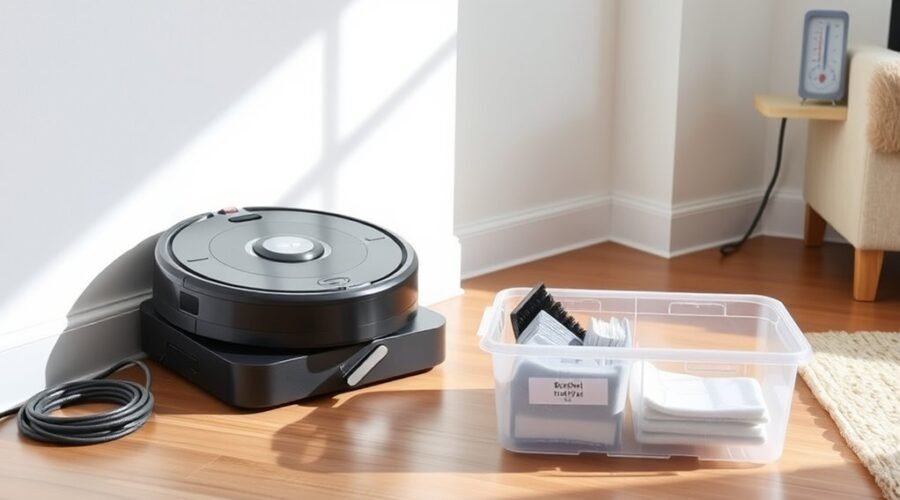
Proper robot vacuum storage protects your cleaner from battery damage, dust buildup, and moisture during months of inactivity. Before putting it away, you need to clean its components, prepare the battery, and shut it down correctly. The right storage method depends on your model, especially its battery type and charging instructions.
Quick Answer
To store a robot vacuum long-term, empty and clean its dustbin, brushes, filters, and mop components. Dry everything completely. Charge the battery to the level your manufacturer recommends, shut down the robot, and unplug its dock. Keep it somewhere cool and dry, recharge it at the recommended intervals, and inspect it before using it again.
At a Glance
| Difficulty | Easy, with model-specific battery instructions |
| Tools Needed | Soft cloth, soft cleaning brush, and your robot’s user manual |
Prep Your Robot Vacuum for Storage
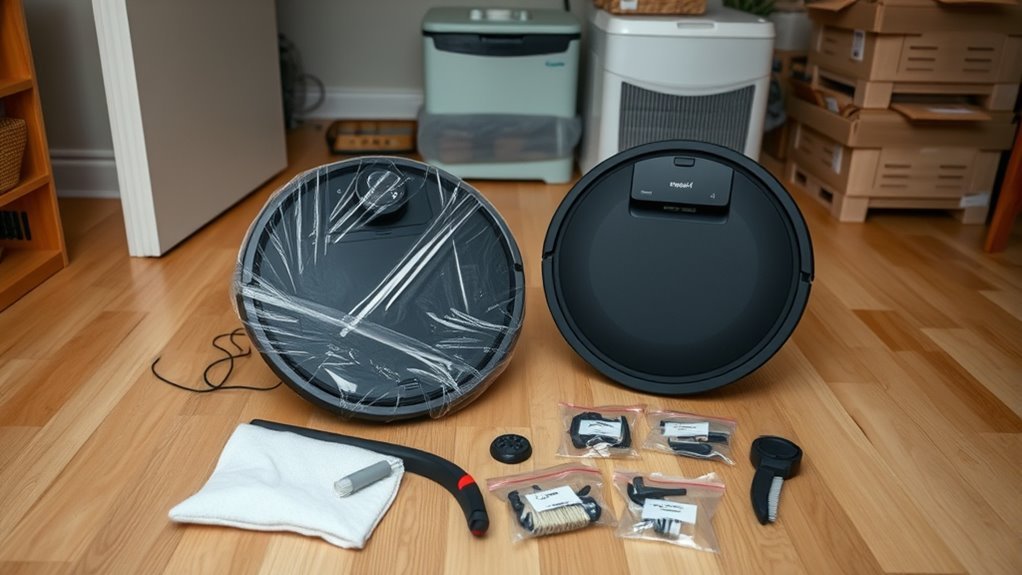
Preparing your robot vacuum for storage starts with a thorough cleaning. Dust, trapped hair, and leftover moisture can cause odors, blockages, or damage while the machine sits unused.
Gather a soft cloth and a small cleaning brush. Then follow these steps before disconnecting the robot and placing it in storage.
- Empty the dustbin. Remove collected dirt, hair, and debris. Wipe the bin clean, including its corners and the area around the dust outlet.
- Clean the filter. Tap away loose dust or use the cleaning method specified in your manual. Only wash the filter if the manufacturer says it is washable.
- Clear the main roller. Remove tangled hair, threads, and debris. Check the roller ends and bearings for buildup that could restrict movement.
- Inspect the side brushes and wheels. Remove wrapped hair and check whether each part moves freely. Replace damaged parts when necessary.
- Clean the sensors and charging contacts. Use a soft, dry cloth to remove surface dust without scratching sensitive components.
- Prepare the mopping system. Empty water tanks, clean washable trays, and remove dirty mop pads. Let every washable part dry completely before storage.
- Clean the docking station. Remove debris from the dock, check its charging contacts, and empty any dirty water tank or dust collection container.
Be careful with filters because cleaning instructions differ between models. For example, the Roomba s Series care instructions state that the dustbin can be rinsed after removing the filter, but the filter itself must not be washed.
If your robot also mops, leaving water in the system can cause more problems than leaving ordinary dust behind. The Roomba Combo mopping instructions explain why you should empty remaining liquid and let the mop pad dry after cleaning.
Store the cleaned parts separately if your manual recommends it. Otherwise, reinstall dry components so they are ready when you need the robot again.
Keep the Battery Healthy in Storage
Your robot vacuum’s battery needs special attention during long-term storage. Leaving a rechargeable battery completely depleted for months can cause deep discharge, making it difficult or impossible to recharge.
However, the ideal storage charge is not the same for every robot vacuum. Battery chemistry, built-in protection systems, and the manufacturer’s instructions determine the correct approach.
Should You Fully Charge the Battery Before Storage?
Many robot vacuum manufacturers recommend a full charge before long-term storage. This provides enough battery capacity to account for gradual discharge while the machine is switched off.
Other models use different instructions. For example, official battery storage guidance for certain removable-battery robot vacuums recommends charging the batteries to 50% before removing them for extended storage.
If your robot has a lithium-ion or lithium polymer (LiPo) battery, do not assume that either 100% or 50% is correct for every model. Follow the charge level specified in its manual.
Remove the battery only when the manufacturer provides a user-approved removal procedure. For robots with sealed or difficult-to-access battery packs, use the recommended shutdown or storage mode instead.
How Often Should You Recharge a Stored Robot Vacuum?
Recharge intervals vary by manufacturer, and there is no universal monthly rule. Even a powered-off robot can lose some battery charge over time.
For example:
- Every six months: The official Roomba battery maintenance guidance recommends fully charging the battery at least once every six months.
- Every three months: Another manufacturer’s robot vacuum battery storage instructions recommend charging at least once every three months to avoid over-discharge.
Some models may require more frequent attention. If your manual specifies monthly charging, use that schedule rather than a longer interval.
Record the storage date and set a reminder for the next recharge. This prevents an extended break from turning into an unexpectedly depleted battery.
How Do You Shut Down the Battery Properly?
Use the robot’s full shutdown function or dedicated storage mode when available. Ordinary sleep mode may leave parts of the electronics operating in the background.
Some Roomba models support a special battery sleep or ship mode that limits power consumption. The official Roomba ship mode instructions explain how to activate this feature on supported models.
Shutdown buttons and procedures vary, so avoid using a button combination intended for another model.
Store It in a Cool, Dry Place
A cool, dry, and well-ventilated location is usually the best place to store a robot vacuum. Stable indoor conditions help protect the battery, electronic parts, plastic housing, and rubber seals.
A moderate room temperature of approximately 50°F to 86°F (10°C to 30°C) is a practical storage target. This is not a universal manufacturer limit, so follow your model’s specified temperature range if it differs.
Keep the machine out of direct sunlight. Heat can accelerate battery aging, while prolonged UV exposure can weaken some exposed plastic and rubber components.
Moisture is another concern. High humidity can encourage corrosion and allow mold or mildew to develop on damp parts.
| Condition | Risk | Practical effect |
|---|---|---|
| Cool, dry place | Heat and moisture exposure | Helps protect the battery and electronics |
| Well-ventilated area | Trapped moisture | Reduces musty odors and mold risk |
| No direct sunlight | UV and heat exposure | Helps preserve plastics, seals, and battery condition |
An insulated indoor closet or spare room often works better than a garage or basement. Garages may become extremely hot or cold, while basements can have persistent humidity.
Choose a clean, level surface away from leaking pipes, heaters, and windows that receive strong sunlight. Avoid placing heavy items on top of the robot or its dock.
If you use a storage cover, make sure the robot is fully dry first. Avoid sealing damp components inside an airtight bag or container, where moisture may remain trapped.
Reduce Battery Drain During Storage
Reducing battery drain helps prevent your robot vacuum from losing too much charge while unused. The most effective method is to shut the robot down completely rather than leaving it in ordinary standby mode.
Some internal circuits can continue using electricity even when the cleaner appears inactive. This small, ongoing consumption is called parasitic drain.
To limit unnecessary power consumption:
- Disconnect the charging dock: Unplug the dock once the robot is ready for extended storage.
- Confirm shutdown: Check that the robot has entered its intended off or storage state, rather than simply dimming its display.
- Check the dustbin: On some models, removing the dustbin may reduce background bin-presence checks. This behavior is model-dependent and does not replace a proper shutdown.
- Consider battery removal only when approved: Some manufacturers recommend removing accessible batteries for extended storage. Others recommend keeping the pack installed and using storage mode.
- Keep track of the battery: Follow the recharge interval in your manual so gradual self-discharge does not leave the battery fully depleted.
There is also an important difference between normal charging and long-term storage.
During everyday use, many robot vacuums are designed to remain connected to their charging stations. Modern charging systems manage battery charging automatically. For example, official charging dock guidance recommends leaving regularly used robots docked while advising shutdown for storage lasting several months.
This means unplugging the dock is generally a long-term storage step, not a requirement after every ordinary cleaning session.
Check Your Robot Vacuum Before Reusing It
Before restarting a robot vacuum after months in storage, inspect its battery, cleaning parts, and charging system. A careful check helps you catch damage or blockages before the robot begins moving.
Follow these steps when bringing the machine back into service.
- Inspect the exterior. Look for cracks, unusual discoloration, loose parts, or signs of moisture damage. Examine any accessible battery compartment for obvious problems.
- Check the charging contacts. Remove dust with a soft, dry cloth. Make sure the contact surfaces are clean and free from visible corrosion.
- Inspect the brushes and wheels. Check that the main roller, side brushes, and wheels move freely. Remove any hair or debris missed during storage preparation.
- Check the dustbin and filter. Empty any remaining debris. If the bin needs washing, follow the manufacturer’s instructions and let it dry completely.
- Reconnect the charging station. Place it on a stable surface and reconnect its power cable. Wake the robot using the procedure specified for its storage mode.
- Recharge the battery. Allow the robot to charge normally before beginning a full cleaning session. Check for charging errors or unusual behavior.
- Inspect the sensors and intake path. Wipe dusty sensors and remove anything blocking the suction opening.
- Check the software. Reconnect the robot to its app when needed, review saved cleaning schedules, and install available firmware updates.
- Run a short test cycle. Confirm that the robot moves normally, collects debris, avoids obstacles, and returns to its dock.
Warning: Do not charge or operate a robot vacuum if its battery appears swollen, leaking, punctured, or otherwise damaged. Stop using it and contact the manufacturer or a qualified repair professional. Never attempt to open or repair a damaged lithium battery pack yourself.
What If the Robot Vacuum Does Not Start?
If the robot does not turn on after storage, first check the wall outlet, charging dock, and charging contacts. Make sure the robot is positioned correctly on its dock.
A battery that has entered a special storage mode may need the correct wake-up procedure before normal charging begins.
If the robot powers on but has a much shorter runtime than before, allow it to complete a normal charging cycle and test it again.
Repeated charging errors, unexpected shutdowns, or severe runtime loss may indicate battery aging or a charging-system fault. If the problem continues, seek model-specific support before replacing parts.
How Can You Tell the Robot Is Ready for Normal Use?
Your vacuum is ready when it charges normally, moves without unusual noise, and completes a short cleaning cycle without errors. Its brushes, wheels, sensors, and suction system should operate as expected.
If you stored the robot somewhere different from its original cleaning area, review its saved map. Some models may need to update their map or locate the dock again.
For vacuum-mop models, refill the clean water tank only after checking that all washable components are clean and properly installed.
Once these checks are complete, you can resume your usual cleaning schedule.
Frequently Asked Questions
What’s the Average Lifespan of a Robot Vacuum?
A robot vacuum typically lasts about 4–6 years, although model quality, cleaning frequency, and maintenance affect the result. The battery may need replacement sooner than the whole machine. Keeping brushes and filters clean and avoiding damp storage can help prevent early wear.
Where Is the Best Place to Store a Robot Vacuum?
A cool, dry indoor closet or another ventilated room is usually best. Aim for a stable temperature, avoid direct sunlight, and keep the unit off damp floors. Do not store it in a humid basement or a garage that becomes very hot or cold.
Should You Leave Your Robot Vacuum Plugged in All the Time?
Yes, during normal use, many robot vacuums are designed to remain on their charging docks. For storage lasting several weeks or months, the instructions may call for switching the robot off and unplugging its dock. Follow the guidance for your exact model rather than applying one charging rule to every machine.
How Many Days a Week Should I Run My Roomba?
Running a Roomba about three to seven days a week suits many homes, but there is no single ideal schedule. Daily cleaning can help with pets or heavy traffic, while less busy rooms may need fewer runs. Check the brushes and bin often enough to match the debris they collect.
Conclusion
Proper robot vacuum storage comes down to three things: clean and dry components, correct battery care, and a suitable storage location. Prepare your cleaner before switching it off, and follow its model-specific charging schedule during extended inactivity.
Before using it again, inspect the battery and moving parts, recharge it, and complete a short test run. These simple precautions can help preserve battery health, prevent unwanted damage, and keep your robot vacuum working reliably.
Sources
- iRobot: Battery Maintenance Tips for Roomba: Battery care, long-term storage, ship mode, and six-month charging guidance.
- AEG: Preparing a Robotic Vacuum for Long Idle Periods: Model-specific instructions for charging removable batteries to 50% before storage.
- Xiaomi: Robot Vacuum 6 Pro FAQ: Full-charge storage preparation, shutdown instructions, and three-month recharge intervals.
- iRobot: Roomba and Braava Shipping Requirements: Model-specific battery sleep and ship mode procedures.
- iRobot: Roomba s Series Essential Care: Dustbin washing, filter handling, and cleaning maintenance.
- iRobot: Roomba Combo Mopping Guide: Emptying water, cleaning mop components, and drying pads.
- Roborock: Charging Dock Guidance: Keeping regularly used robots docked versus shutting them down for extended storage.
- ECOVACS: How Long Do Robot Vacuums Last?: Typical robot vacuum lifespan and maintenance factors affecting durability.