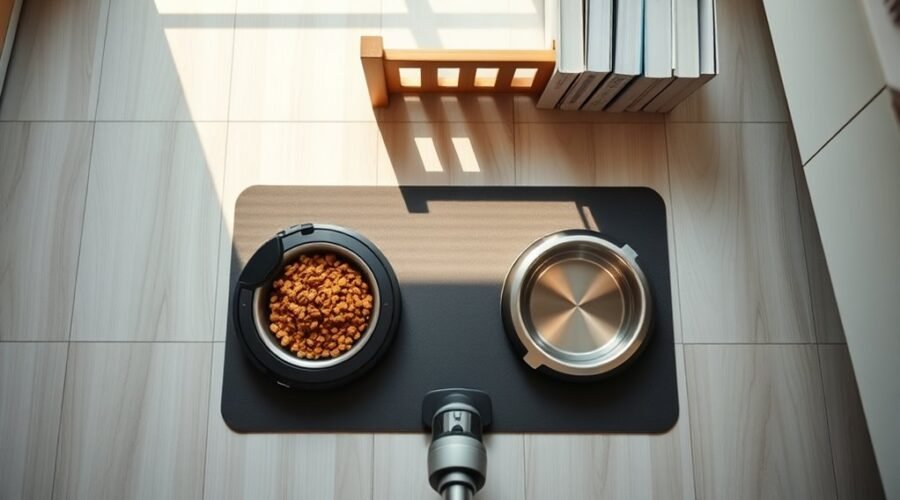
Keeping a robot vacuum away from pet bowls starts with clear boundaries in the app. A No Go Zone should surround each bowl, with extra space for spilled food and water. The dock should stay well away from feeding areas, and loose cords or small items should be removed. Water bowls may need a physical barrier or rug change. The first passes often reveal gaps that still need adjusting.
Set a Robot Vacuum No Go Zone

A robot vacuum can be kept away from pet bowls by setting a No Go Zone in its app, giving the machine a clear boundary around feeding areas where spills and crumbs are likely to occur.
This feature lets the owner map a protected space, usually extending 1.5 to 3 feet around each bowl, so kibble, water, and scattered debris stay outside the cleaning path.
Before relying on it, the model should be confirmed as compatible, since support varies by brand.
Check that your robot vacuum supports No Go Zones, since compatibility varies by brand.
If the home has more than one feeding station, multiple No Go Zones can be drawn to cover each area.
The zones should be reviewed often, especially after bowls are moved or new obstacles appear.
With a precise No Go Zone in place, the vacuum can clean freely elsewhere while pets eat undisturbed and floors remain easier to manage.
Leave Space Around the Dock and Bowls
Keeping a robot vacuum away from pet bowls starts with leaving open space around the dock itself. A minimum of 4 feet in front of the charging station helps the machine return cleanly without drifting into the feeding area.
On each side, 1.5 to 3 feet of clear room supports smooth navigation and reduces the chance of bumping bowls during routine runs. If the layout allows, placing the bowls in another room or a separate corner creates a stronger separation and gives pets an undisturbed eating zone.
App-based virtual barriers add another layer of control; a virtual wall can mark the bowl area as off-limits without changing the whole home. The arrangement should be checked regularly, because furniture shifts can narrow pathways and invite unwanted contact.
With the dock and bowls kept apart, the home stays orderly, the robot works freely, and pets keep their space protected.
Clear Cords and Small Floor Items
Cords, toys, shoes, and other small items should be cleared from the floor before a robot vacuum starts, especially near pet bowls and feeding areas. A quick scan helps reveal pet dishes, loose debris, screws, and nails that can block movement or harm internal parts.
Clear cords, toys, and small debris before vacuuming, especially around pet feeding areas, to prevent blockages and damage.
Regularly clear away pet toys and other clutter so the machine can travel freely without snagging or stopping mid-cycle. Designated storage spots for leashes, chew toys, and accessories keep the feeding zone open and make daily tidying easier.
A weekly floor check supports a cleaner, more independent home by reducing hazards and preserving vacuum performance. This routine also protects floor surfaces from scratches and helps the vacuum finish its route with less intervention.
For households with pets, a clear path means less frustration, fewer interruptions, and more time enjoyed away from chores.
Block Water Bowls and Problem Rugs
Around water bowls, a robot vacuum should be kept out of harm’s way by using app-based virtual barriers, physical blockers, or mats that define clear no-go zones. These tools help block access before the machine reaches wet floors, slippery edges, or pet feeding corners.
Magnetic tape can also mark exclusion strips around water bowls and problem rugs, giving the vacuum a clear signal to turn away. Where pets drink frequently, sturdy mats or low barriers can keep spills contained and preserve a dry cleaning path.
Problem rugs deserve the same attention, since loose edges, fringe, or absorbent fibers can trap brushes and disrupt cleaning. A practical setup leaves bowls in stable, out-of-path locations and keeps the surrounding area checked for spills.
Refine Boundaries in the App
The app can be used to set No-Go Zones around pet bowls, keeping the robot vacuum out of feeding areas during cleaning cycles.
It helps to map the bowl locations carefully and adjust virtual boundaries to match the home layout, especially if bowls are moved or placed near traffic paths.
Regular checks of the cleaning map allow the boundaries to stay accurate and protect against spills and scattered kibble.
Set No-Go Zones
| Action | Benefit |
|---|---|
| Mark the zone clearly | Improves navigation |
| Resize as needed | Preserves cleaning coverage |
| Test after setup | Confirms avoidance |
The app should be reviewed regularly so the vacuum stays aligned with changing furniture or pet habits. Once the zone is saved, a test run can confirm the robot steers away from bowls and leaves the area undisturbed.
Map Pet Bowl Areas
Using the robot vacuum’s app, pet bowl areas can be mapped with No Go Zones that keep cleaning paths clear of feeding stations.
The floor plan view helps place these zones with precision, so the vacuum stays free of food and water dishes. Virtual barriers can be drawn around bowls to mark off feeding corners, hallways, or kitchen edges without blocking the rest of the home.
If bowls move, the map should be updated right away to preserve reliable avoidance. After each cleaning run, performance can be checked to confirm the vacuum respected the boundaries.
When needed, the mapped zones can be refined in the app, giving pets uninterrupted access and giving owners the freedom of a cleaner home without constant supervision.
Adjust Virtual Boundaries
Once the initial map is in place, the robot vacuum’s app should be opened to the virtual boundaries settings so no-go zones can be refined around pet bowls.
These virtual boundaries give pet owners freedom from constant monitoring while protecting food and water dishes from bumps, spills, and scattered kibble.
- Open the app and select the mapping view.
- Mark a no-go zone around each bowl.
- Expand the perimeter to at least two feet for safer clearance.
- Save, then review the layout after furniture or bowls move.
The customizable boundary tools should be checked regularly, since a shifted feeder or chair can change the route.
With careful updates, the vacuum remains efficient, and pets keep their dining space calm, clean, and undisturbed.
Watch the Vacuum’s First Passes
During the vacuum’s first cleaning passes, its route around pet bowls should be watched closely to see whether it respects the intended boundaries.
Any spot where it drifts too near, bumps a bowl, or misses a spill can reveal boundary problems that need correction.
If those early passes show weak avoidance, the no-go zones should be adjusted in the app before the next cycle.
First Pass Monitoring
The robot vacuum’s first few cleaning passes should be watched closely to see how it navigates around pet bowls, nearby obstacles, and any unexpected changes in terrain.
During these initial runs, robot vacuums reveal whether they slow down, reroute, or crowd feeding areas, giving pet owners clear data for safer placement.
- Observe path choices near food and water bowls.
- Note reactions to rugs, mats, and raised edges.
- Use app barriers to block pet feeding zones.
- Record close passes and adjust the layout if needed.
This monitoring helps refine the setup, protect pets’ meals, and free the home from constant manual intervention.
Careful first-pass tracking supports cleaner floors with less risk, letting the machine work independently while respecting the space pets need.
Spot Boundary Issues
After the initial passes are underway, boundary problems can be spotted by watching whether the robot vacuum drifts toward pet bowls, enters mess-prone areas, or presses against furniture and other obstacles.
A careful review of the vacuum’s first routes helps reveal weak spots in the obstacle avoidance system before they become routine. The app’s mapping view can show where the robot vacuum travels, making it easier to see if it skirts too close to feeding stations or cuts into restricted space.
Each pass should be checked for repeated contact with chair legs, baseboards, or low furniture. When the vacuum keeps testing the same boundary, the route needs correction.
This early observation gives pet households more freedom, reducing the need for constant supervision and protecting bowls from disruption.
Adjust No-Go Zones
A robot vacuum’s app should be used to draw customizable No-Go Zones around pet bowls so the machine steers clear of feeding areas from the start. During the first cleaning runs, careful observation helps reveal whether the boundaries truly protect dishes, kibble, and water.
- Watch for boundary breaches near bowls.
- Note missed crumbs or splashes.
- Expand No-Go Zones if the vacuum skims too close.
- Recheck after moving bowls or adding furniture.
Small map changes can free the household from constant manual cleanup while preserving a safe feeding space for pets. After every adjustment, the area should be inspected for lingering food or water spills.
If the vacuum behaves differently on later passes, the No-Go Zones should be refined again until the route stays reliably clear.
Frequently Asked Questions
What Are Some Effective Ways to Hide a Robot Vacuum?
Vacuum Placement improves concealment by tucking the robot under sofas, side tables, or cabinets. Decorative screens, plant stands, and corner positioning hide it well, while rugs and app-based zones keep pets and traffic clear.
What to Do if Your Roomba Runs Over Dog Poop?
Stop it immediately and remove the vacuum from the mess. Using gloves, apply Cleaning Tips: clear waste from brushes and wheels, wash affected parts with warm soapy water, inspect sensors, then set pet-safe No Go Zones.
How Do I Block Roomba From Certain Areas?
Use the app’s No Go Zones and virtual walls, then add Pet Barriers—like gates or mats. An ounce of prevention beats cleanup; monitor first runs, then adjust boundaries to protect pets and liberated floors.
Is There a Robot Vacuum That Can Avoid Dog Poop?
Yes—some robot vacuums can avoid dog poop. Models with intelligent sensors, real-time obstacle processing, and app-based No Go Zones improve Pet Safety, giving pet owners practical, liberated cleaning without constant supervision or messes.
Conclusion
In practice, keeping a robot vacuum away from pet bowls works best when the home is mapped with clear No Go Zones, open space around the dock, and tidy floors free of cords and scattered items. Water bowls and troublesome rugs can be blocked with physical or virtual barriers, while app boundaries should be adjusted as the vacuum learns the layout. During the first few runs, a pet owner may picture invisible fence lines protecting each feeding area.